
It’s Not Just the App: The Importance of Hardware Synchronization
A common misconception is that the app does all the work. In reality, the app is just a display screen. The heavy lifting is done by the hardware connected to your engine. If that device is unreliable, the best electronic logbook app in the world cannot save you from compliance gaps.
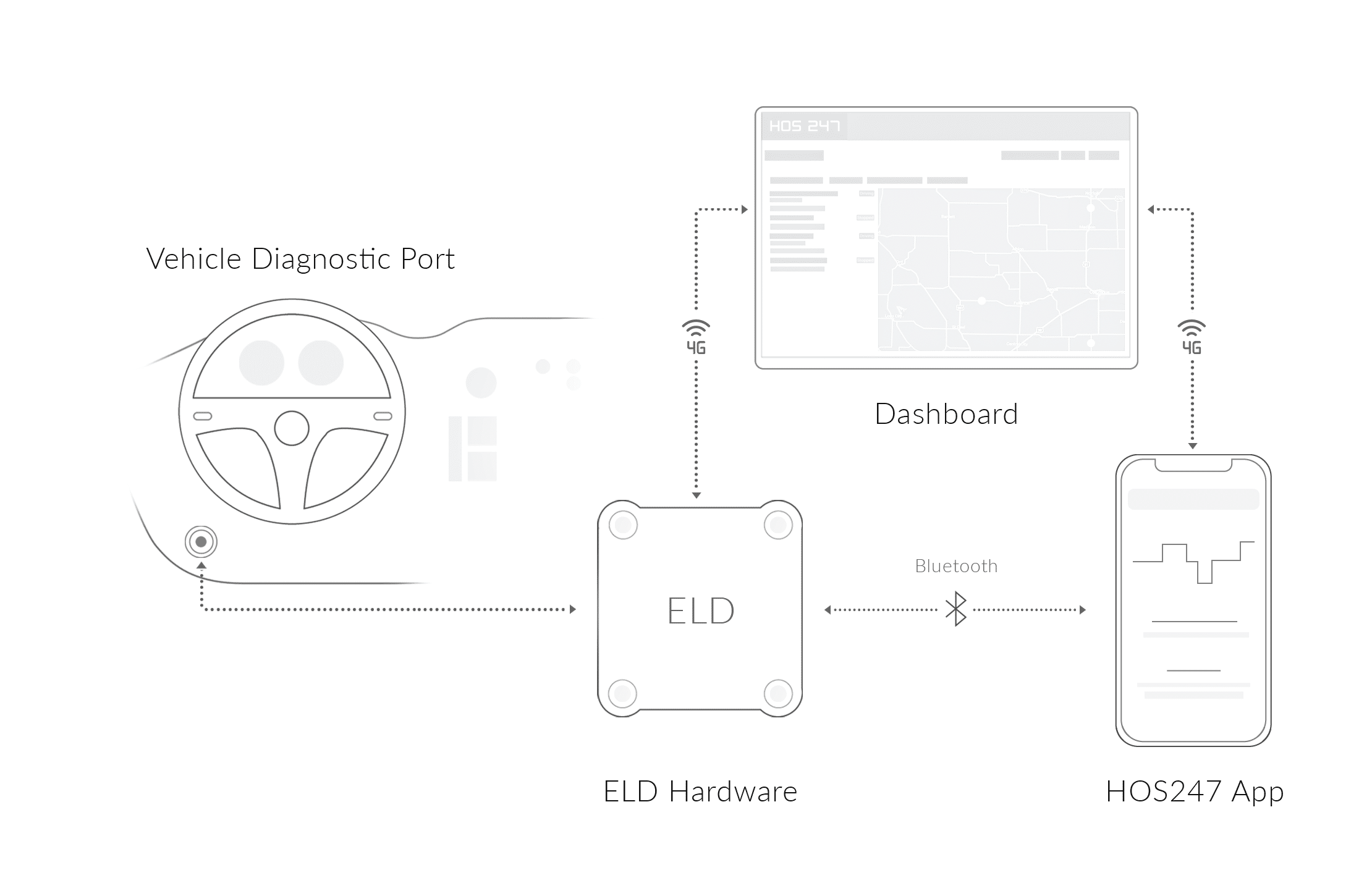
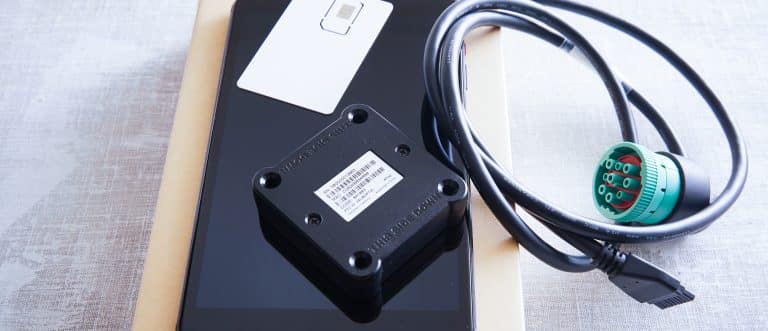
The Hardware Unit (ECM Device)
You might hear people call it a “dongle”; it is an ECM (Engine Control Module) interface device. Its job is to read complex engine protocols — such as J1939 for heavy-duty trucks or OBDII for lighter vehicles — and translate that data into a language your tablet understands.
A high-quality ECM device is hardwired to handle the vibration, dust, and temperature swings of a truck cab without missing a beat. If the device is poorly manufactured, it may vibrate loose or overheat, causing it to stop recording engine hours while you are driving.
Bluetooth Stability and Data Gaps
The connection between the hardware and the app is often a failure point in electronic logging systems.
- The handshake. Your hardware must maintain a constant Bluetooth link with your mobile device to transfer engine data in real-time.
- The risk. In low-quality systems, this connection frequently drops. This creates data gaps or unassigned driving miles that you then have to manually explain or annotate, cluttering your logs and raising red flags during an audit.
Premium systems optimize this Bluetooth protocol to ensure the handshake is instant and persistent, minimizing the “Searching for Device” errors that frustrate drivers.
Offline Mode Reliability
Trucking doesn’t always happen within range of a cell tower. Whether you are in remote oil fields or crossing the Rockies, you need a system that functions independently of the cellular network.
A robust system stores data locally on the hardware when the signal is lost. It continues to record driving time, engine hours, and location data internally. Once you re-enter coverage, the system should sync automatically to the cloud without you needing to press a button. This ensures your logs are always current, regardless of where the load takes you.
Choosing a provider that understands these hardware realities is the first step toward stress-free compliance.

Features That Prevent “Form & Manner” Violations
Every certified ELD can technically transfer data. But during a roadside inspection, the difference between a “compliant” app and a “driver-friendly” app is the difference between a 5-minute check and a 45-minute interrogation.
Here is how specific design choices in your Transport Camnada electronic log app protect you during a stop:
- The “locked” inspection screen. Never hand an officer your unlocked personal phone. A proper app has a dedicated “Inspection Mode” that locks the interface. It displays only the required 14 days of logs and the instruction sheet. This prevents the officer from scrolling through your personal texts, photos, or other apps, protecting your privacy while satisfying the enforcement officer.
- One-tap data transfer. In a high-stress moment, you shouldn’t be digging through “Settings” or “Profile” menus to find the transfer button. Look for an app where the “Send to Enforcement” button is prominent on the dashboard. It needs to support electronic data transfer methods instantly to keep the inspection moving.
- Context for unassigned driving. Poorly designed apps often dump a confusing list of “Unassigned Driving” timestamps on you when you log in. Drivers frequently accept these just to clear the screen, accidentally claiming a mechanic’s test drive as their own on-duty time. A quality system provides clear context (location and duration) for these events, making it easy to reject moves that aren’t yours without fear of creating a log gap.
- Proactive vs. reactive alerts. Most basic apps only flag a violation after you have broken the rule (e.g., “driving time violation recorded”). This is useless for compliance. You need an app with predictive alerts that warn you before the violation occurs (e.g., “30-minute break required in 15 minutes”), giving you time to find safe parking rather than forcing you to choose between a violation and parking on a ramp.
Having these tools at your fingertips turns a potentially chaotic inspection into a routine check-up, getting you back on the road faster.
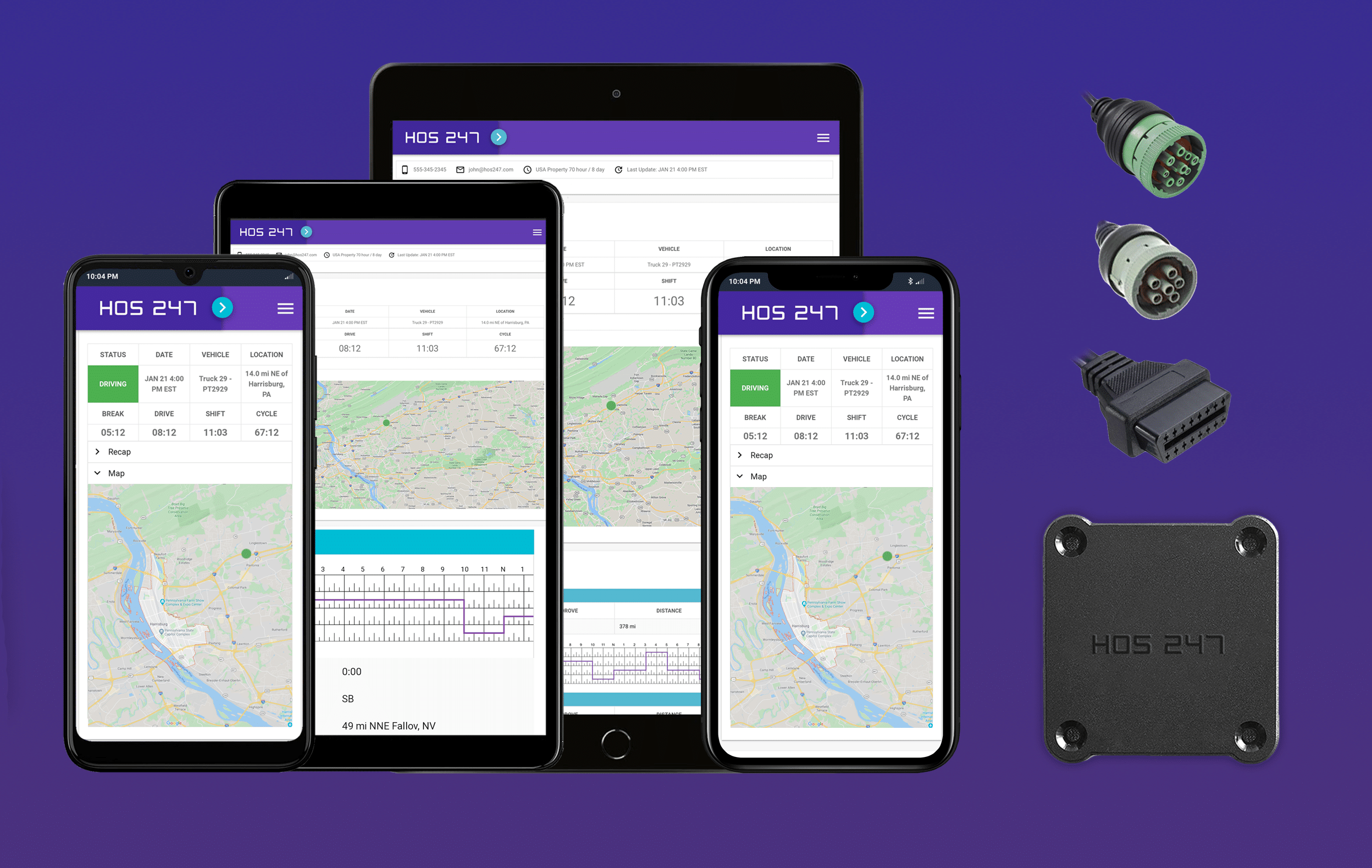
Why HOS247 Is a Preferred DOT Electronic Log App for Truckers
We understand that for owner-operators and fleet managers, technology is supposed to solve problems, not create them. That is why HOS247 is built on a foundation of operational reliability, ensuring that the connection between your truck and your ELD logbook remains stable even in harsh conditions.
Reliability and Uptime
Our hardware is rigorously tested to withstand the vibration, dust, and temperature extremes of a working cab. We prioritize a stable Bluetooth connection to ensure the app always displays live, accurate data, significantly reducing the risk of “data gaps” or sync failures that lead to downtime.
Fleet Management Tools
Beyond standard compliance, HOS247 transforms your log book app into a complete fleet management platform:
- Automated IFTA calculations. Manual mileage tracking is prone to error and eats up valuable time. Our system automatically calculates jurisdictional mileage, streamlining your quarterly tax filings and reducing audit risk.
- Real-time vehicle diagnostics. The app reads engine fault codes (DTCs) and alerts the fleet manager instantly. This allows you to schedule preventative maintenance before a check-engine light turns into a roadside breakdown.
- Idle monitoring. Excessive idling burns fuel and shortens engine life. Our system tracks idle time, helping you identify patterns to cut costs.
- 4G/LTE GPS tracking. You get high-speed, real-time location data. This helps with efficient dispatching and provides critical security in the event of theft or unauthorized use.
Driver-Centric Support
Technology is great, but sometimes you just need to talk to a human. HOS247 provides dependable support seven days a week.
We know the trucking industry is diverse, which is why our support team is multilingual. We offer assistance in English, Spanish, Russian, and Polish. If a driver is stuck at a weigh station on a Sunday and needs help, they can speak to someone who understands them and HOS regulations.
Finally, we believe in earning your business every month. HOS247 operates on a flexible subscription model with no long-term contracts. You are never locked into an agreement; you stay because the system works.
Data Security in Your Log Book App
Security isn’t just about hackers; it’s about protecting your license and your business record during an audit. A compliant electronic Transport Canada log book app protects your data integrity in three specific ways.
- Encryption for inspections. When an officer asks for your logs, the app transfers data using approved electronic transfer methods. This transfer must be encrypted to ensure the file that arrives matches exactly what is on your screen, with no corruption.
- Edit trails. A proper system keeps a permanent record of every edit. If a fleet manager suggests an edit to your log, the app must require you to approve or reject it. This “edit trail” is your protection against harassment or falsification claims, proving exactly who changed what and when.
- Personal conveyance (PC) privacy. When you are off the clock and using the truck for personal reasons (Personal Conveyance), the device should still track the vehicle but with reduced location precision. A driver-focused app respects this distinction, ensuring your off-duty movements remain private while staying compliant with the regulations.
Ultimately, these security measures do more than just meet a technical standard; they build a layer of trust between your fleet and the inspector. When your logs are encrypted, clearly annotated, and free of unexplained gaps, you signal that your operation is professional and transparent. This attention to data integrity helps de-escalate the tension of roadside stops, making the inspection process faster and less antagonistic for everyone involved.
What to Do When Technology Fails
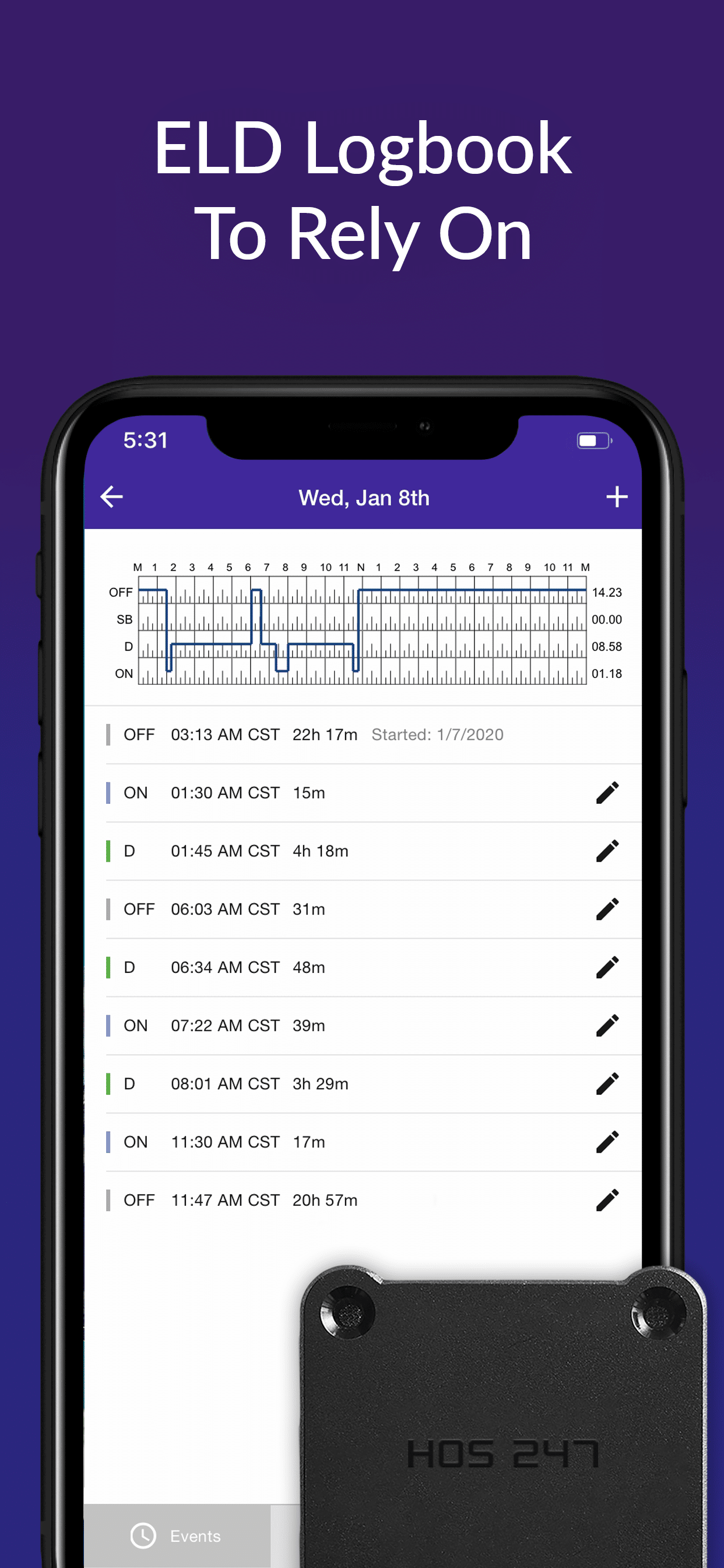
Even the best hardware can encounter issues. Knowing how to troubleshoot on the roadside can save you from a citation for “failure to maintain instructions” or a malfunction.
Bluetooth Re-pairing Guide
If you see a “Disconnected” or “VBUS Error” alert, don’t panic.
- Safety first. Pull over safely. Do not attempt to fix this while driving.
- Cycle power. Turn off your truck engine and the Bluetooth setting on your phone/tablet.
- Wait. Wait 30 seconds to clear the cache.
- Reconnect. Turn Bluetooth back on, open the app, and select your vehicle again.
- Verify. Check the main dashboard to ensure the “ECM” or “VBUS” indicator is green.
Handling “Malfunction” Codes
You may see specific single-letter codes on your grid. Here is what the common ones mean:
- P (Power Compliance). The device lost power while the truck was moving. Check your cable connections.
- T (Timing Compliance). The device clock has drifted more than 10 minutes from UTC time. This often resolves itself once GPS lock is re-established.
- S (Data Synchronization). The hardware storage is full or not syncing with the server. Contact support if this persists for more than 30 minutes.
The 14-Day Rule
Remember: If your electronic logbook system fails completely and cannot be fixed immediately, you are required to switch to paper logs. You must carry a supply of blank grid graphs in the cab. You have 14 days to repair or replace the unit before you are out of compliance.
Frequently Asked Questions About Electronic Log Apps
Can I use a tablet I already own for my electronic log book app?
Yes. Many providers, including HOS247, support a “Bring Your Own Device” (BYOD) model. As long as your Android or iOS tablet meets minimum operating system requirements and has Bluetooth capability, it can pair with the hardware.
Does the app work if I lose cell signal?
Yes. If the app communicates with the hardware via Bluetooth, it does not require a cell signal. All data is stored locally on the device and will sync to the web portal automatically once you regain cellular coverage.
How do I fix an error in my log after I certified it?
You must edit the log. In the app, go to the specific day, tap “Edit,” and make the necessary correction. You will then be prompted to re-certify the log. A note will be added to the edit trail explaining the change.
Conclusion
Choosing the right Transport Canada electronic log app comes down to a single question: how much is your downtime worth? While the market is flooded with budget options, the real cost of a system is measured in the hours you spend fixing connection errors or waiting on hold with support. A reliable system works quietly in the background, ensuring that your driving time is recorded accurately and your inspections are uneventful.
HOS247 was designed with the understanding that a driver’s time is their revenue. By combining robust hardware with a user-friendly app and responsive, multilingual support (in English, Spanish, Russian, and Polish), we provide a solution that adapts to your needs rather than forcing you to adapt to ours. You get the tools to manage IFTA, diagnostics, and logs in one place, without being locked into a long-term contract. Upgrade to a system that respects your time. Contact HOS247 today to learn more about our dependable, no-contract ELD solutions.

As an expert in B2B and B2C sales, I’ve dedicated myself to perfecting sales processes and client retention strategies in the logistics and trucking industry. I have significantly contributed to the expansion of the ELD service, catering to retail and wholesale clients in need of HOS247 ELD solutions. My unwavering commitment to implementing state-of-the-art sales techniques and technologies ensures the continuous growth and success of businesses I work with.










The electronic logging device (ELD) mandate has reshaped the Canadian trucking industry since its implementation. This regulation requires commercial motor vehicle operators to use ELDs to record their hours of service (HOS), replacing paper logs. The mandate aims to enhance
When it comes to maintaining a trucking company, every business owner needs to ensure that they have the best equipment and software available. Finding out which providers meet and exceed industry standards can help business owners make wise decisions. The

For years, the box truck industry relied on paper logbooks to track driving hours. Today, the landscape has shifted. An ELD is no longer just a high-tech accessory; for many fleets, it is a strict federal requirement. An electronic logging