
RODS 101: Understanding Basic Driver Log Requirements
Before diving into complex hardware connections or advanced compliance software, you must understand the core language of commercial logging. The Commercial Vehicle Drivers Hours of Service Regulations dictate exactly how your daily time must be categorized and what identifying information must be permanently attached to those time segments.

The Four Core Duty Statuses
Every minute of a commercial driver’s day must be accurately categorized into one of four specific duty statuses. Your compliance software uses these four categories to generate the visual grid graph that safety officials review during an audit. These are:
- Off-Duty. This status applies when you are completely relieved of all responsibilities regarding the truck, the motor carrier, and the freight. You are free to pursue your own activities and leave the premises entirely.
- Sleeper Berth. This status is specifically reserved for time spent resting inside the compliant sleeper berth compartment of the commercial motor vehicle. Time spent resting in a day cab or a motel room cannot be legally logged as Sleeper Berth time.
- Driving. This status is automatically triggered by your telematics hardware. When the vehicle reaches a speed of 8 km/h (approximately 5 mph), the system must instantly shift your status to Driving. This time cannot be manually edited or shortened.
- On-Duty Not Driving. This category covers all work-related activities performed when you are not actively behind the wheel. It includes fueling the truck, completing pre-trip and post-trip inspections, waiting at shipping docks, and signing bills of lading.
Mandatory Header Data
A visual grid graph alone does not constitute a legal logbook. Federal law requires specific administrative data to be attached to every daily record. If your electronic system fails to populate this information, the log is legally incomplete.
Your daily record must clearly display the current Date and the Total Distance driven within that 24-hour period. It must also include the exact Truck and Trailer unit numbers or licence plates. Finally, the record must clearly state the Carrier Name, the home terminal address, and the principal place of business of the motor carrier you are operating under. Top-tier software platforms will pull the majority of this data automatically from your driver profile and the engine control module to save you time.
Mastering these basic administrative elements is the first and most effective step in avoiding “Form and Manner” violations during a roadside stop. When a transport officer asks to see your screen, having perfectly organized header data and correctly categorized duty statuses immediately sets a professional, compliant tone for the rest of the inspection.
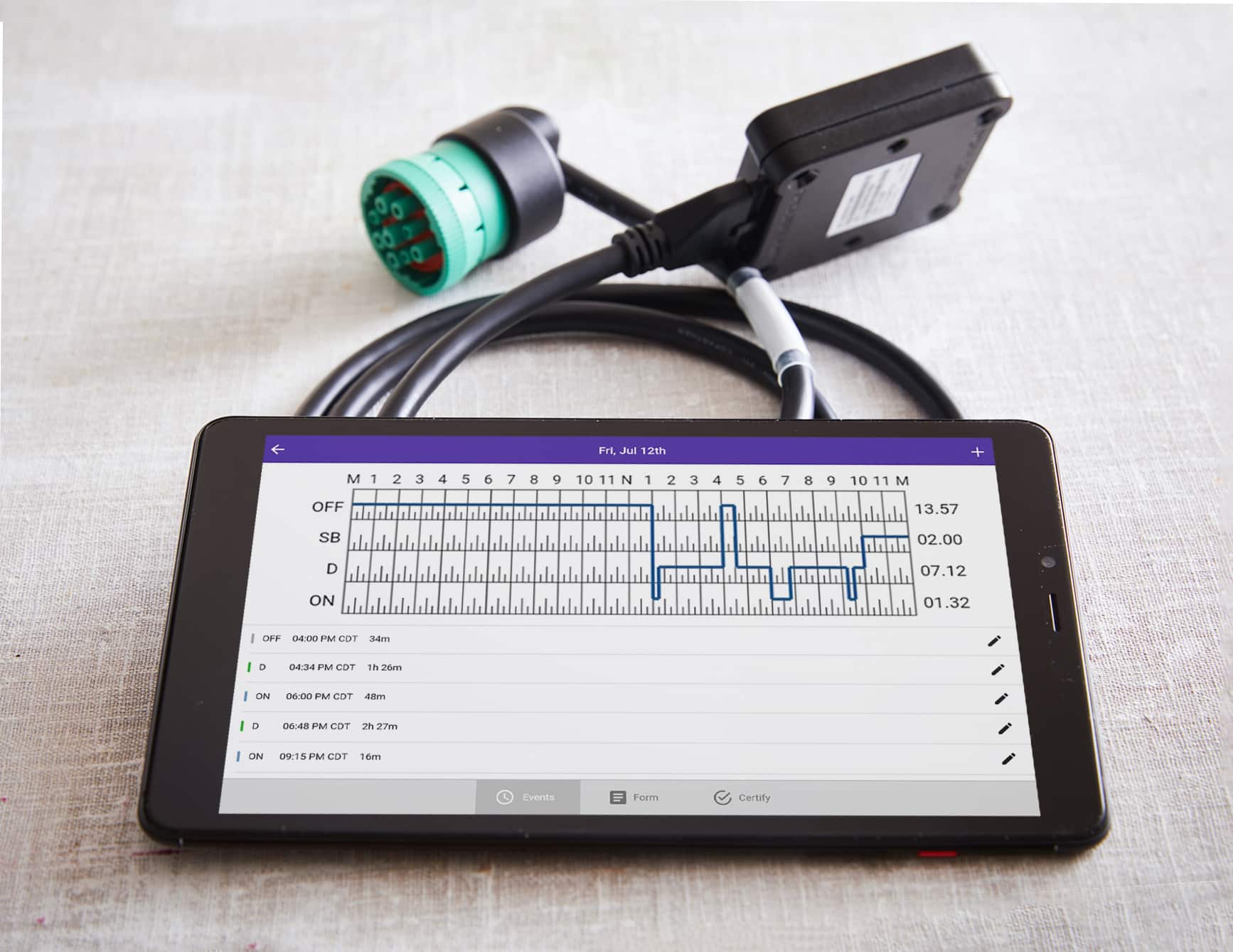
The “Brain and Body” Concept of a Commercial Driver Log Book
Many new operators mistakenly assume they can simply download an application to their smartphone and start hauling freight. However, federal law strictly prohibits standalone, GPS-only mobile applications. To be legally compliant in 2026, your system requires a physical tether to the vehicle. The digital software (the brain) is entirely useless without engine-connected telematics hardware (the body) that has been certified by an accredited third-party body.
Understanding Integral Synchronization
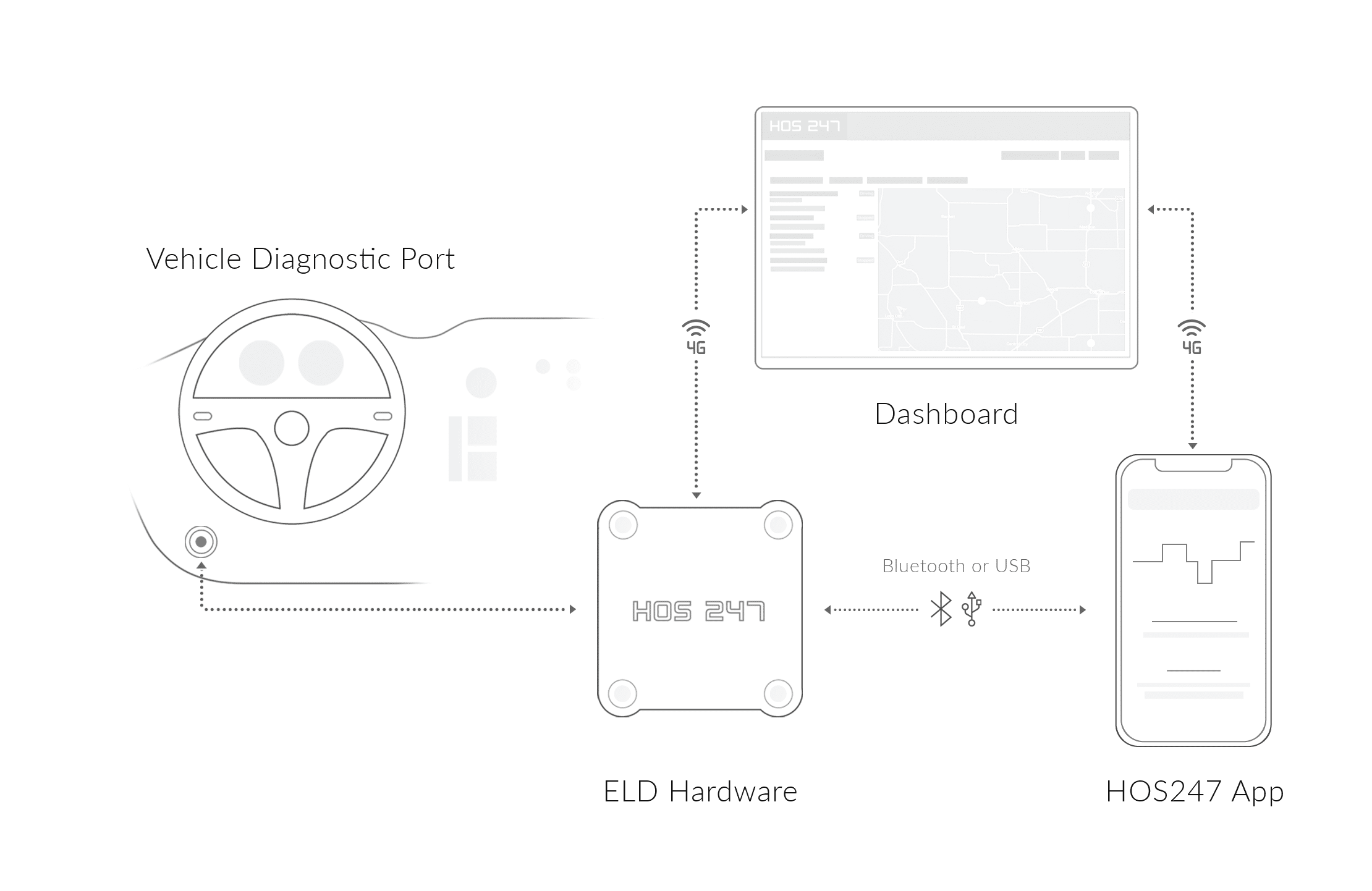
The legal standard that binds the hardware and software together is known as “integral synchronization.” To meet this mandate, a physical telematics device must plug directly into the truck’s diagnostic port, which is typically a J1939 or OBDII connection.
Once secured, this hardware acts as a constant, passive reader. It pulls raw, unalterable data directly from the engine control module. This includes the vehicle’s true odometer reading, total engine hours, and real-time motion status. The hardware then continuously transmits this precise data to your tablet or smartphone interface, which formats it into the standard grid graph.
The Reality of Connection Failures
Understanding this physical tether explains the most common technical headache drivers face on the road. When a system appears to “crash,” freeze, or fail to record kilometers, it is rarely a software interface glitch. Instead, nearly 90% of these incidents are actually connectivity drops between the physical hardware and the mobile display.
If the Bluetooth or wired connection breaks, the digital brain immediately stops receiving data from the physical body. Because of this, evaluating a new system means looking past a sleek app design. A reliable system prioritizes a stable, engineered connection that can withstand the extreme temperature changes and heavy vibrations of a commercial cab.

Hours of Service (HOS) Mastery
A stable hardware connection ensures your data is recorded accurately, but the software must also correctly apply Canadian federal logic to that data. Modern systems must flawlessly track the complex web of Hours of Service (HOS) regulations to prevent costly roadside violations and forced downtime.
The Core Driving and Duty Limits
The federal mandate is built around primary limitations that strictly govern a commercial driver’s schedule. Your compliance software must monitor these clocks simultaneously:
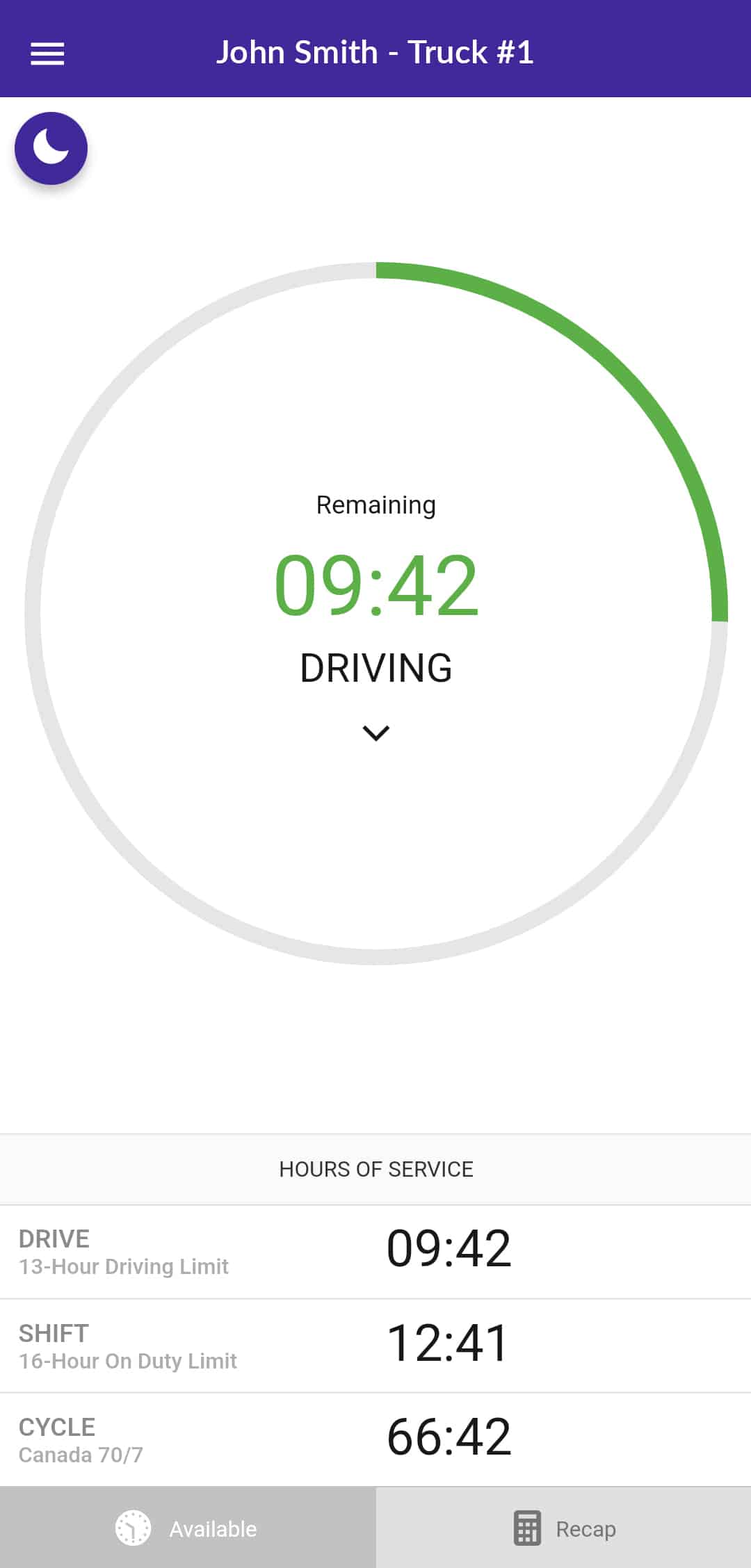
- The 13-hour driving limit. A driver may only operate a commercial vehicle for a maximum of 13 hours in a day or work-shift.
- The 14-hour on-duty limit. A driver cannot drive after accumulating 14 hours of on-duty time in a day or work-shift.
- The 16-hour elapsed time rule. A driver cannot drive after 16 hours have elapsed since the end of the most recent period of 8 or more consecutive hours of off-duty time.
- The 60/70-hour or 120-hour cycle. A driver must follow either Cycle 1 (70 hours on-duty in 7 days) or Cycle 2 (120 hours on-duty in 14 days).
Managing Breaks and Restarts
Beyond the core daily and weekly limits, the software must also accurately track mandatory rest periods. Under Canadian regulations, drivers must take at least 10 hours of off-duty time per day, which includes a mandatory block of 8 consecutive hours and an additional 2 hours of off-duty time taken in blocks of no less than 30 minutes. Unlike other jurisdictions, there is no specific federal requirement for a mandatory 30-minute break after 8 hours of driving, provided the daily off-duty requirements are met.
When a driver needs to reset their cycle, they must complete a specific off-duty period. For Cycle 1, a 36-hour restart is required. For Cycle 2, a 72-hour restart is necessary to reset the clock back to zero. Additionally, all drivers must take at least 24 consecutive hours of off-duty time in the preceding 14 days.
These federal rules serve as the complex logic that your software must manage automatically. High-quality systems calculate these rules continuously in the background, providing proactive alerts to keep the driver in the green and perfectly legal at all times.
Operational Compliance: Data Transfer and In-Cab Materials
A successful roadside inspection relies on much more than just having accurate driving hours. When a transport officer approaches your window, they expect a standardized, highly regulated workflow. Failing to follow the specific procedures for data transfer or missing required physical documents can result in a violation, even if your driving record is perfectly clean.
The Roadside Inspection Workflow
During an audit, the primary goal is to securely hand over your digital records to the safety official’s computer system. Transport Canada requires certified software platforms to support specific methods for this data transfer.
The most common and efficient method is via secure email, which allows the driver to send their files directly to the address provided by the inspector. A secondary option may include a localized transfer via Bluetooth or a wired USB connection, depending on the device’s certification. Modern, high-quality systems prioritize the secure email method, allowing the driver to complete the data handoff in just a few taps without handing over their unlocked personal device to the officer.
Mandatory In-Cab Documentation
Despite the transition to digital compliance, federal regulations still require specific physical documents to be present inside the commercial motor vehicle at all times. If you cannot produce these items upon request, you will be cited. Every cab must contain:
- The system user manual. You must carry a printed or electronic document detailing how to operate the specific hardware and software installed in the truck.
- The data transfer instruction sheet. This document provides step-by-step instructions for the driver on how to successfully produce and transfer their safety records to an authorized safety official.
- The malfunction guide. You need a physical instruction sheet detailing exactly what steps the driver must take if the hardware or software experiences a critical failure.
- Blank paper logs. You are required to carry a minimum 15-day supply of blank paper daily logs. These serve as your mandatory legal backup if your digital system breaks mid-trip.
Being thoroughly prepared with both a smooth data transfer process and the correct physical paperwork significantly reduces the duration of a roadside stop. When you hand over your required materials confidently and transfer your data without hesitation, the inspection process becomes a routine administrative task rather than a stressful event.
Managing the Audit Trail: Unassigned Driving and Edits
While drivers handle the daily task of categorizing their hours on the road, dispatchers and safety managers carry the legal burden of managing the back-office data. Provincial and federal authorities expect motor carriers to actively monitor their fleet’s compliance platform, and failure to properly manage the resulting audit trail is a primary trigger for severe penalties.
Handling Unassigned Driving Events
One of the most heavily scrutinized areas during a facility audit is unassigned driving time. This occurs whenever the commercial vehicle moves without a recognized driver actively logged into the system. Common scenarios include a mechanic taking a truck for a test drive, a yard hostler repositioning a trailer at the terminal, or a driver simply forgetting to log in before pulling out of a truck stop.
Because the telematics hardware continuously reads vehicle motion, it will record these kilometers regardless of who is in the cab. The motor carrier is legally responsible for reviewing these unassigned events on a daily basis. Back-office staff must either assign the driving time to the correct driver’s profile or attach a specific, detailed annotation explaining exactly why the vehicle moved. Allowing unassigned kilometers to pile up unresolved shows a lack of administrative oversight and will immediately flag your company during an audit.
Transparent Edits and the Original Record
Mistakes happen, and federal regulations allow for legal corrections to a driver’s duty status. A dispatcher or safety manager can suggest an edit to fix a logging error, but the driver must manually approve that edit on their mobile interface before it becomes part of the official record.
Crucially, modern compliance software must handle these edits transparently. The system is legally required to permanently preserve the “Original Record.” Even after a legal correction is made and approved, the raw, automatically recorded engine data cannot be destroyed or overwritten. The software must clearly display the newly edited timeline right alongside the original, unedited data.
Maintaining a clean, well-annotated audit trail that preserves the original engine data is the best defense against a comprehensive NSC carrier review. When safety managers proactively resolve unassigned kilometers and handle log edits strictly by the book, they protect the company’s operating authority and ensure the fleet remains in good standing.
Troubleshooting and the Malfunction Rule
Even the most advanced compliance systems occasionally experience technical failures. When a screen freezes or a device stops recording, panicking during a roadside stop is not an option. Canadian regulations provide a specific malfunction protocol that you must follow immediately to remain legally compliant and protect your operating authority.
The Technical Recovery Protocol
When you realize your system has failed, you must take immediate action to secure your driving record.
- Step 1: Document the failure. Note the exact time and location when the hardware or software stopped functioning. Attempt basic troubleshooting, such as rebooting the tablet or checking the cable connections, but do not spend hours trying to fix a broken device while parked on the shoulder.
- Step 2: Reconstruct your record. You must immediately begin recording your hours on your backup paper logs. You are legally required to reconstruct your duty status for the current 24-hour period and the previous 14 consecutive days on paper, unless your dispatch team can retrieve those past records directly from the software’s web portal and send them to you.
Carrier Notification and the Repair Limit
The malfunction protocol also places strict deadlines on both the driver and the motor carrier to resolve the technical issue.
- The immediate notification rule. A driver must provide notice of the system failure to their motor carrier as soon as possible.
- The 14-day paper limit. Operating on paper is strictly a temporary, emergency measure. In Canada, you are generally permitted to use paper logs for a maximum of 14 days (or until you return to the home terminal from the current trip, if longer than 14 days, though specific provincial rules apply). The motor carrier must repair or completely replace the failing hardware within this window. If the truck operates on paper beyond the legal limit, the driver will be immediately placed Out-of-Service upon inspection.
Knowing exactly how to execute this malfunction protocol is just as important as knowing how to operate the software itself. It serves as your ultimate legal safety net when technology fails on the road.
The HOS247 Advantage: Reliability for Fleets
Navigating the 2026 regulatory environment requires a technology partner capable of delivering consistent, daily performance. HOS247 provides fleets with a reliable ELD built specifically to handle the physical realities of the road.
We focus heavily on the physical connection between the brain and the body of the system, offering a comprehensive suite of tools designed to eliminate daily technical frustrations.
- Engineered hardware stability. We utilize proprietary, stress-tested telematics devices designed to maintain an unbroken Bluetooth link with the driver interface, virtually eliminating the dropped connections that cause unassigned driving errors.
- One-year hardware warranty. We stand behind the physical durability of our equipment in the commercial cab, providing a free replacement warranty to keep your trucks moving.
- Bring your own device (BYOD). Our application is fully compatible with the Android and iOS smartphones and tablets you already own, saving your fleet money on expensive proprietary screens.
- Driver-centric interface. The app features large touch targets, high-contrast visuals, and a dedicated night mode to minimize eye strain and make duty status changes fast and clear.
- One-click inspection mode. Drivers can securely transfer their data files to safety officials in seconds via secure email, protecting private routing information and speeding up the roadside audit.
- Multilingual human support. Our top-tier support team is available seven days a week, offering live assistance in English, Spanish, Russian, and Polish to resolve technical issues exactly when they happen.
- No-contract freedom. We believe a provider should earn your business every month. We offer flexible, month-to-month plans without restrictive long-term contracts or hidden cancellation fees.
- Automated IFTA calculations. The system automatically tracks jurisdictional mileage as you cross provincial and state lines, simplifying a complex quarterly tax chore.
- Real-time GPS tracking. Dispatchers can monitor vehicle locations with pinpoint precision to improve daily route planning and provide accurate arrival times to waiting customers.
- Electronic DVIRs. Transitioning from paper to electronic vehicle inspection reports ensures that pre-trip and post-trip defects are instantly communicated to your maintenance shop.
- Fault code diagnostics. The hardware reads diagnostic trouble codes (DTCs) directly from the engine, alerting you to minor mechanical faults before they escalate into expensive roadside breakdowns.
- Idle monitoring. The system tracks exactly how long a truck runs without moving, helping fleet managers identify massive fuel waste and reduce unnecessary engine wear.
Partnering with a reliable technology provider allows drivers to focus entirely on safely operating their vehicles rather than struggling with technical glitches and frustrating administrative tasks.
Frequently Asked Questions About Electronic Commercial Driver Log Books
Staying informed on these common operational questions is a critical step in maintaining a violation-free record. Knowing exactly what the regulations require helps you handle roadside interactions and administrative tasks with complete confidence.

Secure Your Fleet’s Future with a Verified Partner
Operating a commercial fleet means navigating strict data transfer standards and aggressive technology vetting by federal and provincial safety officials. You cannot afford to rely on outdated, unverified systems that threaten your operating authority with constant connection drops and frustrating administrative errors.
Choosing the right technology partner is an investment in your company’s uptime and peace of mind. By outfitting your trucks with a reliable, third-party certified commercial driver log book, you protect your business from unnecessary fines and streamline your daily back-office operations.
Stop settling for poor hardware connectivity and restrictive multi-year contracts that offer zero flexibility. Schedule a demo or start your no-contract trial with HOS247 today to experience a compliance platform built for the rigorous demands of the road.
A Note to Our Readers on Compliance
This article is intended for informational and educational purposes only. It is not a substitute for official regulatory guidance or legal advice. HOS and ELD regulations are complex and subject to change and interpretation by enforcement authorities. Please always refer to official sources for the most current and accurate information.

As an expert in B2B and B2C sales, I’ve dedicated myself to perfecting sales processes and client retention strategies in the logistics and trucking industry. I have significantly contributed to the expansion of the ELD service, catering to retail and wholesale clients in need of HOS247 ELD solutions. My unwavering commitment to implementing state-of-the-art sales techniques and technologies ensures the continuous growth and success of businesses I work with.









For several years, the Canadian ELD market has been defined by a rigorous third-party certification mandate. Unlike other jurisdictions, Canada requires all hardware providers to have their devices verified by an accredited body before they can be legally used. This

Since January 2023, when the ELD mandate came into full effect in Canada, drivers of commercial vehicles have been required to use electronic logging devices to record hours of service. Choosing dependable Transport Canada electronic log books can help carriers

Staying on top of hours of service (HOS) rules is crucial for truckers and fleet managers. These regulations are designed to keep roads safe and drivers healthy by preventing fatigue-related accidents. However, keeping accurate track of driving time and rest