
Why a Standalone Logbook App is Not Compliant
To understand why a simple app downloaded from the Play Store is insufficient on its own, it is necessary to look at the specific rules of the ELD mandate.

The “Integral Synchronization” Requirement in the Canadian ELD Standard
Transport Canada’s ELD Technical Standard, which applies to federally regulated carriers, requires more than just a digital record of duty status. The regulation specifically states that an ELD must be integrally synchronized with the commercial motor vehicle’s engine.
This means the device must automatically capture specific data points directly from the Engine Control Module (ECM) at all times, including:
- Engine power status. When the truck is turned on or off.
- Vehicle motion status. When the truck starts moving.
- Miles/kilometres driven. Precise odometer-based distance.
- Engine hours. Total engine run time.
Why an App Cannot Do This Alone
An Android phone or tablet, no matter how advanced, is not physically connected to the truck’s engine. It has no way to “read” the ECM or automatically detect when the wheels start turning. A standalone app relies on the driver to manually toggle between “Driving” and “On Duty,” or it relies on the phone’s GPS to estimate movement. This does not meet the legal requirement for integral synchronization.
If a driver uses an app that is not connected to the engine, they are essentially using an electronic version of a paper log. While this was acceptable before the full enforcement of the Canadian ELD mandate, it is no longer compliant for federally regulated carriers required to use an ELD.
The Complete System: Hardware + Software
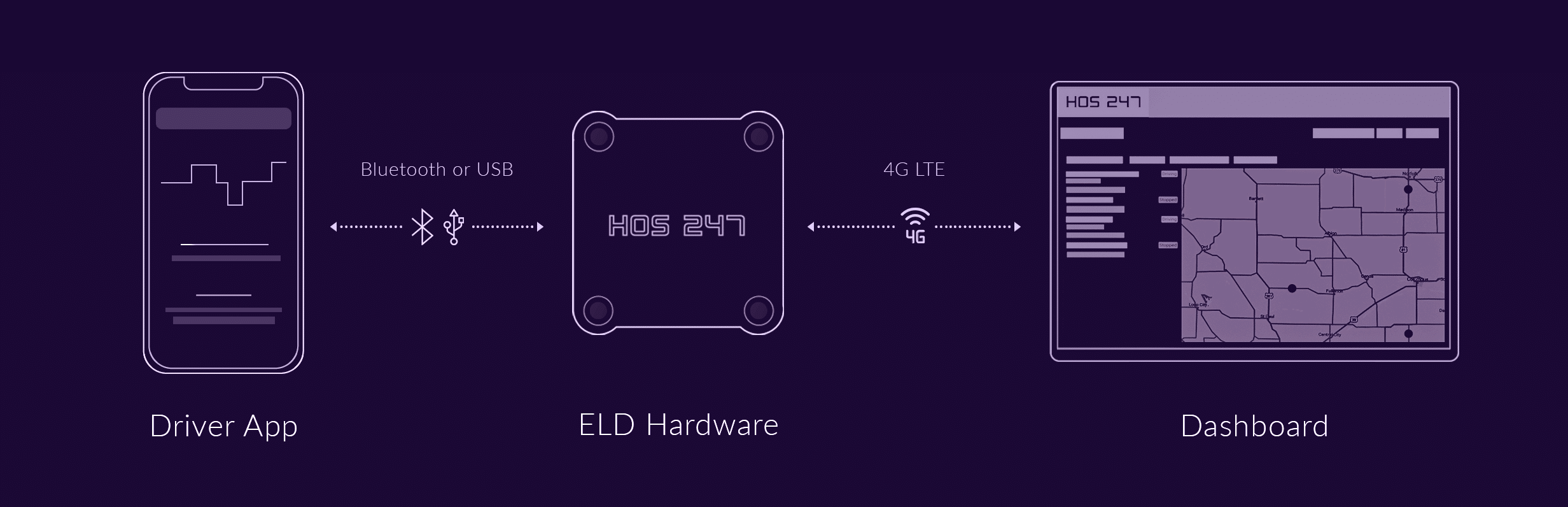
To be compliant, an Android logbook app must be part of a two-piece system:
- The hardware (the device). A physical device that plugs into the truck’s diagnostic port (9-pin, 6-pin, or OBDII). This hardware reads the engine data in real time.
- The Android app (the interface). This software runs on the driver’s tablet or smartphone. It connects to the hardware via Bluetooth to receive the engine data and display it as a compliant grid log.
The Winning Formula:
Durable Hardware (ECM Connector) + Reliable Android App (Software) = Full ELD Mandate Compliance
The rest of this guide focuses on how to select this complete system, starting with the significant advantages of using the Android platform that is likely already in your pocket.
The BYOD Advantage: Why an Android-Based ELD System is a Smart Choice
For years, legacy ELD providers forced fleets to purchase expensive, proprietary tablets that were locked down and difficult to replace. Today, the “Bring Your Own Device” (BYOD) model has transformed the industry, and Android is leading the charge.
Using an Android-based ELD system offers three distinct advantages for owner-operators and fleet managers:
- No expensive proprietary hardware. The biggest barrier to entry for many drivers is the upfront cost. With an Android ELD system, you do not need to buy a dedicated tablet from your provider. You can use a smartphone or tablet you already own. This drastically reduces the initial investment required to get compliant.
- Driver-friendly and familiar. Technology training is a major hurdle in trucking. When drivers use their own Android devices, they are already comfortable with the interface, the touch screen, and the settings. They don’t need to learn a new operating system, which reduces frustration and speeds up the onboarding process.
- Flexibility and cost savings. Proprietary hardware locks you in. If a provider’s custom tablet breaks, you often have to wait days for a replacement and pay a premium price. With a BYOD Android system, if your screen cracks or your battery dies, you can walk into any electronics store, buy a replacement, download the app, and be back on the road in an hour.
While the flexibility of BYOD is a major benefit, it places a huge responsibility on the software provider. Because Android runs on thousands of different devices, you need an app that is rigorously tested to be fast, stable, and bug-free on any device you choose to use.
What Makes a “Drivers Logbook App” Great? A 5-Point Checklist
Not all Android ELD apps are created equal. Some are outdated adaptations of old mobile software, while others are modern, intuitive tools designed for daily use on the road. When evaluating an app, ignore the marketing gloss and focus on these five core performance areas.
1. Rock-Solid Stability and Connection
This is one of the biggest complaints drivers have about low-quality systems. The app is the bridge between your phone and the hardware “dongle” plugged into the engine, relying on Bluetooth to maintain that link.
- The standard. A high-quality app should maintain a stable Bluetooth connection for your entire shift without dropping.
- The red flag. If driver reviews mention “disconnecting,” “freezing,” or “Bluetooth constantly re-pairing,” avoid that provider. A dropped connection means missing data and unassigned driving time — both of which can create log issues during an inspection.
2. A Simple, Driver-Friendly Interface
Inspections are stressful enough without fumbling through a confusing app. A great interface keeps essential actions quick and obvious.
- Duty status. Changing between statuses should be fast and intuitive, with clear, easy-to-tap buttons.
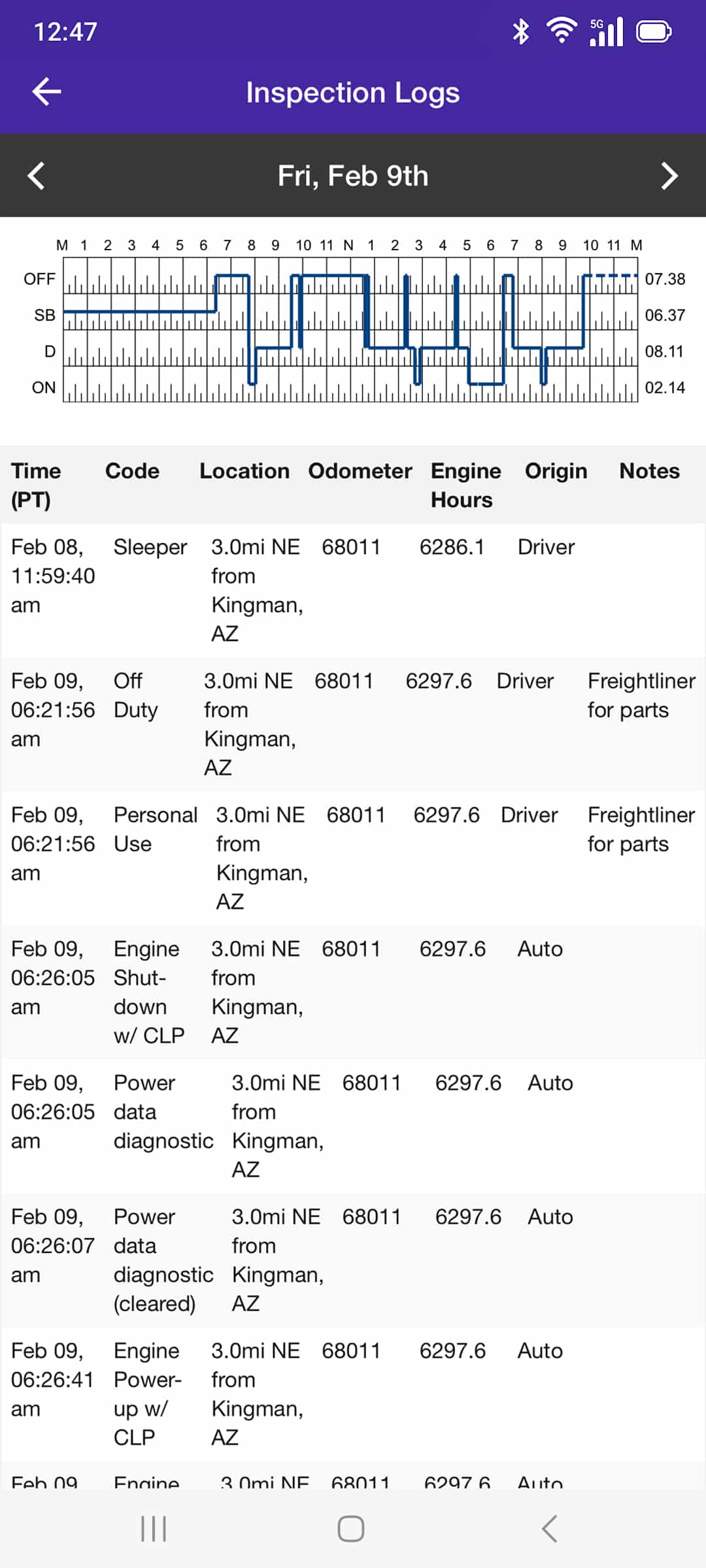
- Inspection mode. The app should have a clearly labelled Inspection Mode that displays only the required recent logs and hides personal information or non-ELD content on your device.
3. Strong Offline Functionality
Truckers drive through dead zones. A compliant app must continue working seamlessly in those conditions.
- How it works. Even without data service, the hardware and app should continue communicating via Bluetooth to record every mile/kilometre, engine hour, and duty status change.
- The sync. When signal returns, the app should automatically sync all locally stored data to the cloud. If an app “pauses logging” or becomes unusable without cellular service, it’s not suitable for real Canadian driving conditions.
4. Proactive Violation Alerts
A logbook app shouldn’t just record violations — it should help you avoid them.
Look for apps that provide clear visual or audio alerts as you approach key HOS limits, such as:
- Approaching your required 30-minute break (if applicable to your schedule).
- Coming close to your daily driving limit.
- Running out of on-duty time in your shift window.
These alerts help prevent accidental violations, especially on long or irregular routes.
5. Top-Rated Provider Support
Even great software can glitch — and questions about split sleeper rules or edits can come up at any hour.
- The reality. Your app is only as good as the support behind it.
- The test. Choose a provider that offers live support every day of the week. Avoid companies that rely solely on email or ticket systems; when you’re stuck at an inspection station with a frozen screen, you need a phone number and a real person who can help you right away.
A great Android app can turn your phone into a reliable co-pilot — but software is only half the story. Next, we compare the top Android ELD systems based on driver feedback.
Note: Ratings are based on Google Play Store data and are subject to change.
When selecting a provider, look for a balance. A high app rating is essential, but it should be paired with driver-friendly policies like flexible contracts and responsive support.

The HOS247 Solution: Why HOS247 is the Go-To Choice for Android Users
Our drivers logbook app for Android is consistently top-rated in the Google Play Store. Why? Because we designed it with one goal: simplicity. It is stable, intuitive, and designed to keep drivers compliant without getting in their way.
HOS247 provides a dependable solution for Android users by focusing on five key areas:
- A top-rated, driver-friendly app. We designed our app to be simple and intuitive. It is consistently rated highly by drivers because it is stable, easy to navigate, and makes HOS compliance straightforward.
- Seamless hardware integration. Our hardware and Android app as a single, complete system. This eliminates the connection drops and data-sync errors that often plague “mix-and-match” systems, providing a stable connection to the engine.
- Reliable support. When you have a problem, you need a person, not a ticket number. Our expert, multilingual support team is available every day of the week. We speak English, Spanish, Polish, and Russian, and our callback policy ensures you are never stuck on hold.
- Complete fleet management. The same app and hardware can run automated IFTA distance calculations, real-time GPS tracking, and vehicle diagnostics (fault code) alerts. This turns your compliance tool into a system that saves time and money.
- Flexible, no-contract plans. We believe in earning your business, not locking you into it. We are so confident in our system that we offer flexible, no-contract plans that allow you to scale or cancel at any time.
HOS247 provides a complete, reliable ecosystem where the hardware, software, and support all work together to keep you compliant and on the road.
How to Install and Set Up Your Android ELD System in 5 Steps
Getting a new ELD system up and running is designed to be a fast, straightforward process. Because the system uses a “Bring Your Own Device” model, there is no need for professional installation or complex wiring.
Follow these five steps to go from opening the box to being road-ready in under 10 minutes.
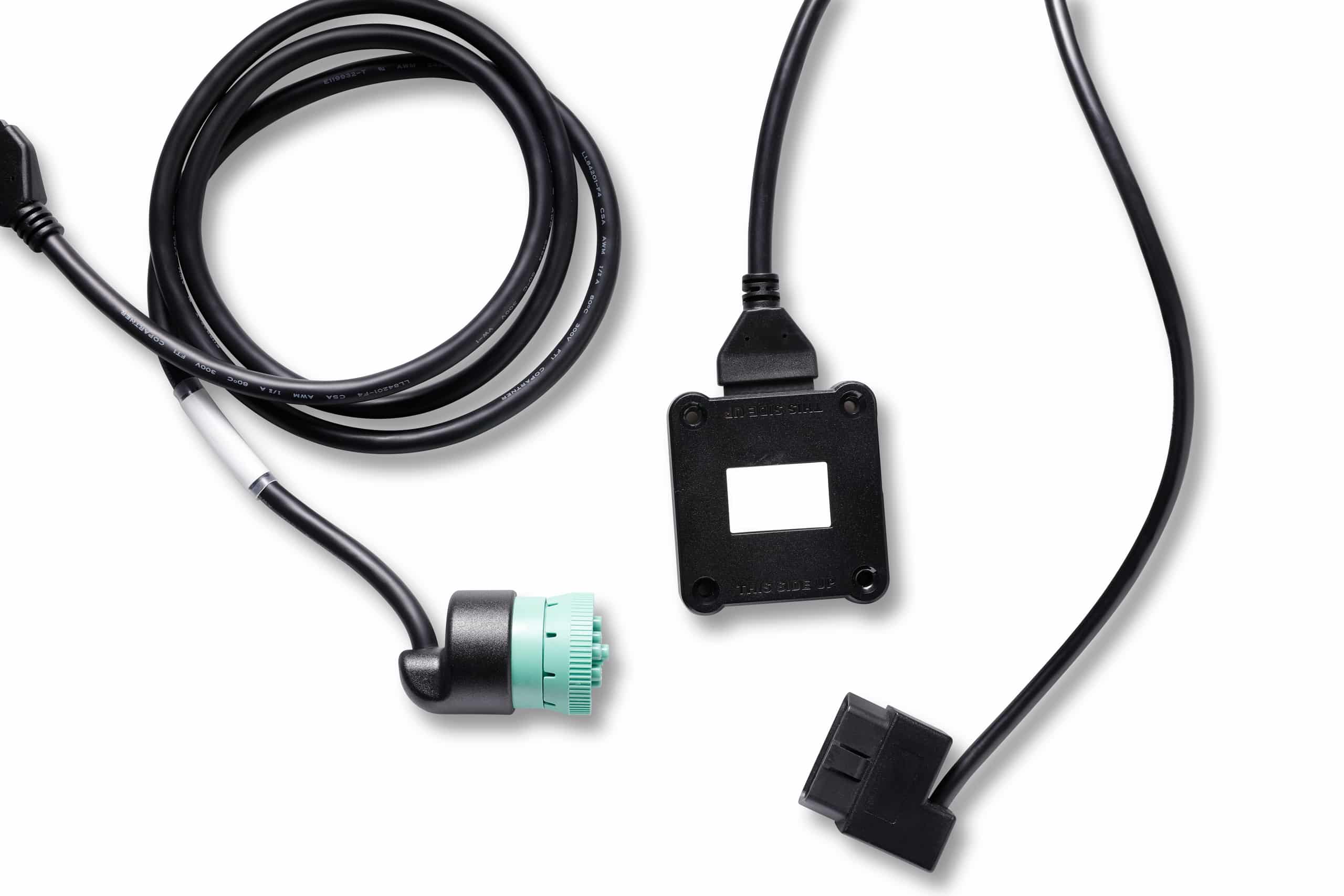
- Step 1. Locate the diagnostic port. Find the diagnostic port inside the cab. In most heavy-duty trucks, this is a 9-pin or 6-pin round port located on the driver’s side, often under the dashboard or near the clutch pedal. In lighter vehicles, it is typically a rectangular OBDII port near the steering column.
- Step 2. Plug in the hardware. With the engine off, align the pins and firmly plug the ELD hardware device into the port. Twist the collar (if applicable) to lock it in place. A light on the device will usually flash to indicate it is receiving power.
- Step 3. Download the app. Open the Google Play Store on the Android smartphone or tablet. Search for the specific provider’s app (e.g., “HOS247 ELD Logbook”) and tap Install.
- Step 4. Connect via the app. Turn on the Android device’s Bluetooth, but do not pair it in the phone’s settings. Open the newly installed ELD app and log in. Select the vehicle from the list, and the app will automatically search for and connect to the hardware device.
- Step 5. Confirm compliance. Once connected, a status indicator (usually green) will appear in the app. The system will automatically record the VIN and engine data. Complete a pre-trip inspection report within the app to finalize the setup. The truck is now compliant and ready to drive.

As an expert in B2B and B2C sales, I’ve dedicated myself to perfecting sales processes and client retention strategies in the logistics and trucking industry. I have significantly contributed to the expansion of the ELD service, catering to retail and wholesale clients in need of HOS247 ELD solutions. My unwavering commitment to implementing state-of-the-art sales techniques and technologies ensures the continuous growth and success of businesses I work with.










When choosing an ELD for your business in Canada, it’s important to remember that user-friendly software is as crucial for compliance with the ELD law as dependable hardware. The truck driver log app on the driver’s phone or tablet displays
A driver is on a critical, time-sensitive delivery. At a roadside inspection, the elog freezes. The officer is waiting, dispatch is on hold, and the driver’s entire Hours of Service (HOS) log is suddenly in question. This scenario is a

For years, the box truck industry relied on paper logbooks to track driving hours. Today, the landscape has shifted. An ELD is no longer just a high-tech accessory; for many fleets, it is a strict federal requirement. An electronic logging