
Beyond the Cab: Understanding Elog Synchronization
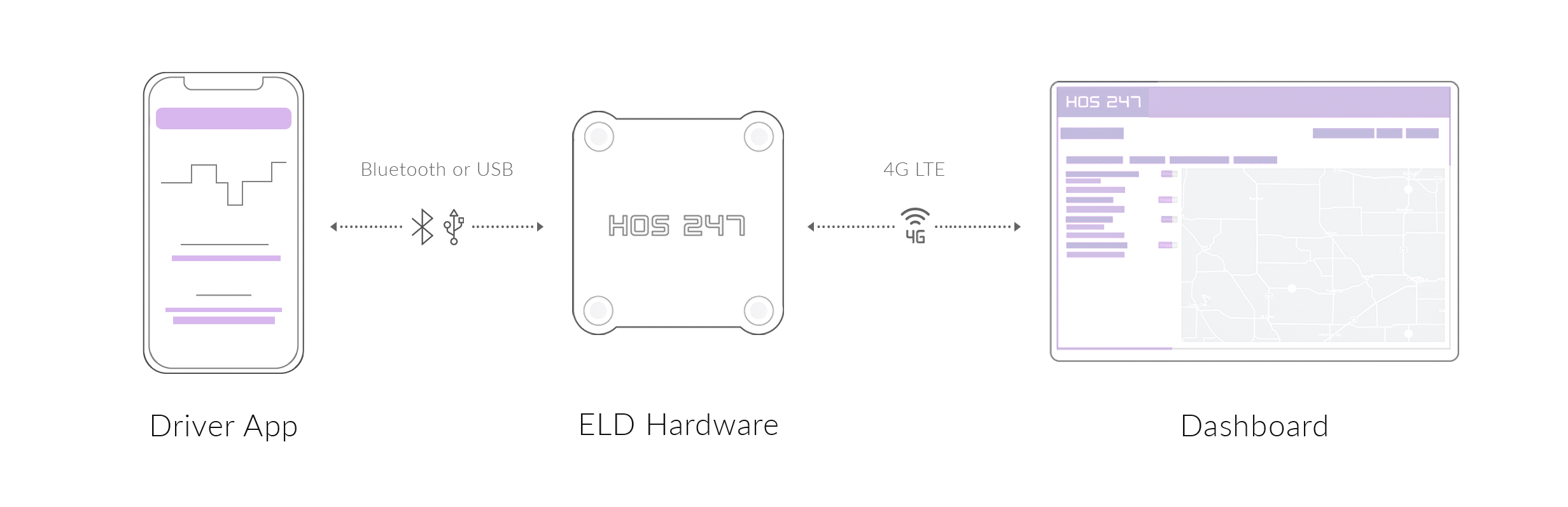
To troubleshoot effectively, you need to understand what is happening under the hood. A common misconception is that the tablet is the logbook. In reality, the app is just a display; the actual electronic logbook system relies on synchronization between the hardware connected to the vehicle and the software interface.
The ECM Interface Device (Not Just a “Dongle”)
While often referred to as a “dongle,” the hardware unit is technically an ECM interface device. Its primary function is to interpret the vehicle’s data protocols — typically J1939 for heavy-duty trucks or OBD-II for medium-duty vehicles.
A high-quality ECM device does more than power on. It must read precise engine data, including total engine hours and odometer values, and transmit them consistently. If the hardware cannot filter electrical interference or handle voltage fluctuations, it can lead to corrupted records and incomplete logs.
Integral Synchronization
ELD technical standards require integral synchronization, meaning the elog logbook must capture vehicle movement data automatically and without delay.
The most critical threshold is the 5 km/h (≈3 mph) motion rule:
- Motion detection. When the vehicle exceeds the defined movement threshold, the system must automatically place the driver into Driving status.
- The risk. If the connection between the ECM device and the app lags or drops, driving time may be recorded without an active driver profile. This creates unassigned driving events that must be reviewed and resolved later, increasing administrative workload and raising inspection concerns.
Data Transfer During Inspections
During an inspection, the system does not simply display logs on the screen. The electronic logbook must compile the records into a standardized data file that can be transferred to enforcement using the approved output methods defined by Canadian Council of Motor Transport Administrators.
This process requires the app to package log data, duty status records, location entries, and header information into a secure file on demand. A stable application and reliable connectivity are critical, as an inability to present or transfer records is commonly treated as a compliance failure.
Understanding these technical links helps distinguish between a temporary app issue and a true hardware or synchronization failure.
Mastering Complex HOS Scenarios with Your Elog Electronic Logbook
A basic app tracks time. A professional elog electronic logbook helps you manage the edge cases within Hours of Service rules. Handling special driving categories correctly is the difference between a clean inspection and a preventable violation.
Managing Unassigned Driving
One of the most common sources of log discrepancies is unassigned driving time. This typically occurs when a mechanic moves the vehicle or when it is repositioned without a driver logged in.
- The problem. The system records vehicle motion without a driver profile, creating an unassigned driving event.
- The fix. Do not accept unassigned driving that is not yours. A compliant system allows drivers to reject these records and annotate them (for example, “Mechanic road test”). This keeps the time off the driver’s cycle while maintaining the required audit trail for the carrier.
Personal Conveyance (PC) Best Practices
Personal Conveyance (PC) allows movement of the vehicle for personal use while Off-Duty, but it remains a frequent audit trigger.
- Correct usage. The elog electronic logbook must be placed into PC mode before the vehicle moves. This ensures the time is recorded as Off-Duty and that location data is handled appropriately.
- The risk. If PC is not enabled before movement, integral synchronization will automatically record Driving status. Once captured, this driving time cannot be retroactively converted to Off-Duty without annotations that often attract inspection scrutiny.
Agricultural and Short-Haul Exemptions
Many operations qualify for exemptions such as the 160-km (100 air-mile) short-haul radius or agricultural commodity provisions. A rigid elog system will still generate violation alerts unless it supports proper exemption configuration.
A capable system allows these exemptions to be applied correctly so compliant driving within the exempt radius does not trigger false duty-limit warnings that clutter logs and complicate inspections.
Diagnosing and Fixing Elog Logbook Failures on the Road
Technology isn’t perfect. Cables vibrate loose, and GPS signals bounce. Knowing how to troubleshoot your elog logbook on the roadside can prevent enforcement issues related to a device malfunction.
Connectivity Drops (Bluetooth Handshake)
If your tablet shows “Disconnected” or “VBUS Error,” the handshake between the ECM hardware and the app has failed.
- Safety first. Pull over. Do not adjust settings while driving.
- Cycle the power. Turn off the truck engine. Toggle Bluetooth OFF on your tablet/phone.
- Hard reset. Unplug the ECM device from the diagnostic port, wait 30 seconds, and plug it back in.
- Reconnect. Turn Bluetooth back ON and open the app. The “ECM” indicator should turn green.
Decoding Malfunction Indicators
Your screen may display single-letter codes indicating specific data failures. Here is how to interpret them:
- “P” (Power Compliance). The device is not receiving sufficient power. This often means the connection to the diagnostic port is loose. Check that the device is firmly connected and secured to prevent vibration movement.
- “T” (Timing Compliance). The system clock has drifted beyond the allowable threshold from Coordinated Universal Time (UTC). This is usually related to GPS synchronization. Moving the vehicle to an area with a clear view of the sky often resolves this automatically.
- “U” (Unidentified Driving). This is a data diagnostic event, not a malfunction. It indicates that there is unassigned driving time recorded on the device. You must review and resolve these records (accept or reject) to clear the event.
The 14-Day Paper Log Protocol
If troubleshooting does not resolve the issue and the device is confirmed to be non-functional, you must revert to paper logs immediately.
- The rule. You must keep a supply of blank daily log grids in the cab.
- The timeline. You may use paper logs for up to 14 days or until the device is repaired or replaced.
- The notification. You must notify the carrier as soon as practicable so that corrective action can be taken and the device repaired or replaced.
Being prepared with this knowledge demonstrates to an enforcement officer that you understand your compliance obligations and are managing your equipment responsibly.
Why HOS247 is the Superior Elog Electronic Logbook Solution
When your revenue depends on compliance, unreliable hardware is a liability. HOS247 is built for fleets and owner-operators who view their electronic logbook as a critical operational tool, not just a regulatory requirement. We prioritize system stability and operational data over unused features.
Reliability First: Industrial-Grade Architecture
The most common point of failure in electronic logging is the hardware connection.
- Industrial-grade ECM devices. Our hardware is stress-tested to withstand vibration, dust, and temperature fluctuations inside a commercial cab. This build quality helps maintain a secure connection to the diagnostic port, reducing the likelihood of power or synchronization-related malfunction events.
- Stable app performance. The HOS247 app is optimized for stability. It is designed to manage duty status changes and data transfers reliably, ensuring readiness during inspections.
Advanced Fleet Management Tools (The “All-in-One” Advantage)
HOS247 transforms your mandatory compliance device into a broader fleet management platform:
- Automated IFTA calculations. Manual mileage tracking is time-consuming. The system automatically calculates mileage by jurisdiction, simplifying quarterly fuel tax reporting.
- Real-time vehicle diagnostics. The system reads engine diagnostic trouble codes (DTCs) and notifies the fleet manager. This supports preventative maintenance planning before minor issues escalate.
- Idle monitoring. Excessive idling increases fuel consumption and engine wear. The elog logbook tracks idle time to help improve operational efficiency.
- 4G/LTE GPS tracking. High-speed, real-time location data improves dispatch coordination and adds asset visibility.
The Support Difference
Technology is only as strong as the support behind it.
- Multilingual expert team. Support is available 7 days a week in English, Spanish, Russian, and Polish. The team assists with both technical troubleshooting and compliance-related questions.
- No-contract flexibility. HOS247 operates on a flexible subscription model without long-term contracts, allowing carriers to maintain service based on performance rather than contractual obligation.
HOS247 is built for drivers and fleets that need consistency. With stable hardware, flexible terms, and responsive multilingual support, it delivers an elog system designed to perform reliably in real-world conditions. When compliance tools work the way they should, inspections stay routine and your focus stays on the road.
Seamlessly Transitioning to a New Electronic Logbook Elog System
Switching providers can feel complex, but proper preparation ensures a smooth transition.
Data Archiving
Before cancelling your previous service, remember that you are required to retain at least 14 days of records in the vehicle and maintain supporting records as required by regulation.
- Action step. Download all driver logs and related reports from your current provider’s portal. Store them securely before the account is closed, as access may be terminated upon cancellation.
Installation & Setup
Installing the HOS247 system is designed to be quick and tool-free.
- Locate the port. Find the vehicle’s diagnostic port (commonly 9-pin, 6-pin, or OBD-II) near the driver’s footwell or steering column.
- Secure the unit. Plug the HOS247 ECM unit firmly into the port. Ensure it is properly secured to prevent vibration movement.
- Pairing. Turn the engine on and follow the in-app instructions to pair the device via Bluetooth.
Driver Training
Driver adoption is often the primary challenge during transition. A user-friendly interface reduces this barrier. Because HOS247 uses a clear design with visible status indicators, most drivers adapt quickly, minimizing the need for extended training sessions.
Frequently Asked Questions
How do I handle an ELD malfunction during a roadside inspection?
If your device fails during an inspection, you must be able to present the required records using an alternative method, including display or printout if available. If the device is confirmed to be malfunctioning, you must reconstruct your records on paper beginning immediately and ensure the device is repaired or replaced within 14 days.
Can I use a tablet I already own for my elog?
Yes. HOS247 supports a Bring Your Own Device (BYOD) model. As long as your Android or iOS device meets minimum operating system requirements and supports Bluetooth, it can connect to the electronic logbook hardware.
What happens if I forget to log out of my electronic logbook?
If you fail to log out, the system may remain in On-Duty status, affecting your available off-duty time. If another driver moves the vehicle while you are logged in, that driving time may be attributed to your profile. Driving time that has been automatically recorded cannot be edited; it can only be annotated. Always confirm your duty status before leaving the vehicle.

Upgrade to an Elog System That Protects Your Time, Revenue, and Compliance
A modern elog logbook should support operational efficiency, not create additional complications. Whether you are dealing with connection interruptions, resolving unassigned driving events, or seeking responsive support, system reliability matters.
HOS247 offers industrial-grade hardware and multilingual support designed to help fleets and owner-operators maintain accurate records and consistent compliance. Upgrade to a system built for real-world operations. Contact HOS247 to learn more about our flexible ELD solutions.

As an expert in B2B and B2C sales, I’ve dedicated myself to perfecting sales processes and client retention strategies in the logistics and trucking industry. I have significantly contributed to the expansion of the ELD service, catering to retail and wholesale clients in need of HOS247 ELD solutions. My unwavering commitment to implementing state-of-the-art sales techniques and technologies ensures the continuous growth and success of businesses I work with.











What is a driving log app? Driving log apps give drivers, owner-operators and fleet owners the ability to record/manage hours of service electronically. The driving hours log app must be connected directly to the truck engine in order to record

In today’s fast-paced business world, effective asset management is crucial for maintaining a competitive edge. Companies across various industries rely on their assets, such as vehicles, equipment, and inventory, to keep their operations running smoothly. However, managing these assets can

Managing a fleet can be challenging, from tracking their locations to preventing delays, theft, and other issues. However, there is a solution that can revolutionize fleet management: GPS trailer trackers. These devices provide motor carriers with unprecedented control over their