
Who Must Follow DOT Hours of Service Rules?
Before calculating weekly cycle limits, it is essential to determine if the operation falls under the federal mandate. The DOT hours of service regulations apply specifically to operators of Commercial Motor Vehicles (CMVs) involved in interstate commerce.
The Federal Motor Carrier Safety Administration (FMCSA) defines a CMV based on weight, passenger capacity, and cargo type. If a vehicle meets any of the following criteria, the driver is generally subject to HOS rules:
- Weight threshold. The vehicle has a Gross Vehicle Weight Rating (GVWR) or Gross Combination Weight Rating (GCWR) of 10,001 pounds or more. This applies to the rating or the actual weight, whichever is greater.
- Passenger transport. The vehicle is designed to transport 16 or more passengers (including the driver) not for compensation, or 9 or more passengers for compensation.
- Hazardous materials. The vehicle is transporting hazardous materials in a quantity that requires placards.
Interstate vs. Intrastate
A common source of confusion lies in the difference between interstate and intrastate commerce. Interstate commerce applies when cargo crosses state lines, requiring strict adherence to federal rules. Intrastate commerce occurs when the vehicle and cargo remain entirely within one state, subjecting the driver to state-specific regulations (like California or Texas rules), which may differ slightly in weight thresholds or duty hours.
Understanding these distinctions ensures that compliance efforts are focused where they are legally required. By verifying the specific classification of the vehicle and the nature of the cargo, fleet managers can avoid unnecessary administrative work for exempt operations while ensuring non-exempt drivers remain fully compliant.
Understanding the Core DOT Commercial Driver Hours of Service Regulations
Compliance starts with mastering the four main clocks that dictate a driver’s day. These rules work together to ensure drivers remain alert and safe on the road.
The 11-Hour Driving Limit
This rule is simple but rigid. After 10 consecutive hours off-duty, a driver is permitted to drive for a maximum of 11 hours.
- The timeline. If a driver starts at 6:00 AM after a full night’s rest, they have 11 hours of “behind the wheel” time available to use before they must stop.
- What counts. Only time spent physically operating the vehicle counts against this limit. Fueling or loading does not reduce this bucket, though it affects the 14-hour window.
- The consequence. Driving 11 hours and 1 minute is a violation. Once the limit is reached, the vehicle must stop until another 10-hour rest break is taken.

The 14-Hour Driving Window
While the 11-hour rule limits driving, the 14-hour rule limits the workday. This “window” opens the moment a driver comes on-duty.
- Why it is a “window.” This clock ticks continuously, regardless of activity. Taking a lunch break or sitting at a dock does not pause the 14-hour countdown.
- The hard stop. A driver cannot drive the truck after the 14th hour. For example, coming on duty at 6:00 AM means driving must cease by 8:00 PM, regardless of how many driving hours remain.
The 30-Minute Break Rule
To prevent fatigue during long shifts, the FMCSA requires a break.
- The requirement. A driver must take a 30-minute break after 8 cumulative hours of driving.
- Flexibility. This break can be satisfied by any non-driving status, including “On-Duty Not Driving” (while fueling) or “Off-Duty.”
The 60/70-Hour Rule
This rule prevents cumulative fatigue over several days.
- The calculation. A driver cannot drive after accumulating 60 or 70 hours of on-duty time in a rolling 7 or 8-day period.
- Managing the limit. This is a rolling total. As a new day starts, hours from the oldest day in the cycle drop off, freeing up time.
The 10-Hour Rest Requirement
To reset the daily clocks (11 and 14 hours), a driver must take at least 10 consecutive hours off-duty. This can be achieved by logging Off-Duty, Sleeper Berth, or a combination of both (provided it is consecutive).
Mastering these four clocks is the foundation of DOT compliance. By carefully tracking the 14-hour window and managing the weekly cycle, drivers can maximize their earning potential without risking the penalties associated with HOS violations.
HOS Exemptions and Special Situations
While the core rules apply to most, DOT Commercial Driver Hours of Service regulations include specific exemptions to provide flexibility for real-world scenarios.
Split Sleeper Berth Provision
This advanced rule allows drivers to pause the 14-hour clock by splitting the 10-hour break into two periods.
- The splits. Drivers can use an 8/2 split or a 7/3 split.
- The requirement. One period must be at least 7 consecutive hours in the sleeper. The other must be at least 2 hours (sleeper or off-duty). The two periods must total at least 10 hours.
- The benefit. When paired correctly, neither break counts against the 14-hour clock, extending the workable day.
Adverse Driving Conditions
When unexpected events occur, the rules allow additional flexibility. Drivers may extend both their 11-hour driving limit and their 14-hour window by up to 2 hours if they encounter unforeseen weather or traffic conditions (like a highway closure) that were not known before the trip began.
The 16-Hour Short-Haul Exception
Local drivers can extend the 14-hour driving window to 16 hours once every 7 consecutive days. To qualify, the driver must return to their work reporting location that day and must have been released from duty at that location for the previous 5 duty tours.
Personal Conveyance and Yard Moves
- Personal conveyance (PC). Using the vehicle for personal reasons while off-duty allows drivers to move the truck without logging driving time, provided it does not advance the load.
- Yard moves. Moving the truck within a terminal or customer facility can be logged as “On-Duty Not Driving” rather than driving time, preserving the 11-hour limit.
Utilizing these exemptions requires precise documentation. Drivers should always annotate their logs when using provisions like Adverse Conditions or Personal Conveyance to ensure that auditors understand why the standard limits were exceeded or paused.
Records of Duty Status and ELD Requirements
Understanding the rules is only half the battle; proving compliance through accurate documentation is the other. DOT rules require every non-exempt driver to maintain a Record of Duty Status (RODS), commonly known as a log.
The ELD Mandate
Implemented fully in 2019, the Electronic Logging Device (ELD) mandate requires most interstate drivers to use an FMCSA-registered device. These devices synchronize with the vehicle’s engine to automatically record driving time, ensuring accuracy and preventing tampering. Paper logs are now restricted to specific groups, such as drivers of pre-2000 model year engines or those who only keep logs for 8 days or fewer in a 30-day period.
Mandatory In-Cab Documentation
Regardless of whether a driver uses an ELD or paper logs, specific documents must be present in the cab during an inspection:
- User manual. Instructions for the specific ELD make and model.
- Data transfer sheet. A guide on transferring HOS records to safety officials via Bluetooth or Web Services.
- Malfunction instructions. Guidelines on reporting and managing ELD failures.
- Blank paper logs. A supply sufficient for at least 8 days, used in case of ELD malfunction.
Carriers must retain these records for six months according to DOT commercial driver hours of service regulations. Maintaining a complete and organized compliance file in the cab ensures that roadside inspections remain brief and professional, minimizing downtime for the driver.

HOS Violations: Understanding the Risks
Violating DOT HOS regulations carries significant consequences. In the era of ELDs, “fudging” the numbers is impossible, and enforcement officers use sophisticated software (eRODS) to scan logs for inconsistencies instantly.
Common Violations and Penalties
- The 14-hour overage. Working past the 14th hour is the most frequent non-driving violation, often due to delays at loading docks.
- Unassigned driving. If a vehicle moves without a driver logged in, the system creates an “unassigned driving” event. Failure to annotate this time is a major red flag during audits.
- Out-of-Service (OOS) Orders. Serious violations result in an immediate shutdown at roadside. The driver may be forced to park for 10 to 34 hours, resulting in missed delivery windows and lost revenue.
- Financial Impact. Fines can range from $1,000 to over $16,000 per violation. Additionally, violations degrade the carrier’s CSA score, leading to higher insurance premiums and more frequent inspections.
Enforcement is no longer limited to physical weigh stations; roadside officers can download data via Bluetooth to highlight violations instantly. Avoiding these penalties requires not just an understanding of the rules, but the discipline to stop driving when the clock runs out, regardless of proximity to the destination.
How Electronic Logging Devices Simplify Compliance
For many drivers, the switch to ELDs initially felt like a burden. However, a modern ELD is not just a digital policeman; it is a tool that actively helps drivers manage HOS regulations with less stress and greater accuracy.
Why ELDs Matter
Before ELDs, compliance relied on mental math. One calculation error could lead to a violation. Electronic logs streamline this by:
- Automatic status changes. The system switches to “Driving” status at 5 mph, ensuring drive time is captured accurately.
- Real-time warnings. High-quality ELDs provide audio and visual alerts as a driver approaches the 11-hour limit or 30-minute break, acting as a proactive co-pilot.
- Ease of inspection. Data is transferred wirelessly to the officer, eliminating arguments over handwriting legibility and making inspections faster.
Choosing the Right ELD
When selecting an ELD, fleets should look for FMCSA registration, an intuitive interface to prevent “form and manner” errors, and reliable customer support. When a technical glitch happens at 2:00 AM, responsive support is the difference between a quick fix and an Out-of-Service order.
Technology should be an asset, not a hurdle. By choosing an ELD that integrates features like recap calculations and DVIRs, fleets can turn a regulatory requirement into an operational advantage that saves time and protects the bottom line.
HOS247 ELD: A Reliable Compliance Partner
In a market flooded with complex and expensive options, HOS247 stands out by prioritizing what matters most to professional drivers: simplicity, reliability, and support.
Built for Trucking Operations
HOS247 was designed to eliminate the friction often associated with DOT HOS compliance. The system is tailored for fleets and owner-operators requiring a solution that functions effectively immediately upon installation.
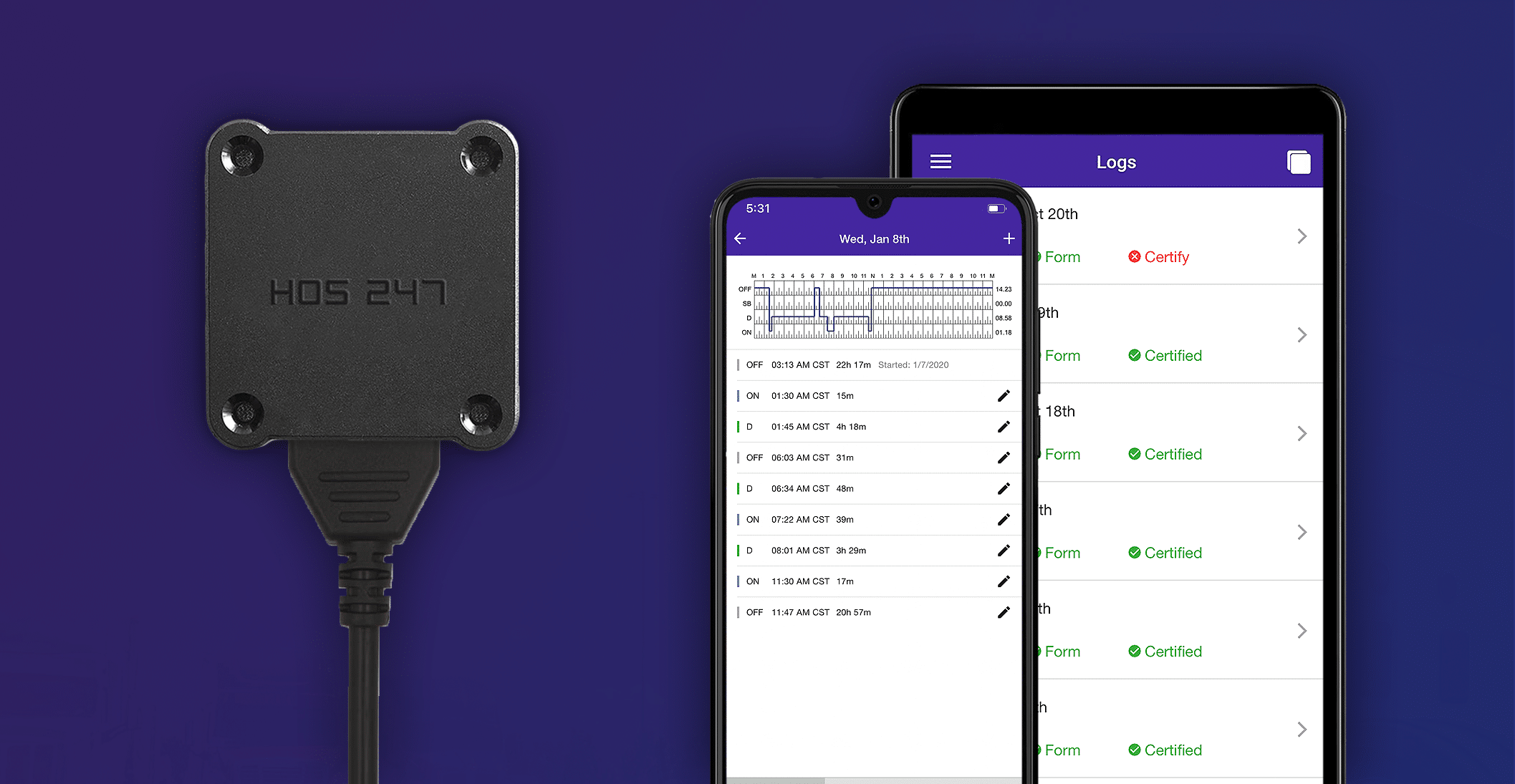
- Reliability. The hardware connects directly to the engine’s ECM and maintains a stable Bluetooth connection to the tablet or smartphone. This stability prevents the “dropped data” issues that frequently plague inferior devices.
- Simplicity. The app interface is clean and straightforward. Drivers can view available hours at a glance, certify logs with a single tap, and complete inspections in seconds. Even those who are not comfortable with complex technology find the system easy to master.
- Compatibility. The HOS247 app operates smoothly on both iOS and Android devices, allowing operators to utilize smartphones or tablets they already own.
Support That Drivers Can Count On
Technical issues rarely occur at convenient times, so support must be available whenever the fleet is running.
- Top-rated service. A dedicated support team is available 7 days a week. Unlike providers that rely heavily on automated chatbots, HOS247 offers access to real human agents.
- Multilingual agents. Assistance is available in English, Spanish, Russian, and Polish, ensuring clear communication for diverse driving teams.
- Callback policy. Drivers are not left waiting on hold. If all agents are busy, the team employs a callback policy to resolve issues promptly without wasting the driver’s operational time.
A Complete Fleet Management Platform
Beyond basic compliance, HOS247 offers a comprehensive fleet management platform. Users can integrate GPS tracking for real-time visibility and automated IFTA mileage calculations to reduce quarterly administrative burdens. With transparent pricing and no long-term contracts, the service is designed to earn business through performance rather than restrictive agreements.
Partnering with HOS247 represents an investment in peace of mind. By combining durable hardware with accessible, multilingual support and a flexible business model, HOS247 ensures that compliance becomes a seamless part of daily operations rather than a source of stress.
Best Practices for Managing Hours
Staying compliant requires more than just reacting to the clock; it requires proactive strategy. By implementing specific management techniques, drivers and fleet managers can maximize productivity without risking violations.
Strategic Planning
- Identify rest areas early. Knowing exactly where safe parking is available prevents the stress of hunting for a spot as the 11-hour limit approaches.
- Build buffer time. Dispatchers should factor in “buffer time” for unforeseen delays. If a trip is calculated to take exactly 10 hours and 45 minutes, a single traffic jam can trigger a violation.
- Protect the window. Drivers should avoid coming “On-Duty” until they are truly ready to work. Triggering the 14-hour clock for a 15-minute task and then sitting idle wastes valuable operational time.
Weekly Cycle Management
Managing the 60/70-hour limit is critical for continuous operation. Many experienced drivers use the “Recap” strategy, running roughly 8.5 to 9 hours a day. This allows them to run indefinitely on hours that become available again after the 8th day, avoiding the need for a full 34-hour restart.
By combining smart route planning with a disciplined approach to the 14-hour window, drivers can maintain a steady flow of miles. This proactive approach reduces stress and ensures that the logbook remains a record of safe, efficient operation rather than a source of anxiety.

Frequently Asked Questions
Can a driver continue driving after the 14-hour window expires?
No. Once the 14-hour window closes, a driver cannot operate a commercial motor vehicle for business purposes. They must take 10 consecutive hours off-duty. However, they may continue to perform non-driving work (like loading) after the 14th hour, but this time counts toward the 60/70-hour weekly limit.
Do local drivers need an ELD?
Not always. Drivers who qualify for the Short-Haul Exemption (operating within a 150 air-mile radius and returning home daily within 14 hours) are exempt from using an ELD. They must still keep time records. If they exceed these limits more than 8 days in a 30-day period, an ELD becomes mandatory.
What if a driver is stuck in traffic and about to violate the 11-hour rule?
If the traffic delay is due to an unforeseen “adverse driving condition” (like a highway closure due to a crash that happened after the trip started), the driver may extend their driving time and window by up to 2 hours. This exception does not apply to predictable rush-hour traffic.
Can personal conveyance be used to extend the day?
No. PC is for personal use only (like driving to a restaurant or hotel from a terminal). It cannot be used to move closer to the next pickup or advance the load. Misusing PC to extend the workday is a common violation.
Understanding these nuances helps prevent accidental violations. When in doubt, it is always safer to stop and rest than to risk a violation that could impact the carrier’s safety rating or the driver’s livelihood.

Conclusion
DOT Commercial Driver Hours of Service regulations establish the boundaries for every interstate operation. Navigating the rigid structure of the 11-hour limit, the 14-hour window, and the various weekly cycles remains one of the most demanding aspects of professional driving.
Success in this regulatory environment requires consistency. A violation at a roadside inspection results in more than just a fine; it causes downtime that impacts the entire delivery schedule. Utilizing a stable electronic logging system is the most effective method to ensure that duty status records remain accurate and audit-ready, preventing the costly disruptions associated with non-compliance.
Reliability is the defining factor when selecting equipment for this task. A dependable system ensures that inspections are routine and that the fleet remains focused on driving rather than troubleshooting technology. For a solution that prioritizes stability and straightforward compliance, HOS247 provides the necessary tools to keep operations running smoothly and legally.
A Note to Our Readers on Compliance
This article is intended for informational and educational purposes only. It is not a substitute for official regulatory guidance or legal advice. HOS and ELD regulations are complex and subject to change and interpretation by enforcement officials. Please always refer to official sources for the most current and accurate information.

As an expert in B2B and B2C sales, I’ve dedicated myself to perfecting sales processes and client retention strategies in the logistics and trucking industry. I have significantly contributed to the expansion of the ELD service, catering to retail and wholesale clients in need of HOS247 ELD solutions. My unwavering commitment to implementing state-of-the-art sales techniques and technologies ensures the continuous growth and success of businesses I work with.










The trucking industry operates on tight schedules, narrow margins, and the need for maximum safety. In such a complex and demanding environment, having the right tools can make all the difference. One such tool is truck tracking software, powered by

The trucking industry has come a long way since the early days of log books. These essential records have been a part of the commercial driving landscape for decades, serving as a critical tool for ensuring compliance with hours of
Running a business is challenging, no matter the size. Just like giant companies with hundreds of vehicles in operation, owners of small fleets face similar problems related to inefficient dispatch, lack of visibility, extra fuel expenses, and time-consuming paperwork. Small