
Technical Criteria for an Electronic Driver Logbook App
Commercial logging software operates under specific federal parameters. The application must collect mandatory data without draining device batteries or forcing drivers to update statuses manually. Transport Canada outlines strict technical specifications that every certified platform must meet.
The primary technical criteria include:
- Unassigned driving penalties. The application communicates directly with the vehicle engine control module (ECM). The hardware reads the odometer and logs physical motion data. Federal rules dictate that the system must record a driving status automatically once the vehicle reaches eight kilometres per hour. The software locks the screen to prevent manual edits during transit. This automatic trigger stops unassigned driving events from accumulating on the carrier safety profile.
- Failed inspection criteria. The application generates a visual graph grid on the mobile device screen. This display shows enforcement officers all duty status transitions throughout the mandatory 24-hour reporting period. The grid plots lines across four mandatory categories: Off-Duty, Sleeper Berth, Driving, and On-Duty Not Driving. The officer must be able to read this grid immediately without navigating through complex software menus.
- Form and manner violations. The screen displays the motor carrier name, vehicle identification numbers, and active shipping document numbers. The software also records the physical location of the truck at specific intervals. Officers require these details to verify the log during a physical inspection. Missing shipping numbers or incorrect carrier names result in immediate administrative citations.
- Exceeded hours of service limits. The software calculates the available driving hours and on-duty limits remaining in the current shift. It tracks the 13-hour driving limit, the 14-hour daily on-duty limit, and the 70-hour/7-day or 120-hour/14-day cycle. The application displays these countdown clocks on the main dashboard. This display tells drivers exactly how much time remains before they hit a regulatory boundary.
Drivers switch between logging software, digital dispatch platforms, and GPS navigation systems during a shift. Mobile operating systems often suspend inactive applications to save memory and battery life. The logging software must process data continuously in the background to overcome this limitation. This background processing stops the connection from dropping when a driver hides the logging interface to view a map or answer a call. The software must catch every engine update regardless of what is currently visible on the device screen.
What to Look for in a Truck Driver Logbook System
Motor carriers must evaluate both physical hardware and mobile software when selecting a logging system. The wrong equipment causes data drops and administrative delays. Fleet managers evaluate specific operational benchmarks to find reliable tools.
The core components of an effective digital logging system include:
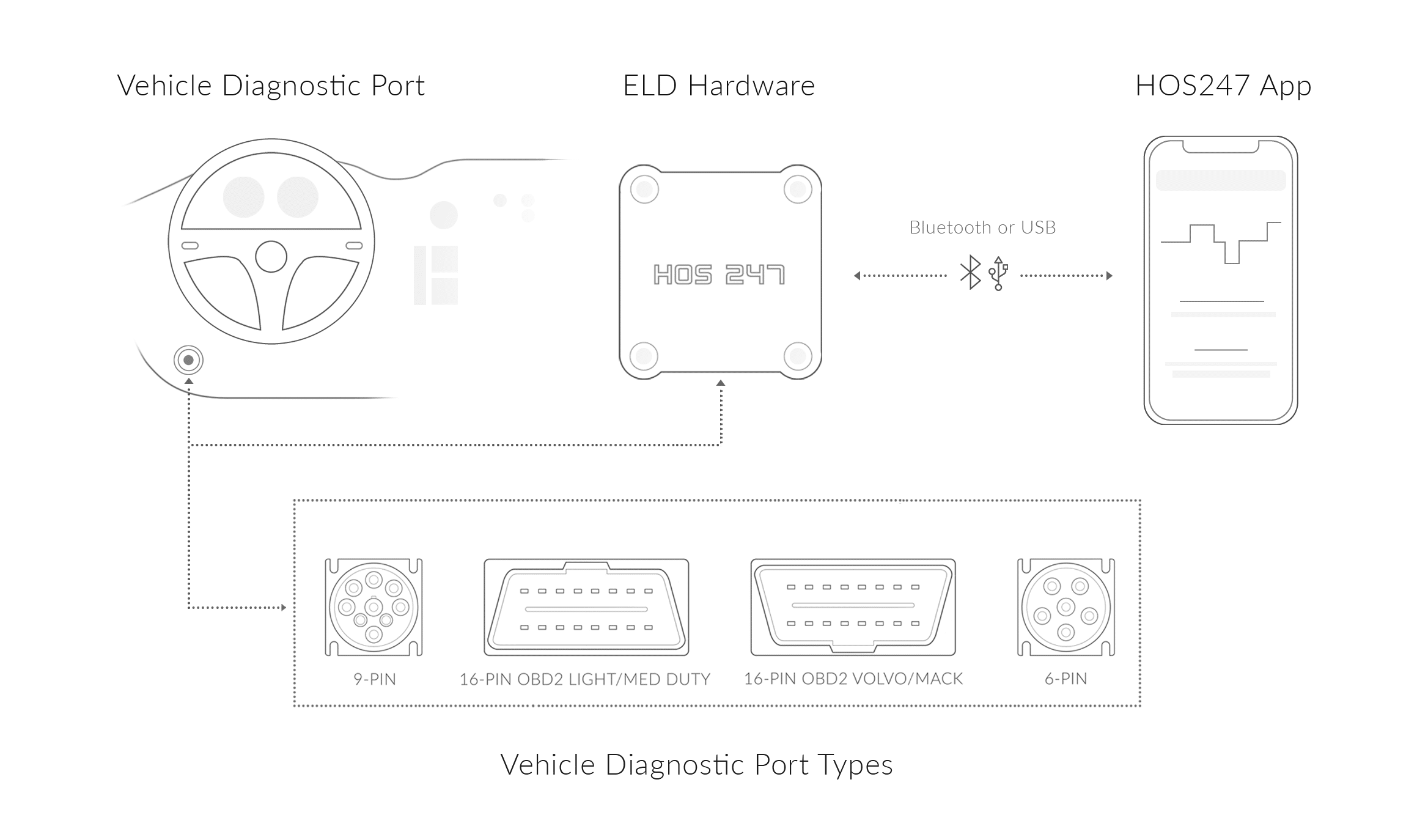
- Costly installation delays. Hardware gateways must plug directly into the vehicle diagnostic port. Standard heavy-duty trucks use a 9-pin J-Bus connection. Light and medium-duty vehicles use an OBDII port. Direct connections remove the need for professional wiring. This plug-and-play design prevents truck downtime during installation.
- Missing data violations. The physical gateway requires advanced Bluetooth or Wi-Fi components. The connection must resist signal drops caused by rough road vibrations or city interference. A stable connection keeps the engine data synced continuously to the mobile application.
- Proprietary hardware expenses. Modern systems offer Bring Your Own Device (BYOD) compatibility. This software runs on standard consumer smartphones and tablets. The application must support both Android and iOS operating systems. Fleets skip the forced purchase of expensive proprietary screens and use devices they already own.
- Cellular blackout data loss. The physical vehicle gateway requires internal flash memory. This internal storage acts as a fail-safe. It captures and stores engine data independently if the mobile device loses power, unlinks, or breaks during a shift. The gateway transmits the saved data once the driver reconnects a working device.
- Night driving distractions. The mobile interface needs large, high-contrast touch targets. Drivers must manage logs with minimal screen taps. The software also needs an integrated night mode. This dark display setting eliminates screen glare inside the cab during overnight hauls.
- Predatory hardware leases. Providers should offer month-to-month subscription structures. Independent owner-operators avoid multi-year, legally binding hardware leases. This transparent pricing allows fleets to scale vehicle counts up or down freely without financial penalties.
- Application clutter. A unified telematics architecture consolidates multiple tools into a single dashboard. Fleet managers track driver logs, vehicle inspection reports (DVIR), and real-time GPS locations through one interface. Advanced systems also handle automatic distance-by-jurisdiction reporting for IFTA mileage within the same portal.
Fleet operators check these hardware and software benchmarks before purchasing a system. Durable equipment captures data accurately and handles the physical demands of daily commercial use.
Streamlining Inspections with Dedicated Software Interfaces
Enforcement officers review electronic logs during roadside inspections. Drivers need software that displays the required data quickly. Complex menus frustrate inspectors and increase inspection times. A compliant driver logbook app includes a dedicated inspection mode to handle these roadside audits.
The law requires an immediate lockdown mode on the mobile device. This mode restricts the screen to the mandatory 14-day log grid. Drivers activate this mode before handing the device to an officer. This lockdown prevents enforcement officers from accessing personal text messages, photos, or administrative settings on the driver’s phone or tablet.
Officers request data transfers to the national portal or via secure electronic communication. The software packages and executes these transfers using Transport Canada technical standards. The primary transfer method uses encrypted email or web services. The application sends files securely according to federal protocols. The driver inputs a routing details provided by the inspector to send the file. If cellular signals fail, the system uses a local transfer protocol, such as Bluetooth or USB, or displays the visual grid directly on the screen for inspection.
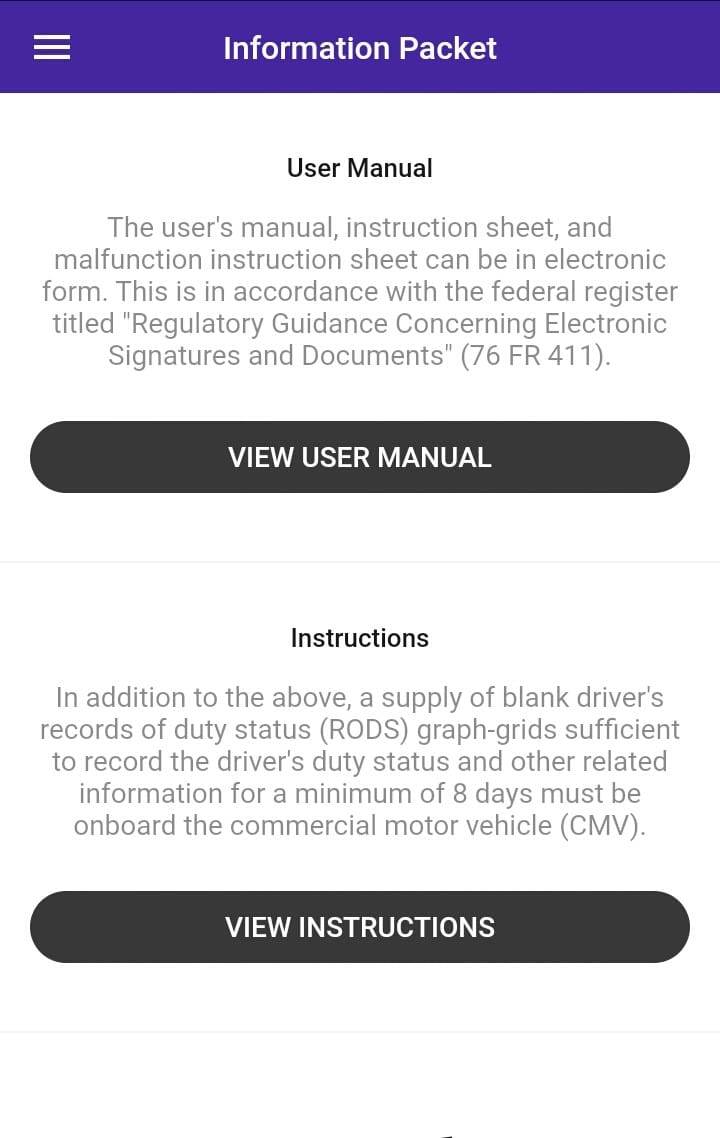
Federal regulations also mandate physical paperwork inside the vehicle. Drivers must present these items during an inspection. Missing paperwork results in automatic administrative citations.
Drivers must carry four specific items at all times:
- Operating instruction citations. The driver must possess a physical or digital user manual. This guide details exactly how to operate the mobile application interface.
- Failed file transfers. The cab must contain explicit data transfer instructions. This document shows the inspector the exact steps to initiate a log transfer from that specific software version.
- Protocol violations. The driver needs an equipment malfunction guide. This instruction sheet explains the exact steps a driver must take if the hardware gateway or mobile application breaks down.
- Backup record failures. The vehicle must hold a minimum supply of 15 blank paper log sheets. Drivers use these graph grids to record their duty status manually if the digital system experiences a total failure.
Sometimes, electronic data transfers fail due to poor signal strength or broken officer equipment. Technical standards outline a legal backup protocol for this exact scenario. The driver hands the mobile device or tablet to the officer. The officer reviews the visual grid display directly on the screen. The officer cannot issue a non-compliance citation for a failed digital transfer if the driver provides a clear visual display.
Drivers clear roadside checkpoints quickly when they utilize an application with a highly organized inspection interface. Smooth data transfers allow commercial operators to satisfy the inspector and resume productive driving without unnecessary delays.
Violation Prevention and Logic Rules
A driver logbook app uses software logic to track complex federal rules. Drivers cannot track multiple rolling clocks accurately in their heads while operating heavy machinery. The mobile application processes these regulations automatically. This background logic prevents drivers from making simple arithmetic mistakes that lead to costly roadside fines.
The software utilizes built-in logic rules to manage these daily scenarios:
- Hours of service calculation errors. Advanced systems compute complex split-sleeper configurations. Drivers use qualifying split-sleeper periods (such as a 2-hour and 8-hour split) to pause their duty clocks. The software calculates available drive time dynamically once a driver pairs a qualifying rest period with a sleeper berth shift. This automation removes manual math errors entirely.
- Emergency driving time penalties. The application allows drivers to apply the two-hour adverse driving conditions exception directly through the interface. Drivers activate this legal extension when unforeseen weather, road closures, or traffic accidents disrupt a scheduled delivery run. The system adjusts the available driving clocks automatically.
- Improper duty status logging. The application structure manages special duty statuses securely through specific interface toggles. Yard Move (YM) allows drivers to maneuver vehicles within private property or terminal yards at low speeds without burning on-duty driving time. Personal Conveyance (PC) permits off-duty transit for personal errands within legal distance limits. The system records both movements under the correct regulatory category to satisfy auditors.
- Accidental shift violations. Multi-tiered audio and visual alerts trigger at specific operational thresholds. The system warns drivers prior to hitting an operational driving limit, a daily on-duty threshold, or a maximum shift limit. These proactive warnings give drivers enough time to find safe parking.
- Unauthorized logbook alterations. The system logic handles carrier-suggested log modifications according to strict regulatory workflows. An administrative correction proposed by a fleet safety manager remains a suggestion until the driver reviews it. The driver must open the application, edit the log, and add a personal text annotation to approve the change. The software rejects the edit if the driver declines the suggestion.
Integrating advanced compliance logic directly into the mobile interface helps independent owner-operators maximize legal operating limits. The software prevents accidental hours of service penalties by automating complex regulatory math.
Managing Network Disconnects and Data Integrity
Commercial trucks operate in remote areas. Mountain passes and rural highways lack consistent cellular coverage. A web-dependent application drops data when a truck enters these dead zones. A compliant digital logbook processes data locally to prevent record gaps during offline operation.
The application architecture handles cellular dropouts through two specific mechanisms:
- Lost data in cellular dead zones. A reliable mobile logging application stores hours of service data directly on the physical device memory during cell service blackouts. The physical hardware gateway continues sending engine telemetry to the tablet or smartphone via Bluetooth. The application records duty status changes, vehicle speeds, and location coordinates locally without a live internet connection.
- Unsynchronized fleet records. An automated reconciliation process occurs once the mobile device re-establishes a cellular signal. The application uploads the locally stored data directly to the administrative cloud servers. This background process updates the carrier portal immediately without requiring the driver to push a manual sync button.
Dependable offline performance prevents data gaps. The system protects carriers from unassigned driving events that occur when trucks operate in remote locations or cross borders. Drivers maintain complete log records regardless of cellular network availability.
Operational Advantages of the HOS247 Driver Logbook
Commercial motor carriers require logging tools that integrate smoothly into daily operations. Complex software slows down drivers and increases the risk of manual data entry mistakes. HOS247 logging system prioritizes hardware durability and straightforward software interfaces.
The system provides specific operational advantages:
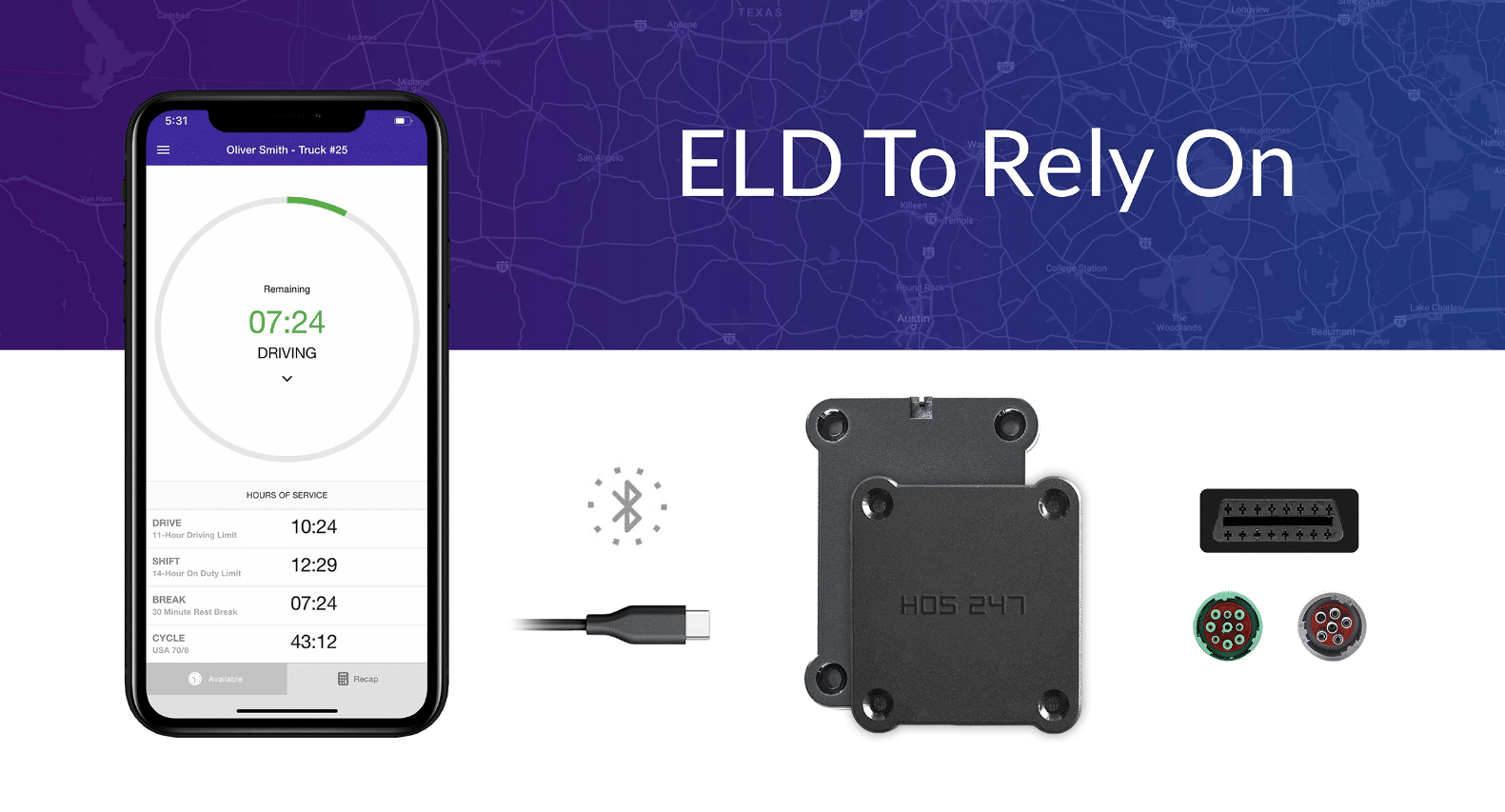
- Driver-focused mobile application. Reduce administrative errors with a straightforward driver logbook app that eliminates complicated menu screens, allowing personnel to manage duty status entries, edit annotations, and complete vehicle inspection reports with minimal taps.
- Plug-and-play vehicle gateway. Eliminate data gaps through instant diagnostic port synchronization that establishes a dedicated Bluetooth link to the mobile device screen, capturing engine parameters continuously without dropping signals during rough road transit.
- Multilingual driver support. Resolve roadside issues quickly with multilingual technical support that connects drivers to live troubleshooting specialists fluent in English, Spanish, Polish, and Russian during stressful checkpoints.
- Optimized software battery performance. Prevent mobile device overheating and rapid battery drain with light background processing code that allows the logging application to run continuously during long shifts without consuming excessive device power or requiring heavy charging cables.
- Universal diagnostic cable assemblies. Avoid vehicle hardware incompatibility with adaptable cable options for standard 9-pin, 6-pin, and OBDII ports, ensuring a secure and reliable connection whether fleets operate heavy-duty semi-tractors or medium-duty delivery vans.
- Hardware replacement warranty. We have a straightforward equipment replacement policy that ensures carriers get a free hardware replacement if needed during the first year.
- Centralized fleet manager portal. Simplify fleet oversight using integrated electronic tools that allow administrators to view real-time vehicle location tracking, digital driver logs, and automated IFTA mileage calculations from a single dashboard.
- No-contract subscription plans. Maintain operational flexibility with no-contract subscription plans that protect carrier cash flow by allowing fleets to scale vehicle counts up or down without multi-year hardware leases.
Combining reliable engine hardware with a driver-focused mobile application allows commercial motor carriers to maintain clean safety ratings. This operational stability optimizes daily freight movement and simplifies administrative fleet management.
Securing Operations With Digital Logging Technologies
A compliant driver logbook app matches regulatory logic with a simple user interface. The software processes background data, while the physical hardware maintains a direct connection to the engine control module. Motor carriers use these digital records to clear roadside checkpoints and pass federal safety audits.
Using a driver logbook application is the standard method for carriers to track their safety scores. The system eliminates administrative roadside citations and stops unassigned driving events before they occur. Contact HOS247 team to schedule a system demonstration and implement a compliant logging platform across your fleet.

I’ve co-founded, built and managed several transportation-related businesses. Now, I’m a founder and CEO of HOS247 – an AI Transportation Platform for trucking companies, freight brokers and other logistics operations. We are transitioning old-style operations to technology-advanced logistics entities and help them to grow their businesses. ELDs (electronic logging devices), fleet tracking and management 2.0 combined with AI-powered dispatch tools.








For today’s commercial driver, compliance requires managing a reliable digital record. When your ELD fleet compliance software fails during a roadside inspection, what should be a simple 15-minute inspection quickly turns into an hours-long delay. The difference between getting back

In today’s fast-paced business world, effective asset management is crucial for maintaining a competitive edge. Companies across various industries rely on their assets, such as vehicles, equipment, and inventory, to keep their operations running smoothly. However, managing these assets can

There’s an old saying that goes “trucking ain’t easy”. However, with CDL electronic logs, logistics operations in trucking can drastically improve for commercial drivers, fleet managers, and owner-operators. The right electronic logging device can help by automatically recording hours of