
Must-Have Software Features for Reliable Daily Logging
Drivers often use the same smartphone or tablet for logging, truck navigation, and dispatch messages. Trucking logs software must work alongside these tools while maintaining a dependable connection to the ELD hardware.

Engine Data Synchronization
The engine connection supplies the data needed to record driving activity automatically. The app should make it easy for drivers to check which vehicle is connected. The ELD must also display visual indicators for active malfunctions and applicable data diagnostic events, including problems with engine synchronization.
Connection problems are easier to address before departure than after driving records are affected. During a trial, carriers should verify that the app reconnects properly after normal stops, device restarts, and other routine interruptions.
Background Stability and Device Management
Drivers frequently switch between navigation, delivery information, and other applications. ELD recording must continue as required when another app is open or the screen is locked.
Supported operating system versions and mobile device settings also matter. Battery-saving restrictions, permissions, and outdated software can affect background communication and Bluetooth connectivity.
Fleet managers should also check battery consumption, responsiveness, and connection stability on the smartphones or tablets drivers will actually use. A short demonstration may not reveal problems that develop over a full shift.
Driver Review and Log Management
Both drivers and motor carriers are responsible for accurate records of duty status (RODS). The software should make it easy for drivers to review daily activity, add annotations, and certify their logs.
A motor carrier must verify certified and submitted records against supporting documents. When the motor carrier identifies an error in a record, authorized staff must ask the driver to correct it. The driver must review and accept or reject the proposed edit. Each edit must include an annotation explaining the reason for the change. If the driver accepts the correction, they must recertify and resubmit the affected records. The ELD must preserve both the original information and the edit history.
For example, if a driver forgot to change from on-duty to off-duty after finishing work, the carrier can propose a correction with an explanation. The driver then reviews the change before it becomes part of the certified record.
During a trial, drivers should check connection indicators, switch between work apps, and complete a log correction with the office. These checks help reveal whether the system supports routine tasks without leaving drivers or managers to work around confusing screens or connection problems.
Operational Advantages of the HOS247 Logging Platform
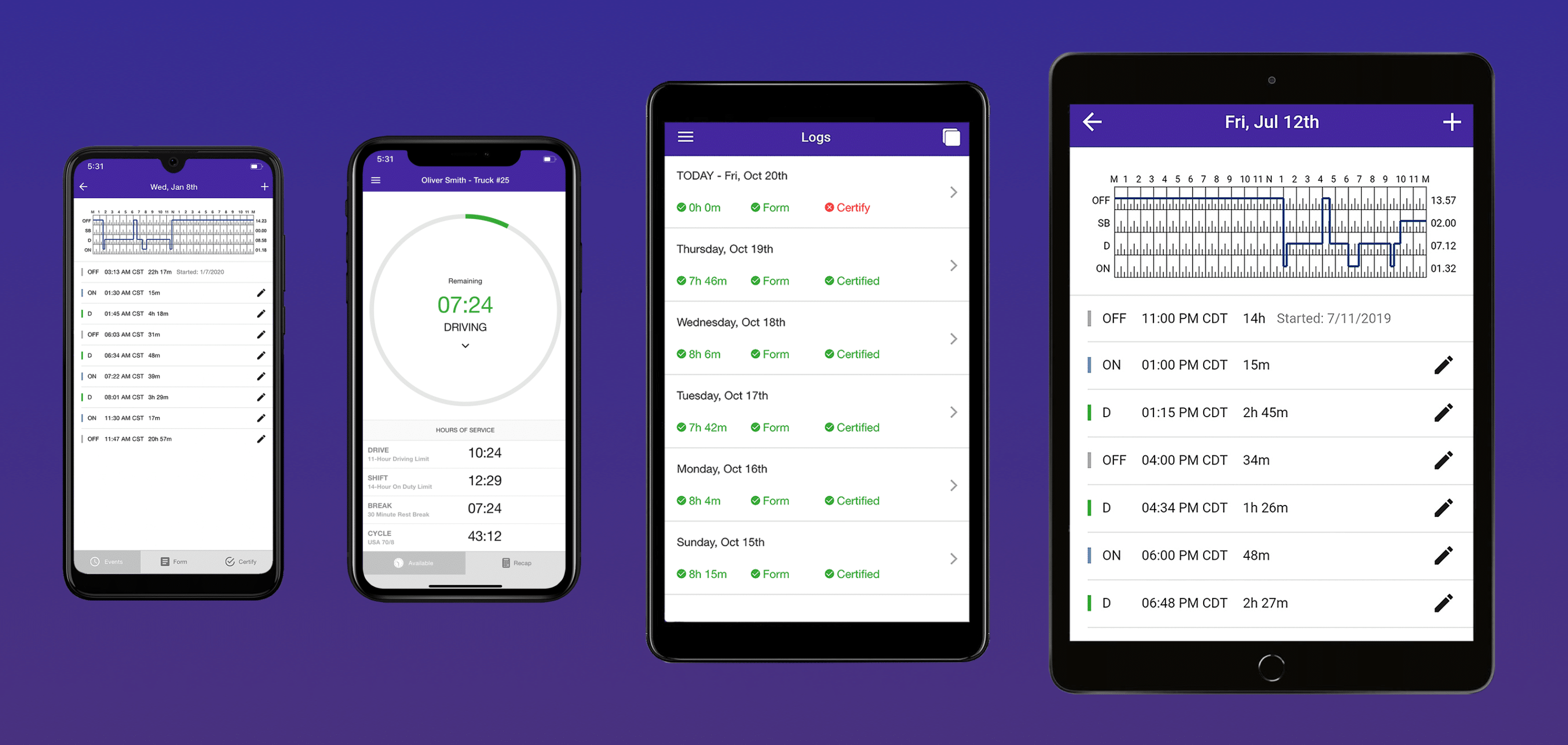
The HOS247 electronic logging system combines an engine-connected gateway, an Android and iOS mobile application, and a web-based fleet manager portal, backed by efficient support. Drivers manage their daily records through the app, while office staff review logs and other operational information through the portal.
Driver-Focused Mobile Application
The HOS247 app allows drivers to manage duty statuses, review logs, add annotations, and complete driver vehicle inspection reports (DVIRs). Keeping these tasks together reduces the need for separate paper forms and makes records easier to access.
Compatibility with supported Android smartphones and tablets, iPhones, and iPads gives carriers flexibility when selecting devices. Fleets can use compatible existing equipment or provide company-owned devices, depending on their operational needs.
Connected Fleet Management
The platform and hardware also support tools that extend beyond daily driver logging:
- GPS fleet tracking. Office staff can check vehicle locations and location history to help coordinate dispatch and respond to questions about a truck’s progress.
- IFTA mileage summaries. Automated International Fuel Tax Agreement (IFTA) mileage calculations organize distances by jurisdiction, reducing manual work when preparing quarterly reports.
- CARB Clean Truck Check. For cross-border fleets with operations in or through California, HOS247 offers a remote system to automate emissions tests. The continuously connected device runs tests while vehicles are stationary and idling and submits the required data electronically to CARB. Testing deadlines, test results and on-demand testing can be managed from the online portal.
Carriers can select a plan with the tools they need, whether that means electronic logging alone or additional tracking and mileage calculations.
Technical Support and Flexible Service Options
Access to support matters when a driver needs help troubleshooting. HOS247 provides technical assistance seven days a week in several languages, including English and Spanish. Representatives can help drivers and fleet managers with setup, logging questions, and troubleshooting.
The system supports common vehicle diagnostic connections, including 6-pin, 9-pin, and OBD-II configurations, with cable options for certain makes and models. Confirming the correct hardware and cable combination before ordering can help avoid installation delays.
HOS247 also offers monthly and annual subscription options without long-term contracts, along with a two-week trial period. This gives carriers an opportunity to evaluate the system with their own vehicles and mobile devices.
A useful trial should include both driver and office tasks. Reviewing logs, locating inspection reports, and contacting support can show whether the platform works well for the entire operation.
Comparing Trucking Logs Software Ratings and Reviews
Choosing trucking log software involves more than comparing features advertised by providers. Reviews from drivers who use the applications regularly can reveal problems with connectivity, log access, navigation, and technical support.
Google Play and the Apple App Store provide useful starting points. Checking both platforms matters because Android and iOS versions can perform differently, especially across operating system updates and device models.
Transport Canada’s Roadside Inspection Requirements for Electronic Logging Systems
A roadside inspection is easier to manage when drivers know where to find their records and understand how to transfer them. Searching through unfamiliar menus or selecting the wrong transfer option can create unnecessary delays.
Under the federal hours-of-service rules, ELD systems must support access to the current day and previous 14 consecutive days of records, the required electronic data transfer methods, and a compliant display or printout. Drivers must also have the required ELD instructions available in the vehicle.
The main inspection requirements include:
- Required inspection records. The ELD must provide the information needed to review the driver’s hours of service, including the daily header, duty status graph grid and detailed log information. On request, drivers must also produce supporting documents for the current trip in their existing format and any permit under which they are driving. An organized inspection screen helps drivers present these records without searching through unrelated functions.
- Electronic data transfer. ELDs must support transfer by email directly to the inspector and may also support USB or Bluetooth. Drivers must follow the inspector’s instructions, use the supported transfer method the inspector requests, and enter the output file comment if the inspector provides one.
- Display or printout access. Drivers must present the required electronic records on the ELD display or as a printout when the inspector requests them. A mobile screen must be readable without requiring the officer to enter the cab. Drivers must also transmit the records electronically if the inspector requests a transfer.
- Malfunction procedures and onboard documentation. Drivers must know how to respond to ELD malfunctions and carriers must ensure each vehicle carries the required information packet. This includes the user manual, data transfer instructions, printed malfunction instructions, and enough blank RODS graph grids for at least 15 days.
An unsuccessful transfer does not necessarily mean that the ELD has malfunctioned. Drivers should follow the provider’s troubleshooting instructions and the applicable federal hours-of-service requirements for ELD malfunctions and data diagnostic events.
Before the first trip, drivers should practice opening the inspection screen, finding the transfer options, and accessing the onboard documentation. Questions about these steps are easier to resolve during training than during a roadside stop.
Keeping Driving Logs Safe When Operating Offline
Travel through rural areas, mountain corridors, or industrial facilities can interrupt cellular coverage. A reliable logging system should continue recording and displaying required information even when an internet connection is unavailable.
Cellular Coverage and Engine Connectivity Are Different
Losing cellular service is not the same as losing the connection between the mobile device and ELD hardware.
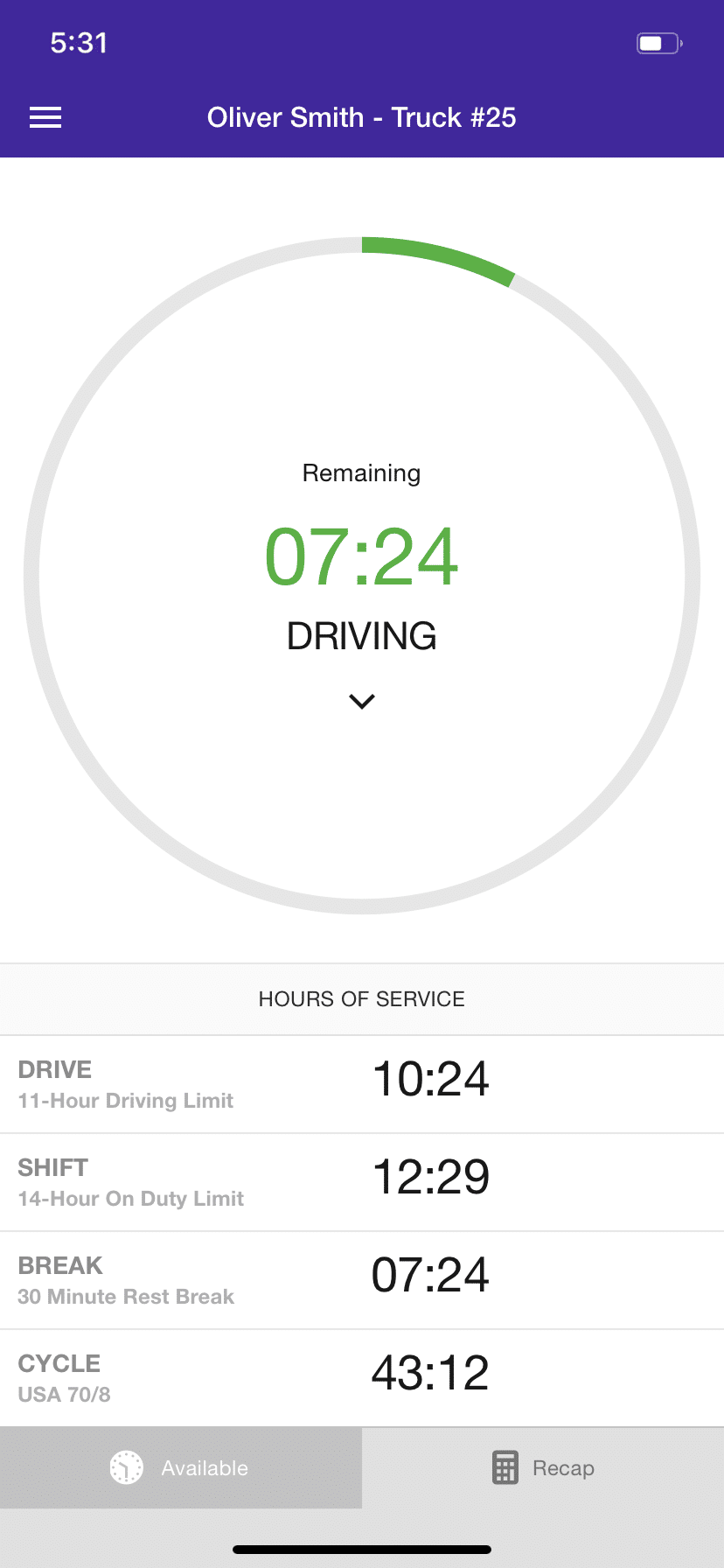
In a Bluetooth-based system, the phone or tablet communicates with the ELD hardware independently of cellular coverage. This allows the local logging system to keep working when internet access is unavailable, provided the required components remain connected and functioning.
A Bluetooth disconnection requires separate attention because it interrupts communication between the mobile application and ELD hardware. Drivers should understand the app’s connection indicators and know when a warning requires troubleshooting. Having a cellular signal does not confirm that the Bluetooth connection is working.
What Remains Available Without Cellular Service?
For an offline-capable system, the main difference is when information becomes available in the fleet portal.
|
System function |
While offline |
After internet access returns |
|
Recording activity |
Driving events and engine data continue to be recorded locally while the required components remain operational. |
Pending records can synchronize with the provider’s cloud system. |
|
Viewing driver logs |
Drivers can review locally stored records, including the current day and previous 14 days. |
Records remain available as synchronization takes place. |
|
Updating the fleet portal |
Managers may see the last synchronized information rather than the driver’s current status. |
Pending records upload, updating the fleet’s administrative view. |
For example, a driver may continue recording a rural delivery while the fleet manager portal displays the last synchronized duty status. This delay does not necessarily mean the driver’s local records are missing.
HOS247 supports offline logging and synchronizes stored data when the mobile device reconnects through cellular service or Wi-Fi.
Local Storage and Long-Term Record Retention
Under the federal hours-of-service rules, motor carriers must retain records of duty status and supporting documents in chronological order for each driver for at least six months after the day they receive them.
Local storage helps keep recent records accessible in the cab, while cloud synchronization allows office personnel to review uploaded information. Carriers must be able to produce retained records and supporting documents when an inspector requests them.
Fleet managers should verify how their provider stores, retrieves, backs up, and exports records, including how information can be recovered if a mobile device is damaged or replaced.
Automated Hours of Service Calculations
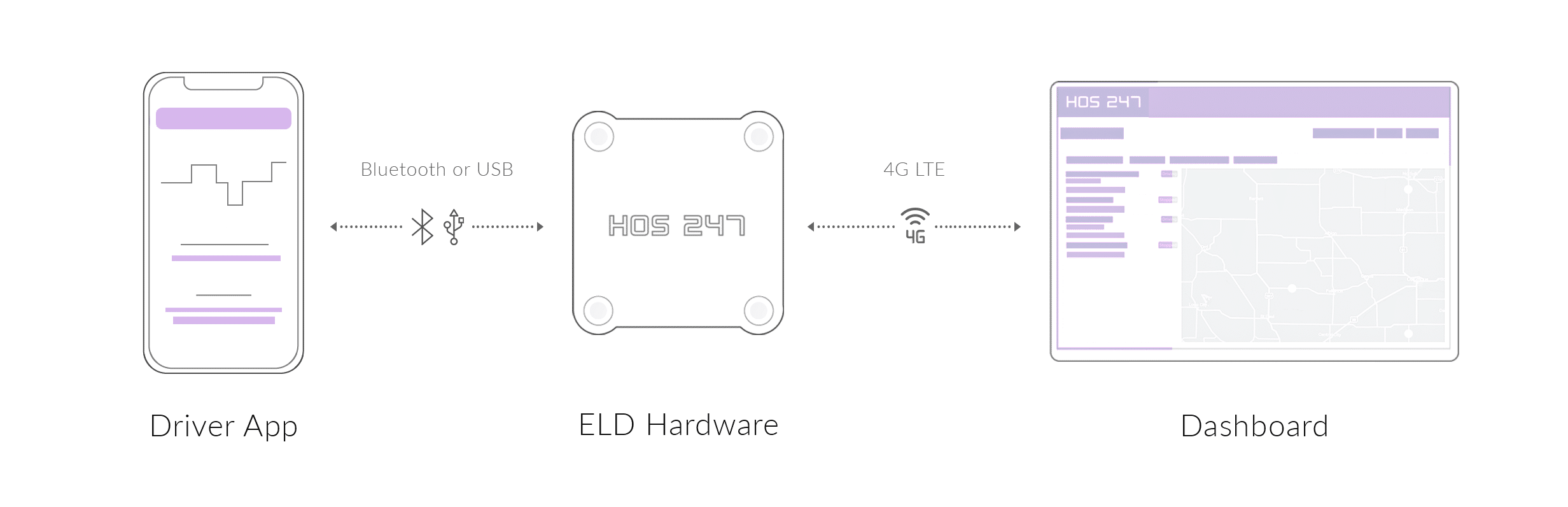
Drivers need to know how a rest break or an unexpected delay affects their remaining hours. A dependable trucking logbook app helps drivers monitor available hours based on recorded activity and applicable federal, provincial, or territorial regulations.
Clear clocks and alerts are useful, but accurate calculations also depend on correct duty status entries and rule settings.
Split-Sleeper Berth Calculations
For solo drivers operating south of latitude 60°N under federal HOS rules, qualifying split-sleeper arrangements include combinations such as 8/2, 7/3, and 5/5.
Each rest period must include at least two consecutive hours in the sleeper berth. Together, the periods must total at least 10 hours. Drivers using this split cannot defer daily off-duty time to the next day.
When properly paired, neither qualifying rest period counts against the 16-hour elapsed-time limit. The 13-hour driving and 14-hour on-duty limits still apply to the work periods immediately before and after each qualifying rest period.
Software supporting split-sleeper calculations can help drivers understand how completed or pending rest periods affect their remaining available hours. Training should also cover how the application displays an incomplete split and the additional rest needed to qualify.
Adverse Driving Conditions
Qualifying adverse driving conditions may allow drivers operating south of latitude 60°N to extend the 13-hour driving limit by the time needed to complete the trip, up to two hours. The exception also allows up to two extra hours of on-duty and elapsed time and a corresponding reduction in the two additional daily off-duty hours. Drivers must still take eight consecutive hours off duty, and the trip must have been possible within the normal limits under normal conditions.
These conditions may include unexpected snow, sleet, fog, or other adverse weather or road conditions that neither the driver nor the dispatching carrier knew about or could reasonably have known about before the driver began driving.
The exception does not apply simply because a delivery is running late or because normal traffic is heavy. Drivers and carriers must determine whether the circumstances meet the federal definition.
Drivers using this exception must annotate their logs to describe the conditions. The app should make that entry straightforward. Selecting the exception in the app does not itself establish eligibility.
Yard Moves and Personal Use
Yard Moves (YM) allow qualifying vehicle movement within a terminal, depot, or port and off public roads to be recorded as on-duty, not driving. Personal use allows qualifying personal use of a commercial vehicle to be recorded as off-duty when the driver is relieved of work responsibilities.
Both special driving categories require carrier authorization and appropriate use.
For personal use to qualify, the vehicle must be unloaded, any trailers must be unhitched, and the trip must be unrelated to the carrier’s business. Personal use is limited to 75 km per day. The driver must record the odometer readings at the start and end of personal use and must be free of any out-of-service declaration under section 91.
Federal, Provincial, and Territorial Rule Settings
Some logging applications support multiple rule sets, including federal and provincial or territorial HOS regulations. Fleet managers should confirm that the software supports the rules needed for their operations.
The applicable rules depend on the nature of the carrier’s operations, not simply the vehicle’s current location. A trip entirely within one province can still fall under federal rules if it is part of a federally regulated carrier’s operations.
Driver training should cover the rules and exceptions the fleet actually uses. Understanding the recorded activity behind an available-hours calculation helps drivers recognize incorrect entries instead of relying on the clock alone.

Choosing Trucking Log Software That Supports Daily Operations
Dependable engine connections, straightforward log corrections, accessible offline records, and clear roadside inspection functions should be priorities when choosing trucking log software.
Carriers should evaluate the complete ELD system rather than comparing mobile applications by price or ratings alone. Hardware compatibility, technical support, fleet manager tools, and the ability to manage additional operational tasks can all affect the value of the service.
HOS247 combines an engine-connected device, an Android and iOS mobile app, a web-based fleet manager portal, and multilingual technical support seven days a week. Its two-week trial gives owner-operators and fleet managers an opportunity to evaluate daily logging, record review, and support with their own vehicles and devices.
Explore HOS247 ELD solutions to compare service options and find a setup that fits the fleet’s operating needs.

As an expert in B2B and B2C sales, I’ve dedicated myself to perfecting sales processes and client retention strategies in the logistics and trucking industry. I have significantly contributed to the expansion of the ELD service, catering to retail and wholesale clients in need of HOS247 ELD solutions. My unwavering commitment to implementing state-of-the-art sales techniques and technologies ensures the continuous growth and success of businesses I work with.








When it comes to electronic logging devices, selecting the right provider can significantly impact your business’s efficiency and compliance. If your current provider falls short in areas such as customer support, user experience, or overall reliability, switching to a better
The federal mandate for electronic logging devices for trucks will soon be in full force. This new requirement came into effect on June 12, 2021. A one-year progressive enforcement period began on that date and was extended for six more
Since Transport Canada’s electronic logging device (ELD) mandate took effect, many local drivers have found themselves navigating a system designed primarily with long-haul operations in mind. Created to enforce hours of service (HOS) rules more accurately, the mandate requires most