
Are Elog Apps FMCSA-Compliant?
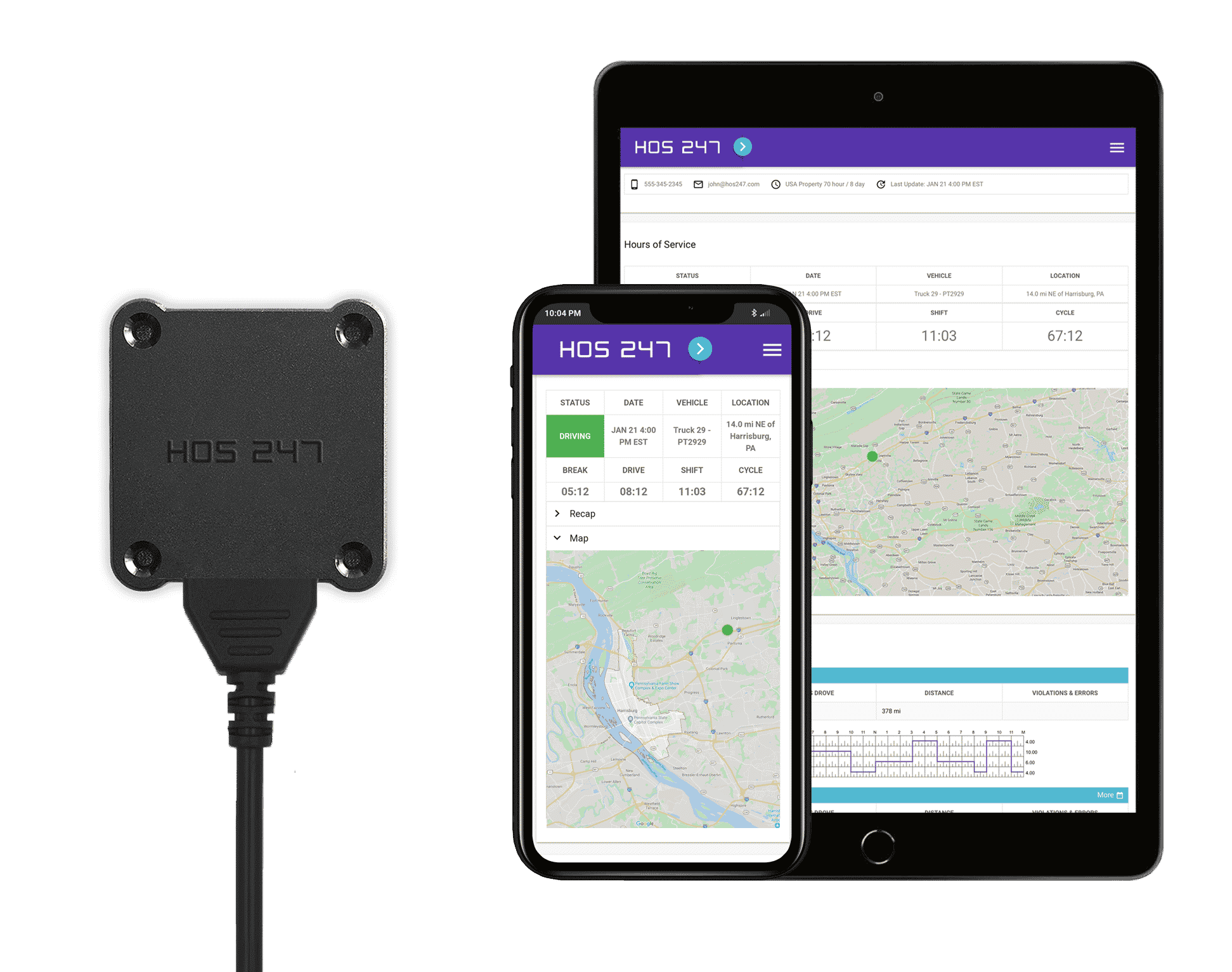
The FMCSA states that an electronic logbook is a device physically connected to the vehicle’s engine. Once connected, it should record HOS information and records of duty status. The device records the information, while the ELD logbook app serves as a tool for drivers, fleet managers, and roadside inspectors to access the gathered information.
Since the hours of service app is simply installed on the driver’s phone or tablet, it is not FMCSA-compliant by itself. However, it becomes compliant when synced with the elog system and paired with the hardware of a registered electronic logging device.
This legal requirement forms the basis of the Bring Your Own Device (BYOD) standard under FMCSA rules. Commercial fleets are permitted to use their existing smartphones or tablets to manage logs, provided the mobile software connects directly to the engine hardware. The mobile application functions only as the visual interface for the driver, while the underlying hardware engine connection continuously records the actual telemetry data, such as engine hours and miles driven. This ensures that carriers can use familiar mobile hardware without sacrificing legal compliance.
Choosing the Right ELD App for Your Trucking Operation
When selecting an ELD solution, the quality of the accompanying app is crucial. A well-designed app can significantly improve driver experience and compliance. Here are key factors to consider:
- User interface. The app should be intuitive and easy to navigate, even for drivers who aren’t tech-savvy.
- Proven reliability. Look for apps backed by consistent user reviews regarding multi-year stability and minimal long-term performance bugs.
- Feature set. Beyond basic HOS logging, consider apps that offer additional features to fit your fleet’s needs.
- Regular updates. Choose a provider that frequently updates their app to address bugs and adapt to regulatory changes.
- Cross-platform compatibility. Ensure the app works well on both iOS and Android devices to accommodate all drivers’ preferences.
- Training resources. Look for providers that offer comprehensive training materials or videos to help drivers master the app quickly.
Beyond these standard requirements, there are crucial driver-centric capabilities that are necessary for smooth daily operations on the road:
- Immediate Bluetooth synchronization. The mobile software must quickly and reliably establish a stable local connection with the engine hardware. Drivers should not have to deal with manual pairing hassles or dropped connections every time they cycle the vehicle’s ignition.
- Font legibility and visual layout. Clear, large typefaces and a high-contrast duty status wheel are essential. Drivers need to be able to easily read their remaining hours and tap the correct buttons while sitting in a stationary cab, regardless of changing glare or low-light conditions.
- Simple log management. The process for managing logs must be straightforward. Drivers require an interface where they can easily add required remarks, change duty status, or correct a non-driving entry directly on the screen without navigating through multiple confusing menus.
By carefully evaluating these factors, you can select an ELD solution with an app that enhances your operations. When an app minimizes technical frustration and simplifies daily administrative adjustments, compliance becomes a natural part of the driver’s routine. Prioritizing usability on the road protects your operation from expensive compliance errors and keeps your trucks moving efficiently.
Mastering the DOT Roadside Inspection Mode
When an enforcement officer stops a commercial vehicle for a roadside inspection, the driver must be able to present their hours of service records quickly and confidently. A high-quality logging app includes a dedicated inspection mode that simplifies this process, ensuring that the driver can fulfill the officer’s request without administrative friction or unneeded delays.
Inspection Mode Efficiency
When an officer requests log verification, the driver opens the app and enters the secure inspection mode with a single tap. The app guides the driver through a clear, step-by-step process to display or transfer the logs. This specialized mode changes the visual interface so the officer can quickly review the current status and the previous seven days of records without needing to navigate through the driver’s personal settings or unrelated fleet data.
Data Transfer Security
Security and driver privacy are critical during a roadside check. When the inspection mode is active, the mobile interface automatically restricts access to the rest of the application, keeping personal and fleet information private. The app then compiles the required eight days of RODS and transmits them directly to the FMCSA’s database using secure federal transfer methods, such as web services or encrypted email. This direct electronic transfer ensures compliance with DOT safety protocols while keeping the inspection fast and secure.
An intuitive inspection interface takes the stress out of roadside checks for both drivers and enforcement personnel. By providing a clear path to display and transmit regulatory records, the software prevents the roadside delays that can disrupt tight delivery schedules. Investing in a system with a straightforward inspection workflow helps maintain a clean compliance record and keeps your trucks moving safely.

Managing Offline Functionality and Data Synchronization
Commercial motor vehicles frequently travel through remote regions, deep valleys, and rural corridors where cellular network coverage is weak or completely unavailable. A professional electronic logging application must be engineered to handle these connectivity drops without interrupting the driver’s log accuracy or violating federal recordkeeping standards.
Storage And Forward Technology
When a truck enters a cellular dead zone, the mobile application relies on built-in storage and forward technology to maintain compliance. Instead of throwing an error or dropping the connection, the application continues to collect engine data and changes in duty status locally. The hardware gateway remains physically connected to the truck’s diagnostic port, safely storing vehicle telemetry, engine hours, and mileage records directly on the local storage buffer of the device.
Automated Re-Syncing Protocols
The moment the commercial vehicle re-enters an area with cellular network coverage, the system activates automated re-syncing protocols. The hardware gateway instantly transmits the cached engine data back to the cloud, while the mobile logbook screen automatically populates with the correct, up-to-date hours of service records. This automated process requires zero manual data entry from the operator, ensuring that the fleet manager’s portal and the driver’s application match perfectly without lag.
Reliable offline management eliminates the risk of missing data gaps that often trigger critical violations during DOT reviews. By ensuring that engine telemetry is captured locally and uploaded automatically, the system guarantees continuous data integrity regardless of cell tower proximity. This seamless synchronization allows drivers to focus entirely on navigating demanding routes without worrying about their cellular signal strength.

Should Truckers Choose Android or iOS Apps to Run ELD Software?
Whether CMV drivers should choose an Android or iOS ELD app is a common question. However, it’s important to note that the online logbook app itself doesn’t have to be compliant. It’s the actual elog solution that drivers should be more concerned with. If the device connected to the vehicle isn’t compliant, neither the Android nor iOS app displaying its data will be useful.
Overall, whether Android or iOS is “better” depends on driver preference. That’s why HOS247 offers both Android and iOS apps, demonstrating our commitment to driver satisfaction. There’s no reason a driver should have to purchase a new smartphone or tablet and learn a new operating system if their current device works fine. Any reputable electronic logbook provider should offer apps for both operating systems with driver convenience in mind.
What truly matters is that drivers encounter the exact same screen layouts, responsive processing speeds, and data entry workflows across both operating systems. This parity means that safety supervisors can design uniform training materials, and team drivers can seamlessly swap mobile devices without having to learn a different visual interface.
Allowing your team to use their preferred operating system removes a significant friction point during technology deployment. When the software performs reliably on both platforms, you eliminate the overhead costs of purchasing company-dedicated hardware for every truck. By focusing on cross-platform stability, your operation gains the flexibility to scale its fleet utilizing the smartphones and tablets your drivers already know and trust.
About HOS Rules
Drivers who are subject to HOS regulations are required to limit the amount of time they spend driving or on duty. According to the FMCSA, the HOS rules apply to most CMV operators involved in interstate commerce and driving a vehicle that fits any of the following descriptions:
- Has a gross vehicle weight rating (GVWR) or a gross combination weight rating (GCWR) of 10,001 pounds or more.
- Is used to transport 16 or more passengers (including the driver) without driver compensation.
- Is used to transport nine or more passengers (including the driver) with driver compensation.
- Is transporting hazardous materials in a quantity that requires the use of placards.
Even if a driver is not required by law to follow the HOS rules, they should still consider using them as a guide to keep themselves and other drivers safe on the road. Using a registered ELD can help significantly while also boosting productivity.
Why Are HOS Rules Enforced?
Driver fatigue has been a significant problem since highways were created and commerce relied on drivers to transport goods across the country. When drivers spent hours behind the wheel without breaks, it led to fatigue, which caused a high number of accidents. The federal government is obliged to keep roads safe for travel, and HOS rules are part of its efforts to achieve this goal.
Commercial truck drivers have been maintaining Records of Duty Status (RODS) as part of HOS requirements since 1937. The rules have been revised throughout the years to keep up with new technology and to better address driver safety.
Who Enforces HOS Rules?
While the FMCSA creates HOS rules, it is the states’ departments of transportation that enforce them. This is typically done at weigh stations and when drivers are pulled over for inspections. The FMCSA also conducts a Compliance, Safety and Accountability (CSA) program used to monitor CMV operators’ compliance with highway safety regulations. If a driver has any HOS violations, it negatively affects their CSA score.
HOS violations are considered a serious danger to public safety by the FMCSA. As such, the agency may enforce corrective measures and even penalize the driver and their carrier. Such corrective measures can include a written warning, an official investigation, a fine, or even loss of their commercial driving certification.
Compliance Safety Accountability Impact
Modern logging software directly protects carrier safety ratings by eliminating form and manner errors. In the past, simple mistakes like missing dates, incorrect carrier names, or unpushed logs dragged down carrier scores during audits. An optimized elog app automates these background fields, leaving no room for clerical errors. By maintaining clean, violation-free records, carriers can keep their CSA scores low, reducing the likelihood of targeted DOT roadside interventions and ensuring access to premium freight contracts.
Staying compliant with hours of service rules requires a system that removes the potential for human error. Because the enforcement landscape directly impacts your business reputation and insurance premiums, tracking your records electronically is the most reliable defense against costly fines. Implementing an approved logging platform ensures that both your drivers and your safety managers remain aligned with DOT expectations at every milestone.
ELD Logbook Apps Must Support the Updated Version of the HOS Rules
Elog providers need to constantly stay informed about changing regulations. If a device purchased five years ago hasn’t been updated, drivers could very well be facing noncompliance and being put out of service.
HOS247 has been providing reliable electronic logging devices and an online logbook app since before the elog mandate was officially passed. We have also kept up with changing regulations so drivers and fleet managers aren’t caught off guard. Part of that has been ensuring HOS247 Android and iOS apps support the most recent version of the HOS rules.
Before defining the most current HOS rules, it’s important to understand what “hours of service” means to the FMCSA. In short, HOS rules specify the maximum amount of time drivers are permitted to be on duty. Ultimately, these rules are intended to increase driver safety by ensuring they take sufficient rest periods, which in turn helps them stay more alert when driving.
The FMCSA published updated HOS rules on June 1, 2020, revising four provisions of the HOS regulations. The goal was to provide more flexibility for drivers without sacrificing safety. Motor carriers and CMV drivers were required to start complying with the current HOS rule starting September 29, 2020.
The four provisions that changed include:
- The short-haul exception. The new HOS rules expand the short-haul exception to a distance of 150 air miles and shifts of 14 consecutive hours, up from 100 air miles and 12 consecutive hours.
- Adverse driving conditions exception. Drivers can now extend both their on-duty and driving limits by two hours when encountering unexpected delays due to traffic or adverse weather.
- 30-minute break requirement. Drivers can now take their break within their first eight hours of driving time, rather than on-duty time. They can also allow a 30-minute period of on-duty time to qualify as the break, provided they weren’t driving during that time.
- Sleeper berth provision. Drivers can now meet their 10-hour off-duty requirement by spending at least seven hours of that period in the berth, with a minimum off-duty period of at least two hours spent inside or outside the berth. As long as they total 10 hours, neither period counts against their 14-hour driving window.
Continuous Regulatory Updating
As the regulatory landscape evolves, cloud-managed software architecture has become a necessity. Automated cloud updates ensure the mobile application instantly reflects new FMCSA interpretations, regional exemptions, or state-specific rulesets without forcing the carrier to manually update or replace hardware. This seamless, real-time update capability ensures your operations remain compliant with current enforcement interpretations, protecting drivers from unexpected violations due to outdated logging parameters.
Relying on a system that updates automatically protects your fleet from falling behind changing DOT standards. When software adjusts to new regulatory adjustments behind the scenes, dispatchers and drivers can operate with confidence. This adaptive technology keeps your operation legally sound and removes the burden of tracking legislative revisions manually.
The Impact of ELDs on Fleet Management
The adoption of ELDs has revolutionized fleet management in several ways:
- Improved compliance. ELDs have significantly reduced HOS violations, leading to better CSA scores for carriers.
- Enhanced productivity. Automated logging saves drivers time, allowing them to focus more on driving and less on paperwork.
- Real-time visibility. Fleet managers can access up-to-date information on driver status and vehicle location, enabling better decision-making.
- Reduced operational costs. ELDs can help identify inefficiencies and fuel usage, leading to cost savings.
- Improved driver safety. By ensuring compliance with HOS rules, ELDs help combat driver fatigue and reduce accident risks.
- Easier audits. Electronic records simplify the process of DOT audits, saving time and resources for carriers.
- Data-driven insights. The wealth of data collected by ELDs can be analyzed to optimize operations and improve overall fleet performance.
Back-Office Administrative Relief
Beyond the benefits on the road, automated data collection eliminates hours of manual data entry for safety supervisors and dispatchers. Instead of sorting through stacks of paper logs, auditing for errors, and manually cross-referencing toll receipts or fuel tickets, back-office teams receive automatically compiled, clean digital records. This centralized data flow dramatically speeds up payroll processing, simplifies record retention, and allows fleet administrators to focus on driver safety coaching rather than tedious paperwork. As the industry continues to evolve, the role of ELDs in fleet management is likely to expand, offering even more benefits to carriers who leverage this technology effectively.
The Importance of Technology in HOS Compliance
As technology advances, complying with HOS regulations and the elog mandate becomes increasingly straightforward. Given the accessibility and benefits of modern ELD solutions, using apps for accurate HOS recordkeeping is highly recommended. Implementing a top-rated hours of service ELD app promotes compliance, enhances safety, boosts productivity, and contributes to more profitable trucking operations.

Common Challenges in ELD Implementation and How to Overcome Them
While ELDs offer numerous benefits, their implementation can present challenges. Here are some common issues and strategies to address them:
- Driver resistance. Some drivers may be hesitant to use ELD technology. Overcome this by providing comprehensive training and emphasizing the benefits of elogs, such as reduced paperwork and fewer HOS violations.
- Technical issues. Like any technology, ELDs can experience glitches. Choose a provider with reliable customer support and have a clear protocol for drivers to follow in case of technical failures.
- Data management. The influx of data from ELDs can be overwhelming. Invest in good data analysis tools and train your staff to interpret and act on the insights gained.
- Integration with existing systems. ELDs may need to work alongside other fleet management software. Ensure compatibility before purchasing, or consider a comprehensive solution that includes all necessary features.
- Compliance complexity. HOS rules can be complex, and ELDs must accurately reflect all exceptions and special cases. Choose an ELD provider that regularly updates their systems to reflect the latest regulations.
- Cost concerns. While ELDs represent an investment, focus on the long-term savings in terms of improved efficiency and reduced violations. Many providers offer flexible pricing models to suit different fleet sizes and budgets.
By anticipating these challenges and planning accordingly, fleets can smooth the transition to ELDs and maximize the benefits of this technology.

Installing Your HOS247 ELD: A Simple, Three-Step Process
Implementing an ELD should be straightforward and efficient. HOS247 offers a user-friendly installation process that can be completed in just three steps. Here’s how to get your HOS247 ELD up and running:
Step 1: Set Up the Web Portal
- Access the HOS247 portal at portal.hos247.com using your provided credentials.
- Navigate to the “Manage” section to input or update company details, vehicle information, portal users, and driver data. Note: Ensure unique login credentials for portal users and drivers, even if they’re the same individual.
Step 2: Install the ELD Hardware
- Connect the nine-pin ELD to the vehicle’s diagnostic port before starting the engine or launching the HOS247 app. Use adapters if necessary.
- Wait for the LED to flash green slowly, indicating power. A flashing red LED shows GPS acquisition; solid red means signal lock.
- Start the vehicle engine.
- Look for a rapid LED flash, signaling detected vehicle activity.
- Once the LED turns solid green, you’re ready to use the HOS247 app.
Step 3: Set Up the HOS247 ELD App
- Download the HOS247 ELD Logbook app from your device’s app store.
- Ensure Bluetooth is enabled on your device. (No manual pairing required)
- Log in using your web portal credentials.
- Choose a vehicle from your portal-created list.
- Enter the ELD’s MAC address (found on the device).
- Confirm the Bluetooth indicator appears in the app’s top right corner.
By following these steps, you’ll have your HOS247 ELD system operational quickly and efficiently. This streamlined process exemplifies HOS247’s commitment to user-friendly solutions that enhance compliance and productivity in your fleet operations.
Addressing these common technical and regulatory questions helps clarify how modern logging systems handle real-world challenges on the road. By understanding how your app manages offline storage, hardware issues, and team driving, your fleet can avoid confusion during roadside checks and daily operations. Clear knowledge of your equipment ensures a smoother compliance process for both drivers and back-office staff.

More Than Compliance: The Power of the Right ELD App
Selecting the right ELD app is crucial for both compliance and operational efficiency. As we’ve explored, solutions like HOS247 offer user-friendly interfaces, reliable performance, and excellent customer support — key factors in choosing an ELD system. By understanding HOS rules, leveraging modern technology, and addressing implementation challenges, fleet managers can not only meet regulatory requirements but also optimize their operations.
The right ELD solution does more than just track hours of service; it enhances safety, improves productivity, and contributes to a more profitable business. As technology continues to advance, staying informed and adaptable will be key to success in the commercial trucking sector. Ultimately, investing in a quality electronic logbook is an investment in your fleet’s future, ensuring you remain compliant, competitive, and efficient in an increasingly digital landscape.

I’ve co-founded, built and managed several transportation-related businesses. Now, I’m a founder and CEO of HOS247 – an AI Transportation Platform for trucking companies, freight brokers and other logistics operations. We are transitioning old-style operations to technology-advanced logistics entities and help them to grow their businesses. ELDs (electronic logging devices), fleet tracking and management 2.0 combined with AI-powered dispatch tools.









In today’s highly regulated trucking industry, fleet managers and drivers face numerous challenges in ensuring compliance with the Federal Motor Carrier Safety Administration (FMCSA) regulations, particularly the Electronic Logging Device (ELD) Mandate. To streamline compliance and make the transition to
A truck daily log book is used to record duty statuses of commercial drivers to ensure compliance with hours of service rules and regulations. There are two types of logbooks: Paper logs. The driver must fill them out manually and
In the world of trucking, where compliance with rules and regulations is necessary for efficient and productive operations, having a dependable commercial truck log book is crucial. Drivers’ logs, originally kept on paper, are used by authorities to verify hours