

Characteristics of a Quality ELD
Acknowledging the importance of finding the best electronic logging system for your business is the first step toward making the right choice. The second step is knowing what characteristics to look for. Consider factors other than price; make sure your device and the ELD app for iPhone work for you instead of against you before making an investment.

Here are some essential qualities to look for:
- Easy to install. Choosing a device that involves a complicated and time-consuming installation process takes up valuable time and could even entail extra fees. Installation should be seamless. A plug-and-play solution like HOS247’s takes minutes to install, and anyone can do it.
- Works for any class of vehicle. Having a device that only works for limited types of vehicles can be inconvenient. For example, carriers with multiple classes of vehicles would need to install different hardware from different providers, making operations that much more complicated. Also, if a driver were to alternate between vehicle classes, they would have to learn how to use different apps. Choosing an electronic logging system that works with all types of vehicles makes things easier for the entire team.
- Compatibility with drivers’ devices. HOS247 offers customers versions of the ELD logbook app for iPhone and Android that run smoothly on both systems, allowing drivers to use their preferred device.
- Ease of use. Ease of use is more than a benefit, it is also a way to help achieve compliance. If the logbook has a confusing interface, drivers may not use it properly. A driver shouldn’t have to waste time trying to deal with complicated technology while on the road. Time is money for trucking businesses, and an iPhone logbook that makes it difficult for drivers to update their status and produce their HOS reports in case of inspections is inefficient. It frustrates drivers, and it can result in fines or even being put out of service. Consider a driver’s daily log app for iPhone that users recommend.
- Software updates. Compliance requirements for elogs and HOS rules might change. Providers must be knowledgeable of regulations and stay on top of updates so they can be programmed into the software. Electronic logbooks should be responsive and adaptable to such changes so fleets remain compliant as regulations change.
- Available upgrades. The needs of a growing fleet change and being stuck with a logbook that doesn’t accommodate such growth can be a roadblock. If a carrier is interested in added features such as GPS tracking or IFTA calculations, it would be unfortunate to be locked into a contract that does not allow them to scale up their plan (or even scale it down). Providers should adjust to the needs of carriers and provide flexibility to help them operate at their best.
- Affordability. Although it shouldn’t be the only thing to consider, the cost of an elog solution can tell you a lot about it. Some providers try to sell an expensive solution that requires professional installation for each vehicle. Others sell cheap devices that seem like an attractive bargain until hidden fees show up on the bill. When considering the affordability of a logbook, it’s important to ask about the pricing structure. Also, keep in mind that bring your own device (BYOD) solutions are more affordable. Drivers can simply download the iPhone app car log book instead of carriers having to pay for dedicated tablets of the provider’s brand.
Evaluating these essential qualities ensures motor carriers deploy a dependable electronic logging system that keeps records accurate, satisfies enforcement officers, and simplifies daily driver workflows.

Can ELD App Records Be Edited?
The information captured by the logbook app for iPhone can be edited under certain conditions and by authorized individuals. Driving time can never be changed to non-driving time. However, if information is missing from the log or if there is a mistake, the driver or authorized staff can edit the record under specific guidelines. The FMCSA’s conditions for editing and annotating elog records are as follows:
- An annotation must always be added to the edit, describing the reason for it. It is important to know that legislation defines annotation as a note added to the record, while edit is a change that does not overwrite the original record.
- The driver must review the edit for accuracy, which is essential when an authorized person other than the driver is making the edit.
- The driver must resubmit the log after authorizing any edits.
- Both the driver and carrier are responsible for maintaining the original record as well as the edit. Motor carriers are required to provide drivers access to records for six months from the date of the edit should the driver request it.
The Data Preservation Mechanics
Behind the mobile interface, the system maintains compliance through an append-only data architecture. When an authorized user submits an edit, the software does not overwrite or delete the original record. Instead, the application appends a certified amendment layer to the original log file. This process preserves the complete digital audit trail, ensuring compliance during state enforcement reviews and carrier audits.
Managing iOS System Stability During Long Shifts
Operating an electronic logbook application continuously on an iPhone requires maintaining background application stability, managing device battery consumption, and protecting hardware performance during extended driving shifts.
Background Data Preservation
Commercial drivers frequently toggle between their logbook app, navigation maps, and dispatch messaging tools. Modern logging software uses background data processing protocols to maintain an active Bluetooth connection with the engine diagnostic gateway, ensuring duty status updates continue seamlessly even when the app screen is minimized.
Device Temperature Calibration
Mounting a smartphone on a vehicle windshield exposes the hardware to direct sunlight and elevated cab temperatures during long daytime routes. Optimized software architecture reduces CPU processor strain and battery heat output, preventing the iPhone from overheating or entering automated thermal shutdown modes while on the road.
Configuring specific background app permissions prevents accidental connection drops in remote areas, keeping compliance data current through every mile of the trip.
Best Practices for Drivers Daily Log App iPhone Users
While having a reliable and user-friendly ELD app is crucial, it’s equally important for drivers to follow best practices when using the app to ensure accurate logging and maintain compliance. Here are some essential tips to keep in mind:
- Stay up-to-date with app updates. Quality providers like HOS247 regularly release software updates to enhance functionality, improve user experience, and ensure compliance with the latest regulations. Make sure to keep your truck driver log book app for iPhone updated to the latest version. Many apps offer automatic update notifications, so you don’t have to manually check for new releases.
- Annotate and edit records properly. As previously discussed, while driving time can never be edited to non-driving time, the FMCSA allows drivers to annotate and edit certain aspects of their ELD records under specific conditions. Always provide a detailed annotation explaining the reason for any edits, review the changes for accuracy, and resubmit the log after making authorized edits.
- Utilize off-duty and sleeper berth statuses. To avoid potential violations, it’s crucial to accurately log your off-duty and sleeper berth statuses. Ensure that you switch to the appropriate status when taking breaks or resting in the sleeper berth. This helps you comply with HOS regulations and prevent potential fines or penalties.
- Review logs regularly. Make it a habit to review your logs regularly to identify and correct any potential errors or discrepancies. This proactive approach can help you avoid costly violations and ensure that your records are accurate and up-to-date.
- Manage unassigned driving time. Logging apps may sometimes record driving time that cannot be assigned to a specific driver. Regularly check for and correctly assign this unassigned driving time to avoid inaccuracies in your records and maintain compliance.
- Leverage additional app features. Many elog apps offer additional features beyond basic logging, such as GPS tracking, vehicle diagnostics, and idle time monitoring. Familiarize yourself with these features and utilize them to enhance your efficiency, productivity, and overall fleet management.
- Maintain supporting documents. In addition to ELD records, drivers are required to keep supporting documents for each 24-hour period, such as bills of lading, fuel receipts, and trip reports. Ensure that you maintain these documents and have them readily available during inspections or audits.
- Seek training and support. If you’re new to using an logbook app or encounter any challenges, don’t hesitate to seek training and support from your provider or fleet management team. Many providers offer comprehensive training resources, including user guides, video tutorials, and dedicated support channels to ensure you get the most out of their app.
By following these best practices and leveraging the full capabilities of your ELD app, you can streamline your logging process, maintain compliance with HOS regulations, and contribute to the overall efficiency and safety of your fleet operations.

Benefits of HOS247 Iphone Logbook App
Besides having a top-rated ELD app for iPhone, HOS247 offers many other benefits to carriers, fleet managers, drivers, and owner-operators. These include:
- Top-rated technical support. Our customer support team is not only easy to reach but also multilingual, offering assistance in English, Spanish, Polish, and Russian. We are dedicated to providing support seven days a week, ensuring that help is always just a call or message away. This comprehensive support system is ideal for addressing urgent issues quickly and efficiently, enhancing overall operational continuity.
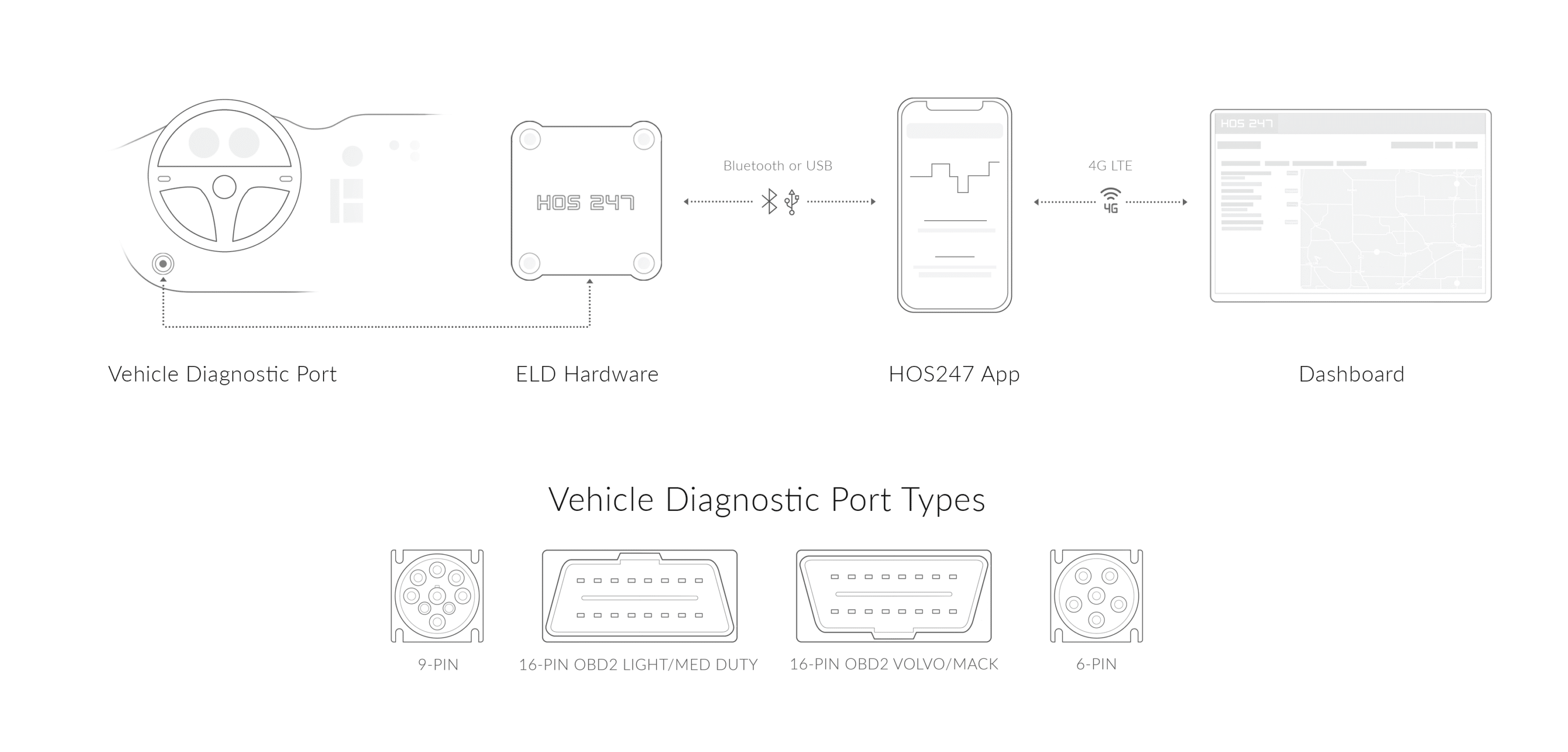
- Quality hardware. We provide durable and easy-to-install hardware that seamlessly connects with the ELD app via a stable Bluetooth connection. This reliability minimizes connectivity issues and ensures accurate data logging and reporting, crucial for compliance and monitoring.
- Flexible plans with no contract. At HOS247, flexibility is key. Our plans are designed to be as adaptable as your business needs. You can easily add or remove features such as IFTA mileage calculations, GPS tracking, vehicle diagnostics, and more. This flexibility allows you to scale services to fit your operations without being locked into a long-term contract, providing financial and operational flexibility.
- Two-week trial. We offer a two-week trial period that allows you to thoroughly test our system. This trial is designed to let you explore the features and benefits of our ELD solution with no risk. If the system does not meet your expectations, you can return the device for a full, hassle-free refund. This policy underscores our confidence in the quality and reliability of our products.
- Fleet management portal. HOS247 enhances fleet operations with comprehensive tools for full fleet visibility. Our system includes features for idling reporting and maintenance scheduling, which help reduce costs and improve vehicle lifespan. Additionally, easier dispatch and streamlined operations contribute to increased efficiency and profitability. These tools provide tangible benefits in terms of time savings and cost reduction, ultimately leading to improved bottom lines for our customers.
These benefits collectively make HOS247 not just a provider of compliance tools but a versatile partner in fleet management, capable of adapting to the diverse needs of modern transport operations to help them increase productivity and profitability.

Beyond Logging: Advanced Features of the Best Vehicle Log Book App for iPhone
While compliance and safety are top priorities when choosing an ELD solution, modern trucking operations often require additional capabilities to streamline processes, enhance efficiency, and gain a competitive edge. Here are some key features that can elevate your fleet operations:
- IFTA mileage calculations. Accurate mileage tracking is essential for complying with the International Fuel Tax Agreement (IFTA) and supporting proper fuel tax reporting. The HOS247 ELD app for iPhone can log the distance traveled by jurisdiction.
- Idle time monitoring. Excessive idling can significantly impact a fleet’s bottom line, wasting thousands of dollars per vehicle annually in fuel costs and contributing to environmental pollution. The HOS247 logbook app for iPhone includes idle time monitoring capabilities, helping drivers and fleet managers identify and address excessive idling patterns. This feature empowers carriers to implement idle reduction strategies, promote eco-friendly practices, and realize substantial cost savings.
- GPS fleet tracking. Tracking vehicles provides carriers with a bird’s eye view of their operations. This enables them to see driver HOS availability, type of vehicles available, proximity to loading sites, and more all on one map. It also allows customer service teams to inform customers of accurate delivery times. Additionally, GPS tracking allows fleet managers to analyze past trips to see how they can improve routes and increase efficiency.
- CARB Clean Truck Check (CTC) remote testing. Complying with California Air Resources Board (CARB) emissions regulations requires heavy-duty commercial vehicles over 14,000 lbs to pass periodic emissions checks. The HOS247 logging platform pairs with CARB-certified hardware to perform remote CTC emissions testing directly through the engine diagnostic port while the truck remains in operation. Automating testing schedules and transmitting results electronically to the state’s portal eliminates shop visits, driver downtime, and registration holds.
While the needs of one trucking operation will be different from the next, these basic features are commonly praised by HOS247 users. Reading reviews from actual HOS247 ELD app for iPhone users and comparing them to other providers’ can help carriers make an informed decision on the best vehicle log book app for iPhone available.
Roadside Checkpoint Protocols and Secure Data Transfer
During a roadside safety inspection, commercial drivers must present their Hours of Service records to law enforcement quickly and securely using their mobile screen.
Initiating Roadside Inspection Mode
Drivers follow a simple operational sequence inside the app menu to activate DOT inspection mode. This action locks the smartphone screen into a compliance-only viewer, preventing inspection officers from accessing personal files, text messages, or external applications while reviewing mandatory log graph grids.
Transmitting eRODS Files
When requested by an inspector, the mobile application packages the active 24-hour log sheet alongside records for the previous seven consecutive days. The system transmits these encrypted electronic records directly to the federal database using wireless web services or secure email transfer.
Immediate entry into inspection mode shortens roadside delays, allowing vehicles to return to active transit routes quickly and avoid unnecessary downtime at checkpoints.

Frequently Asked Questions About iPhone Logbook Apps

I’ve co-founded, built and managed several transportation-related businesses. Now, I’m a founder and CEO of HOS247 – an AI Transportation Platform for trucking companies, freight brokers and other logistics operations. We are transitioning old-style operations to technology-advanced logistics entities and help them to grow their businesses. ELDs (electronic logging devices), fleet tracking and management 2.0 combined with AI-powered dispatch tools.









Motor carriers must understand and correctly apply DOT ELD exemptions to keep operations efficient and compliant. The Federal Motor Carrier Safety Administration (FMCSA) mandates electronic logging devices for most commercial operations across the country. However, federal rules allow exceptions based

The trucking industry has undergone a significant transformation due to technology. Today, GPS asset tracking systems have become an integral part of modern fleet management, offering unprecedented visibility and control over valuable resources. GPS fleet tracking systems leverage satellite technology

Trucking companies need to find solid solutions that help them to stay within their Hours of Service regulations. Making mistakes about this one crucial aspect of their company can be quite costly when DOT audits come around. Not only do