
Why You Can’t Just “Download” Compliance
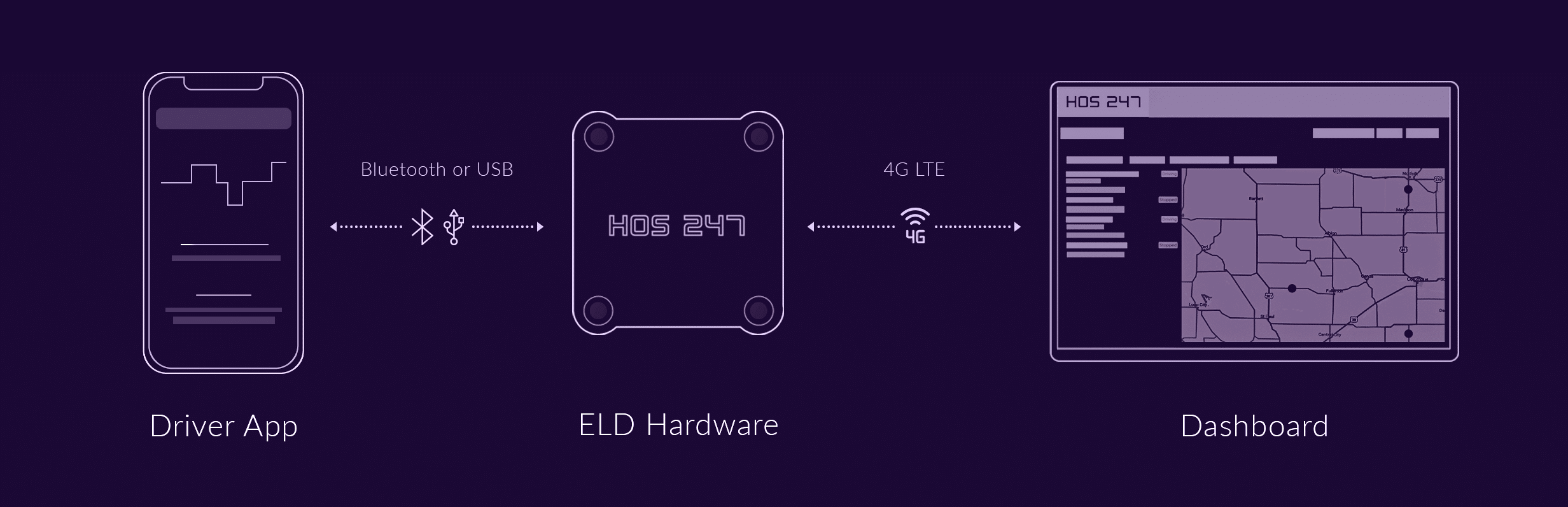
Many drivers mistakenly treat their electronic logbook like a standard smartphone app. You cannot simply download a piece of truck logs software from an app store and expect it to be legal. The FMCSA mandate requires a physical tether to the vehicle, creating a system that relies equally on heavy-duty physical hardware and intelligent digital software.
The Body: The Hardware Connection
The telematics device plugged into your diagnostic port acts as the muscle of the operation. This piece of hardware lives in a brutal, uncompromising environment. It must survive the constant vibration of the road, extreme cab heat, and heavy dust while staying firmly connected to the ECM (Engine Control Module). Its sole job is to read the J1939 or OBDII protocols, accurately pulling raw data like vehicle speed, RPMs, and odometer readings directly from the truck’s computer.
The Brain: The Software Interface
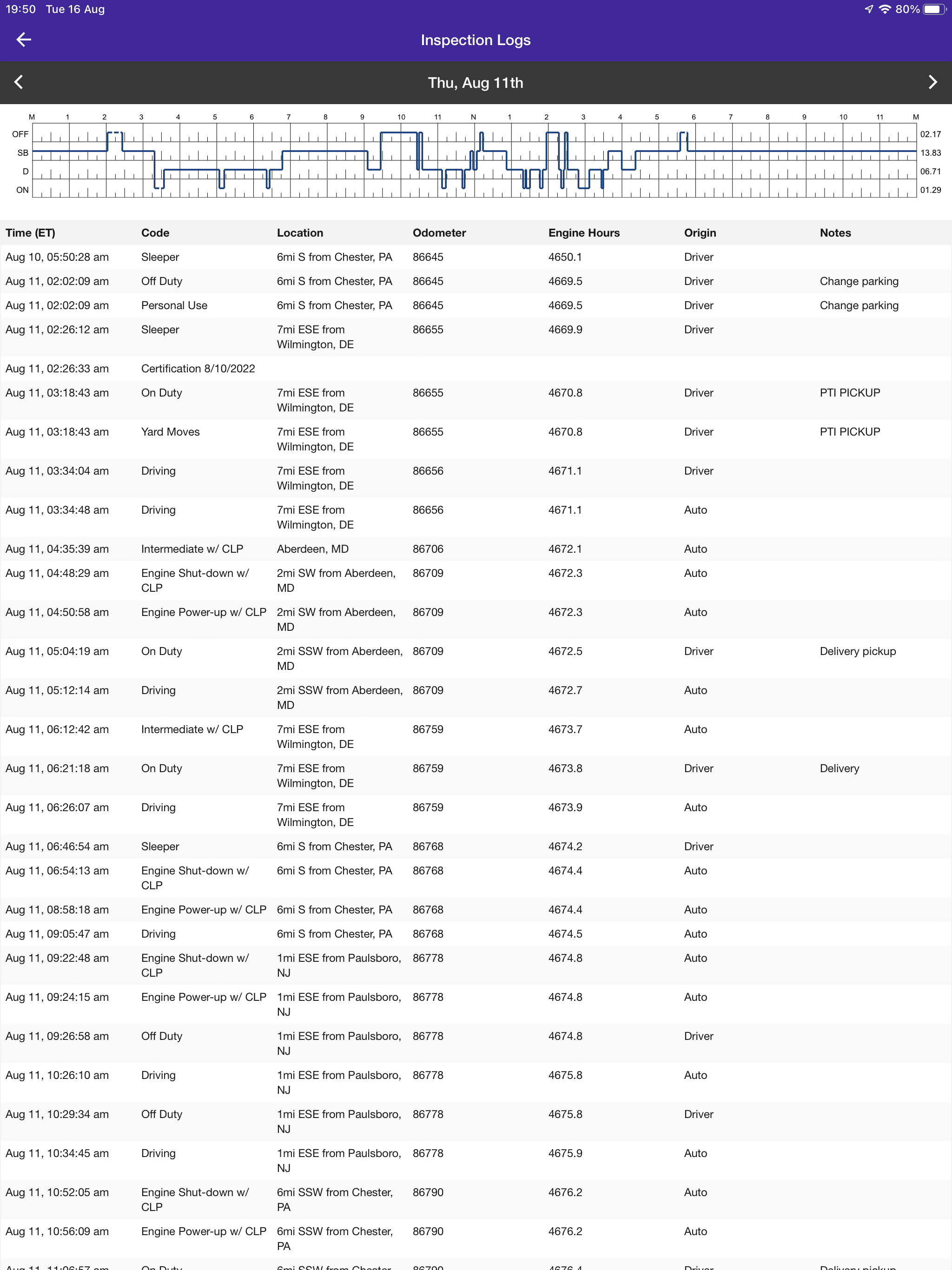
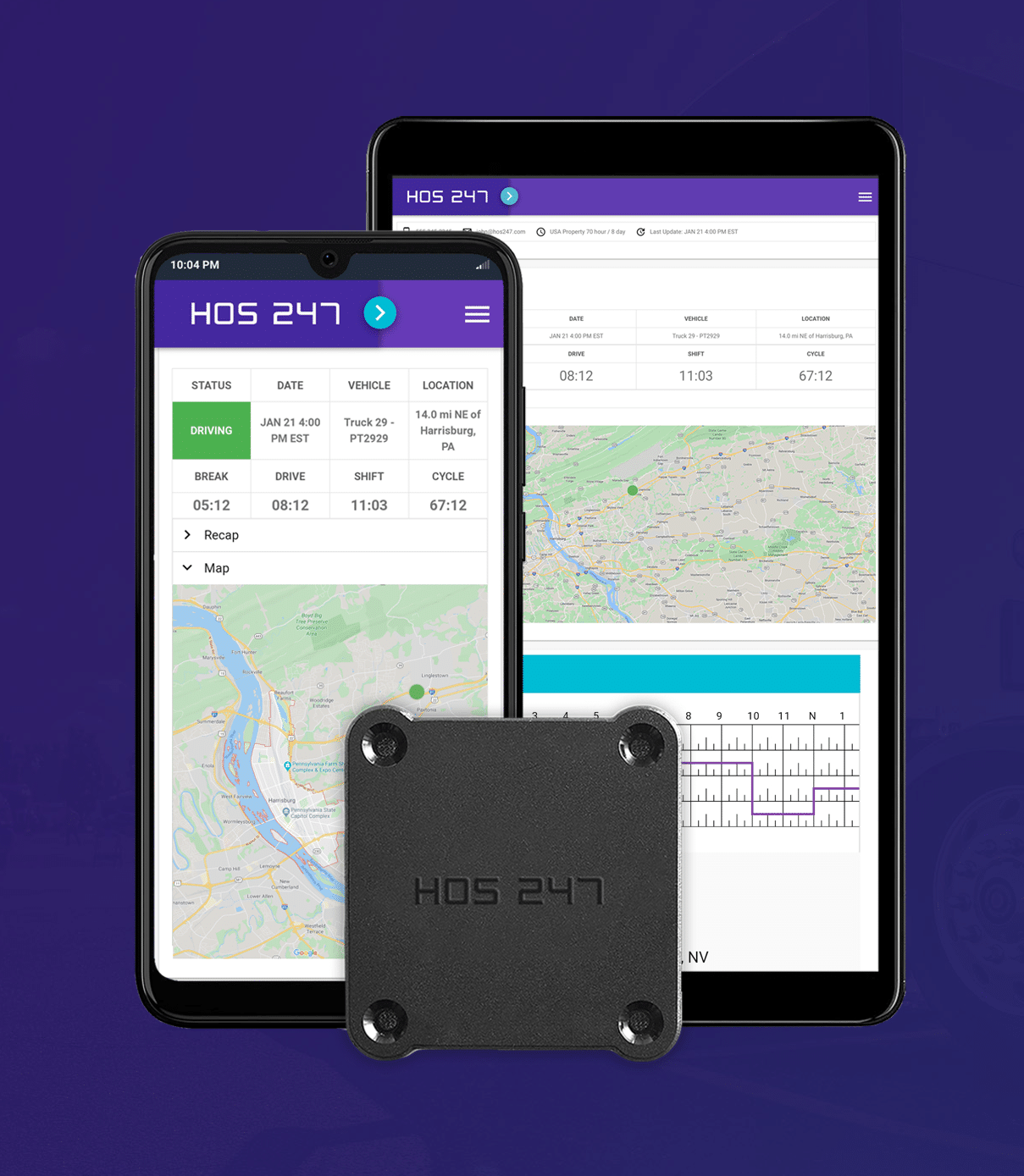
The application installed on your tablet or smartphone serves as the intelligence of the system. It takes the raw, complicated data streaming from the engine and translates it into a readable format. The software calculates your remaining hours, generates the familiar grid graph, and formats the files for a roadside data transfer. A well-designed brain makes the driver’s daily workflow highly efficient, but it remains completely dependent on the raw information it receives from the engine.
The Critical Link
The failure point for most compliance tools is the invisible bridge between the brain and the body. When drivers complain about their software crashing, freezing, or losing miles, they may be experiencing a hardware connection drop. If the Bluetooth link between the ECM device and the tablet breaks, the app stops receiving data. The system flatlines, creating unassigned driving events and missing log segments that force the driver to spend hours making manual corrections.
The Reality of System Integration
A beautifully designed app will likely fail if it is paired with cheap, unreliable hardware. To pass a roadside inspection without delays, you need a system where the physical device and the digital application are engineered specifically to talk to each other without interruption. When the brain and the body are built for each other, compliance becomes automatic.
Warning: The 3 Types of Risky Software
Many products marketed as simple, cost-effective solutions are actually high-risk setups that can cost you your operating authority. Understanding what to avoid is just as important as knowing what to look for in a new logging system.
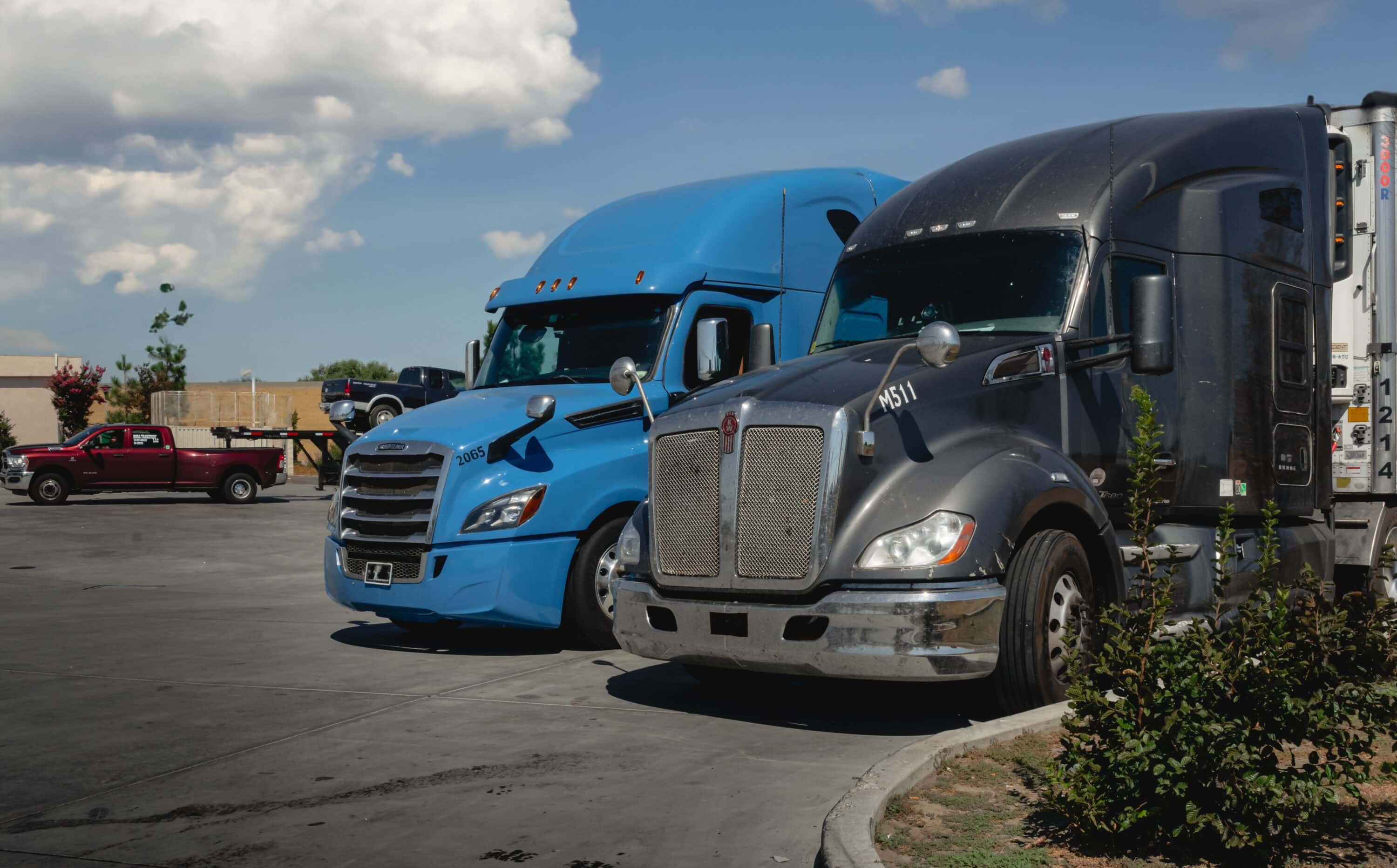
- The GPS-only. Mobile apps that rely entirely on your phone’s internal GPS are strictly illegal for commercial logging. To meet the federal mandate, an electronic logging device must physically plug into the truck’s diagnostic port to read the engine’s data directly. If an app does not require a wired hardware connection to your dashboard, it is not a compliant system.
- The “ghost” loggers. Some systems are quietly marketed with loopholes designed to automate log falsification, such as facilitating fake team driver setups to extend hours. Auditors and roadside inspectors have made identifying and penalizing these systems a major enforcement priority in 2026. Using software designed to cheat the system will inevitably result in severe fines and Out of Service orders.
- The “free” hardware. If a provider offers you a logging device with zero upfront costs, you are usually paying for it through a rigid three- or five-year data contract. These companies may use generic hardware components. If that hardware fails or vibrates loose, the driver is legally responsible for the missing logs and remains financially locked into paying the monthly subscription fee.
Protecting your operation means reading the fine print and understanding the technology you are buying. Falling for a free hardware gimmick or relying on a standalone mobile app usually results in expensive citations, broken contracts, and forced downtime. A professional driver needs a professional, verified tool.
5 Must-Have Features for Reliable Truck Log Software
A compliant system keeps you legal, but a well-designed system actively makes your workday easier. When evaluating new electronic logging software, you need tools that prevent violations and handle the heavy administrative lifting automatically. Here are the five core features required for a compliant commercial operation:
- Robust offline mode. Commercial routing often takes drivers through cellular dead zones, like the remote stretches of West Texas or mountainous passes. The software must continue to record and store engine data locally on the hardware device, then automatically sync that data to the cloud the moment a 4G connection returns.
- Automated IFTA reporting. Calculating fuel taxes manually is a massive drain on administrative time. Your software should track your jurisdictional mileage automatically as you cross state and provincial lines, turning a complex quarterly chore into a simple, one-click report.
- Predictive alerts. A highly effective app warns you before you run out of hours, rather than simply flagging a violation after it happens. Drivers need proactive audio and visual notifications — such as a warning that a mandatory 30-minute break is required in 15 minutes — to plan their stops safely.
- One-click inspection mode. The roadside inspection workflow must be fast, secure, and intuitive. Drivers should be able to lock their tablet screen and successfully transfer their log files to a DOT officer via web services in three taps or less.
- Vehicle diagnostics. Your system should help monitor the mechanical health of your truck. By reading diagnostic trouble codes (DTCs) directly from the engine, the software can alert you to minor engine faults before they develop into expensive roadside breakdowns.
What Reliable Means in Real Life
In the demanding environment of commercial trucking, reliability is measured by exactly how much time a system saves you. A truly reliable setup delivers these specific real-world outcomes:
- Clean logs. Your records remain consistently accurate, free from unexplained gaps, frustrating unassigned driving events, or missing miles.
- Quick inspection workflow. When you pull into a weigh station, you can hand over your data confidently and securely. You avoid fumbling through complicated menus or rebooting a frozen tablet while an officer waits at your window.
- Minimal downtime. You spend less of your day sitting on the shoulder or on the phone with dispatch trying to resolve a frustrating sync error between your engine and your display.
- Fast resolution. When a technical issue does arise, connecting with a knowledgeable support team gets your problem solved quickly so you can get back to driving immediately.
Ultimately, a dependable system translates directly to fewer headaches and more profitable miles. When your technology works quietly and accurately in the background, you spend less time managing your software and more time maximizing your driving hours safely.
Why HOS247 is the “Brain & Body” Solution
When searching for the right ELD, the market is filled with disjointed systems where the application and the engine device struggle to communicate. HOS247 takes a different approach. We built an integrated ecosystem where the digital brain and the physical body are engineered specifically to work together flawlessly.
Engineered Integration
We do not just resell cheap, third-party hardware and pair it with a generic application. The HOS247 device is rigorously stress-tested to survive the harsh environment of a commercial vehicle. It is designed and programmed to maintain a stable Bluetooth link with our app, minimizing data gaps and dropped connections that cause compliance violations. Because we stand behind the durability of our equipment, every device comes with a one-year free replacement warranty.
Driver-Centric User Experience
A system is only effective if a driver can use it easily at the end of an exhausting 14-hour shift. The HOS247 interface features large touch targets and high-contrast visuals to reduce input errors. We also include a dedicated Night Mode to minimize eye strain during late-night driving. This intuitive design ensures that managing your duty status is fast and frustration-free.
The Freedom of No Contracts
Many providers lock fleets into restrictive, multi-year agreements to cover the cost of their “free” hardware. At HOS247, we are so confident in the reliability of our system that we offer flexible, month-to-month plans. We believe a provider should earn your business every 30 days based on performance, giving you the operational freedom to scale your fleet without hidden cancellation fees.
Top-Tier Multilingual Support
Even with the most reliable system, complex edge cases happen. When the regulations get confusing or you need help with log management, our support team is available seven days a week. We offer expert assistance in English, Spanish, Russian, and Polish. You get to speak with a knowledgeable human who understands the FMCSA rules and can resolve your issue quickly.
Operational Tools Beyond Logging
The HOS247 platform provides a suite of useful tools designed to improve your daily workflow. Alongside precise HOS tracking, the system includes real-time GPS fleet tracking, automated IFTA mileage calculations, and comprehensive reporting tools. These features turn a mandatory compliance device into a powerful fleet management asset.
The Ideal Fit for Your Fleet
HOS247 is built for drivers and fleet managers who demand true flexibility, highly responsive support, and dependable day-to-day performance. By combining rugged hardware with an intelligent, easy-to-use app, we provide a reliable system that keeps your records clean and your operations running smoothly.
How to Vet Your Software Provider
Finding dependable electronic logs requires looking past the glossy marketing website and examining a company’s technical track record. Before committing to a new system, you must run the provider through a strict buyer’s checklist to ensure they can actually deliver on their promises.
The Technical Evaluation Checklist
Use these three specific criteria to evaluate any potential compliance partner:
- Update history. Check the Google Play Store or Apple App Store to see when the application was last updated. Has the app been updated in the last three months? Regular, frequent updates indicate that the company is actively maintaining its code to keep up with shifting FMCSA compliance standards.
- Hardware ownership. Ask if the hardware is proprietary to the software provider or if it is a generic, third-party unit. Proprietary units generally offer much better firmware integration because the same engineers build both the brain and the body. This setup guarantees a more stable connection and faster support.
- The trial period. You should never sign a long-term contract or make a major fleet investment without a proper road test. Always look for a provider that offers a 14-day trial so you can see exactly how the hardware handles the vibration of your truck and how the app performs during an inspection workflow.
Treat your search for a compliance system the same way you would treat buying a new rig. Do your research, check the technical history, and test the equipment on the road. A thorough vetting process protects you from getting trapped with a buggy application and ensures you choose a partner capable of supporting your business long-term.

Comparing App Store Ratings
A good starting point when comparing providers is checking app store ratings. Read the written reviews and look for recurring patterns. Consistent complaints about dropped Bluetooth connections, frozen roadside inspection modes, or unreachable customer support are major red flags. A slightly lower overall score with positive reviews about hardware reliability is often a safer bet than a five-star app that constantly disconnects from the engine. Here is a quick look at major providers in the ELD market.
Frequently Asked Questions About Truck Log Software
Is truck logs software the same as an ELD?
No. The software is just the visual interface you interact with on your screen. An Electronic Logging Device (ELD) refers to the complete, legally compliant system, which must include both the digital application and the physical telematics hardware plugged securely into the truck’s engine.
What’s the easiest truck log software for owner-operators?
The most effective systems for owner-operators combine a clean, intuitive app design with flexible financial terms. An ideal solution features large buttons for simple duty status changes, automated IFTA reporting to save administrative time, and month-to-month billing that avoids locking independent drivers into long-term corporate contracts.
Can I use truck logs software on my phone?
Yes, most modern compliance applications are designed to work smoothly on standard smartphones and tablets. This “Bring Your Own Device” (BYOD) approach allows you to use the hardware you are already comfortable with, provided the application pairs correctly with a compliant, engine-connected telematics device.
What should I do if my logs won’t load during an inspection?
First, stay calm and explain the technical issue to the DOT officer. Try to restart the application or reboot the tablet. If the issue persists, immediately contact your provider’s customer support line for live troubleshooting. You should also have your required 8-day supply of blank paper logs ready as a legal backup. If the software fails completely, you must follow the FMCSA’s standard malfunction protocol.
Month-to-month vs contract ELD — what’s better?
Month-to-month plans are generally much better for fleets of all sizes. They offer financial flexibility and force the provider to continuously earn your business through reliable service. Long-term contracts often trap carriers into paying for outdated hardware or poor customer support with steep early cancellation penalties.
What’s the difference between ELD hardware and the logging app?
The hardware is the physical device that plugs directly into the diagnostic port to read raw engine data like vehicle speed, motion, and RPM. The logging app is the digital program that receives this raw data via Bluetooth or a wired connection, translates it into a compliant HOS grid, and displays it on your screen for daily use.
How do I avoid hidden ELD fees?
Avoid providers offering “free” equipment, as they typically hide the true cost of the hardware inside multi-year data contracts. Look for companies that clearly publish their monthly subscription rates upfront and explicitly state that they do not charge activation or cancellation fees. Always ensure that essential features like IFTA reporting are included in your tier rather than billed as expensive extras.
The Value of Operational Knowledge
Having a clear understanding of these operational basics helps you cut through the sales noise when shopping for a new system. By knowing exactly how the technology works and what billing traps to avoid, you can confidently choose a tool that supports your business safely and efficiently.
Secure Your Fleet with a Complete Compliance Truck Log Software System
Do not let a simple search for new truck log software lead you into a costly hardware failure. In the strict enforcement climate of 2026, downloading a generic app is not enough to protect your operating authority. You need a fully integrated system where the digital brain and the physical body work together seamlessly to keep your records accurate and your trucks moving.
Choosing the right compliance partner means investing in reliable hardware, an intuitive interface, and accessible human support. Stop settling for dropped connections, frustrating inspection delays, and restrictive long-term contracts.
Upgrade to HOS247 to get a reliable system where the hardware and software are engineered to work for you. Contact us today to start your no-contract, risk-free trial and experience hassle-free compliance.

As an expert in B2B and B2C sales, I’ve dedicated myself to perfecting sales processes and client retention strategies in the logistics and trucking industry. I have significantly contributed to the expansion of the ELD service, catering to retail and wholesale clients in need of HOS247 ELD solutions. My unwavering commitment to implementing state-of-the-art sales techniques and technologies ensures the continuous growth and success of businesses I work with.











HOS247 is the ultimate provider of all your needs to run a trucking business or just a truck: Hours of Service ELD solution for fleets and owner-operators, GPS fleet tracking, vehicle maintenance and more. We work hard to bring up

An electronic logging device is a federally mandated device for most commercial driver license holders who must maintain records of duty status. These devices help monitor the drivers’ time on the road to meet hours of service compliance. HOS247 is

Staying on top of hours of service (HOS) rules is crucial for truckers and fleet managers. These regulations are designed to keep roads safe and drivers healthy by preventing fatigue-related accidents. However, keeping accurate track of driving time and rest