
Technical Synchronization and Automated Data Integrity
To meet mandatory federal electronic logging device requirements, an electronic driver log platform must maintain continuous, precise synchronization with the commercial motor vehicle’s engine gateway. The FMCSA outlines four explicit technical parameters that the physical hardware must automatically record from the vehicle’s diagnostic port cable:
- Ignition cycle events. The device must log every instance the vehicle engine is powered on or shut down, creating an unalterable timestamp of operational activity.
- Vehicle motion thresholds. The system must automatically detect when the vehicle enters motion. Federal standards dictate that once a vehicle reaches a speed threshold of 5 mph, the software must automatically transition the driver’s duty status to “Driving.”
- Total odometer readings. The hardware must read and transmit total odometer mileage directly from the ECM, supporting tracking accuracy without relying on manual driver entries.
- Continuous engine hours. The system must log total engine operation hours continuously, providing an accurate, tamper-proof record of engine runtime.
|
Mandatory Technical Parameter |
Detection Standard |
Regulatory Purpose |
|
Ignition Cycles |
Automated ECM Event Detection |
Establishes exact operational timestamps for power-on / power-off. |
|
Vehicle Motion |
5 mph Speed Threshold |
Triggers automatic duty status transition to “Driving” to eliminate manual status updates. |
|
Odometer Readings |
Direct ECM Mileage Readout |
Captures precise vehicle mileage for accurate RODS and IFTA auditing. |
|
Engine Hours |
Continuous Engine Runtime Tracking |
Verifies actual engine operation time independently of GPS movement. |
A major pain point for fleet managers and safety directors is managing unassigned driving events. Data integrity rules mandate that any time a vehicle moves past the 5 mph threshold, the hardware gateway captures the movement and logs the miles, even if the driver forgot to log into the mobile app beforehand.
When unlogged vehicle movement occurs, the system generates an unassigned driving file that must be manually reviewed, annotated, and assigned to the appropriate driver or administrative personnel (such as a mechanic moving the truck in the yard). Unassigned miles create a major administrative burden for safety teams and act as an immediate red flag for DOT inspectors during an audit.
Systems prone to connection drops between the engine gateway and the mobile logbook software artificially multiply unassigned driving records by failing to attribute miles to the logged-in driver during transient disconnects. Utilizing a high-performance logging setup with verified Bluetooth background stability helps protect fleet assets. Proving continuous, secure background data capture is the only reliable method to eliminate phantom unassigned mileage penalties and simplify compliance during federal audits.

Comparative Market Standings of DOT Electronic Driving Log Platforms
To maintain operational continuity on the highway, a commercial driver logbook program must perform consistently under real-world conditions. While many providers promise simple compliance, actual highway operations expose significant technical discrepancies between platforms. Application store ratings reflect actual field performance, shedding light on software stability, background processing efficiency, and user interface design.
Evaluating driver feedback from public application repositories highlights how prominent electronic logging platforms compare when deployed in daily commercial transport operations.
The Performance Reality Table
A low application rating is not merely a cosmetic flaw; it directly correlates to roadside stress, technical friction, and lost dispatch hours. When a driver logbook application freezes or fails to maintain an active engine gateway link, the driver faces immediate compliance vulnerability during weigh station pull-overs or roadside audits.
Choosing an electronic driver logs setup supported by verified high driver satisfaction rankings removes technical friction inside the cab. Selecting an optimized, driver-approved system remains the most practical path for independent operators and fleet safety directors seeking to protect revenue hours.
Roadside Inspection Protocols and eRODS File Transmission
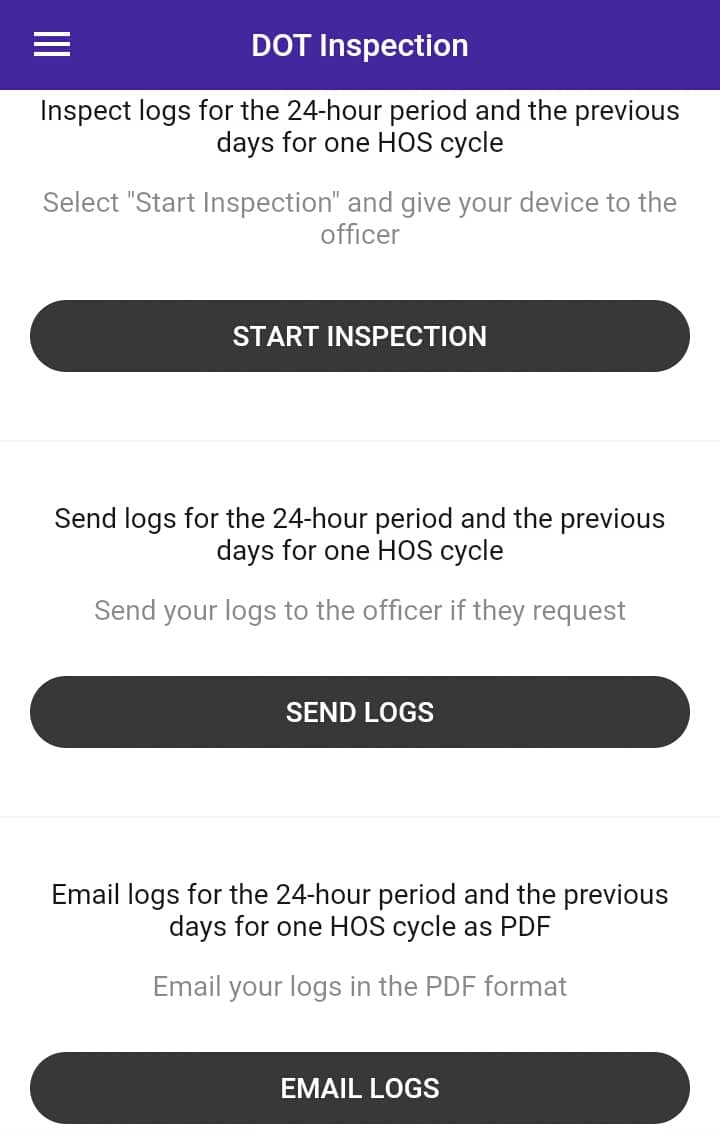
Enforcement checkpoints represent the ultimate test of a fleet’s digital compliance strategy. During a DOT roadside review, the commercial driver must present clear proof of compliance through an approved electronic logging interface. Modern electronic logging software must include a dedicated single-tap inspection mode designed to protect carrier security and streamline the officer’s review.
When inspection mode is activated, the application locks down sensitive operational data, personal messaging, and fleet management files. It strictly displays the current 24-hour log graph alongside the preceding seven consecutive days of driver logs.
Once the safety official requests official electronic records, data transfer occurs through standardized FMCSA Web Services or encrypted email protocols. The system compiles the raw Record of Duty Status data into an electronic Record of Duty Status (eRODS) output file and transmits it directly to the inspecting officer’s field terminal.
In remote corridors or mountainous regions, cellular network coverage frequently drops, preventing immediate cloud-based eRODS transfers. Federal regulatory frameworks account for these connectivity gaps by establishing clear backup validation protocols:
- Primary transfer attempt. The driver initiates an automated transfer via FMCSA Web Services.
- Secondary protocol. If web service transmission fails due to localized network drops, the driver attempts a direct encrypted email submission.
- On-screen display fallback. If all wireless transmission options are unavailable due to complete signal loss, presenting the clean 24-hour graph grid and driver logs directly on the mobile screen satisfies all federal requirements.
As long as the engine gateway hardware captures underlying data locally, displaying the on-screen graph prevents non-compliance citations during wireless blackouts.
Deploying an organized, driver-focused inspection interface reduces the time commercial vehicles spend idling at roadside weigh stations. Intuitive software layouts remove compliance ambiguity, proving to be a critical operational tool for keeping freight moving between terminals.
In-Cab Compliance Documentation and Backup Contingencies
While electronic logging platforms store compliance data digitally, federal regulations require drivers to maintain specific physical documentation inside the vehicle cab at all times. Failing to produce these mandatory documents during a roadside inspection results in instant compliance violations, regardless of whether the primary logging device functions properly.
The Federal Motor Carrier Safety Administration (FMCSA) under 49 CFR § 395.22 requires commercial vehicles to carry four distinct compliance items:
- System user manual. An operational guide detailing how to navigate and operate the logging system.
- Data transfer instruction sheet. A step-by-step instruction sheet explaining how to initiate roadside eRODS file transfers to enforcement officers via FMCSA Web Services or email.
- Hardware malfunction guide. A document outlining the specific visual or audible malfunction indicators generated by the hardware, along with required driver response procedures.
- Backup paper log supply. A minimum supply of eight blank graph-grid paper log sheets compliant with 49 CFR § 395.8, enabling manual logging if hardware fails.
Mandatory In-Cab Document Checklist
|
Required Document Item |
Regulatory Citation |
Operational Purpose |
|
System User Manual |
49 CFR § 395.22(h)(1) |
Provides operational guidance for navigating the device software. |
|
Data Transfer Sheet |
49 CFR § 395.22(h)(2) |
Outlines execution steps for eRODS transfers during roadside checks. |
|
Malfunction Guide |
49 CFR § 395.22(h)(3) |
Identifies hardware failure codes and required driver response steps. |
|
8 Blank Paper Logs |
49 CFR § 395.22(h)(4) |
Serves as emergency manual logging supply if hardware malfunctions. |
When logging hardware suffers an internal failure, strict regulatory timelines trigger immediately under 49 CFR § 395.34. The driver and carrier must follow a precise compliance workflow to avoid enforcement action:
- 24-hour notice. The driver must record the malfunction and provide written notification to the motor carrier within 24 hours of discovery.
- Immediate RODS reconstruction. The driver must immediately reconstruct the record of duty status for the current 24-hour period and the preceding seven consecutive days using paper logs (or printed PDF outputs), unless the records remain accessible on the mobile device.
- 8-day repair window. The motor carrier has eight days from the initial discovery date to repair, service, or replace the malfunctioning hardware unit. If replacing the equipment takes longer than eight days, the carrier must submit an official extension request to the FMCSA State Division Administrator within five days of driver notification.
Carrying complete backup documentation is a mandatory safeguard against immediate OOS orders. Partnering with a transparent hardware provider ensures fleet operators receive compliant in-cab documentation packets and rapid equipment replacement support before regulatory deadlines expire.
Dynamic Compliance Logic and Special Duty Statuses
Modern hours of service tracking extends beyond recording basic Driving, On-Duty, Off-Duty, and Sleeper Berth statuses. Advanced compliance software incorporates dynamic logic engines designed to process complex duty status exceptions without corrupting core driver logs.
Commercial operations frequently utilize special operating categories and exemptions that alter standard driving clocks:
- Split-sleeper berth calculations. Property-carrying drivers can divide their required 10-hour off-duty period into two segments — either an 8/2 split or a 7/3 split. The longer segment must be spent entirely in the sleeper berth (at least 8 or 7 consecutive hours), while the shorter segment can be off-duty or sleeper berth time (at least 2 or 3 hours). When both periods are completed, the software automatically recalculates the 14-hour on-duty window from the end of the first rest period, preserving usable driving hours.
- Adverse driving conditions extension. When drivers encounter unexpected adverse road conditions, such as severe weather or road closures that could not be foreseen prior to dispatch, federal rules allow a two-hour extension on both the 11-hour driving limit and the 14-hour driving window.
- Yard move (YM). An On-Duty status category designated for moving trucks within closed terminal facilities, yards, or customer locations. When set correctly, mileage accumulated does not count against driving hours or trigger vehicle motion events.
- Personal conveyance (PC). An Off-Duty status category allowing drivers to operate a commercial motor vehicle off-duty for personal transit during non-working time.
A common source of driver stress is the fear of incurring accidental hours of service violations due to complex cycle rules or cross-border transit. Driving rules change across jurisdictional lines; for example, standard interstate rules enforce an 11-hour drive limit within a 14-hour window, whereas intrastate rules in states like Texas (12 hours drive time / 15 hours on-duty) or California enforce different daily limits.
Compliance software must evaluate remaining work cycles dynamically based on the active operating jurisdiction, calculating exact available drive time automatically to eliminate manual calculation errors.
Automating regulatory logic inside the cab allows commercial drivers to maximize their legal working hours safely. Implementing software engineered to handle split-sleeper calculations, duty toggles, and state-specific rules eliminates rule confusion and transforms compliance software into an operational asset.
Operational Advantages of HOS247 Electronic Logbook
Maintaining high compliance standards and keeping vehicles moving requires hardware stability and clean, intuitive software interfaces. HOS247 delivers a comprehensive electronic logging solution designed around the actual needs of commercial drivers, safety directors, and fleet owners. Benefits include:
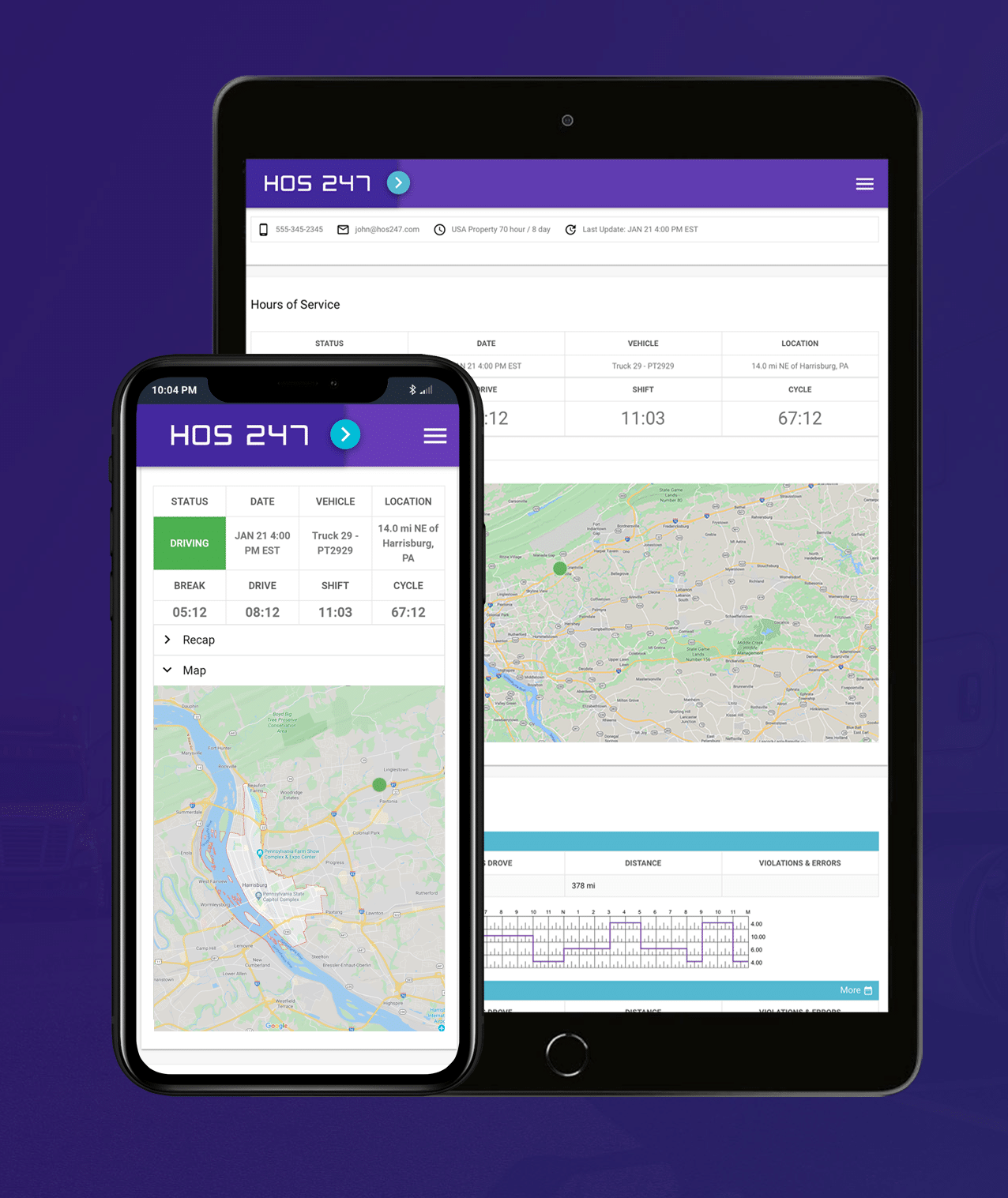
- Driver-focused mobile application. Reduces administrative errors through a straightforward driver logbook app that eliminates complicated menu screens. Commercial drivers can update duty status entries, add annotations, and complete electronic Driver Vehicle Inspection Reports (DVIRs) with minimal screen taps.
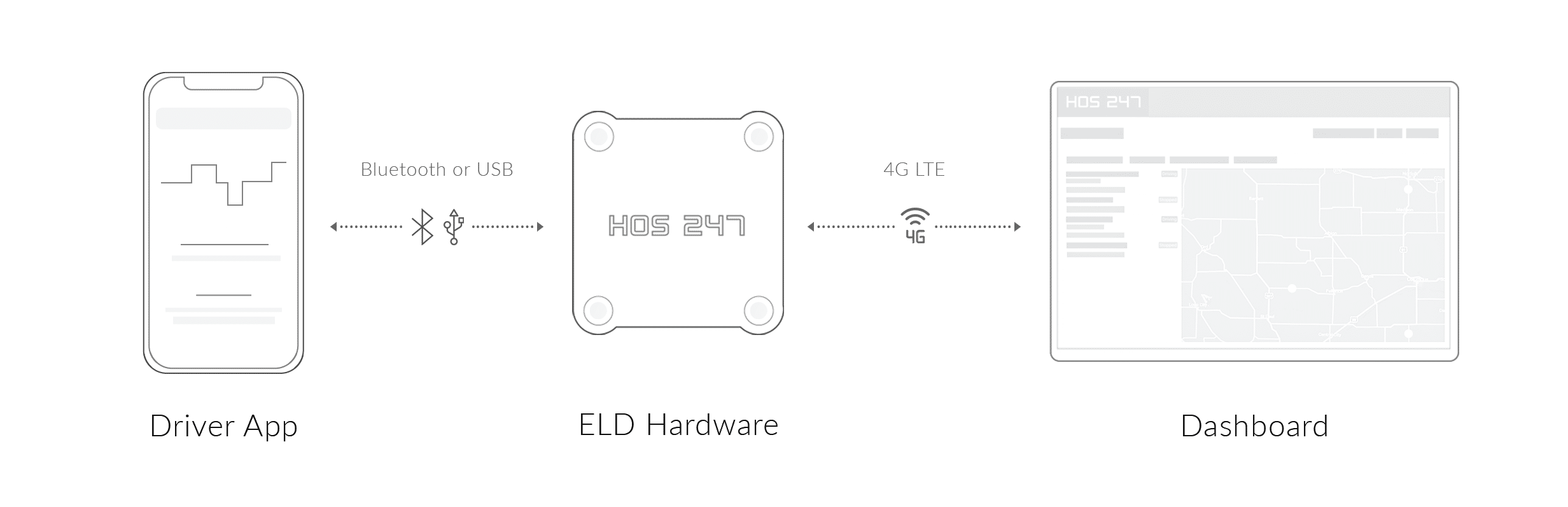
- Plug-and-play vehicle gateway. Prevents data gaps by connecting directly to the vehicle’s diagnostic port and establishing a dedicated Bluetooth link to the mobile device screen. The engine gateway reads and transmits critical engine parameters continuously without dropping connection during transit.
- Multilingual driver support. Resolves roadside issues quickly with technical support available seven days a week. Support agents can assist drivers in multiple languages, including English and Spanish, during stressful roadside inspections.
- Optimized software battery performance. Prevents mobile device overheating and battery drain with background processing code. The logging application runs continuously during long shifts without consuming excessive device power or requiring high-wattage charging setups.
- Universal diagnostic cable assemblies. Avoids hardware incompatibility with adaptable cable options for standard 9-pin, 6-pin, and OBDII ports. This ensures a secure connection whether fleets operate heavy-duty tractor-trailers or medium-duty delivery vehicles.
- Transparent hardware replacement options. Minimizes unexpected operational costs with straightforward equipment replacement policies. Carriers can swap damaged components quickly without facing early termination penalties, activation charges, or hidden fees.
- Centralized fleet manager portal. Simplifies fleet oversight using integrated management tools. Fleet administrators can view real-time GPS location tracking, digital driver logs, and automated IFTA mileage calculations across every jurisdiction from a single dashboard.
- No-contract subscription plans. Maintains operational flexibility with no-contract subscription models. Carriers protect their cash flow by scaling vehicle counts up or down as business demands fluctuate, without being tied to long-term hardware leases.
Combining reliable engine hardware with a driver-focused mobile application allows commercial motor carriers to protect their safety ratings, reduce back-office paperwork, and optimize their daily operations.
The Business Impact of Quality Driver Logs
Navigating FMCSA compliance standards requires choosing equipment built for physical reliability and software simplicity. Implementing DOT electronic driver logs is more than an exercise in satisfying federal regulations; it is a foundational operational decision that affects daily driver productivity, roadside inspection efficiency, and overall fleet profitability.
Evaluating electronic logging systems requires looking beyond minimal upfront costs to inspect hardware stability, driver app usability, and vendor transparency. Unstable hardware connections, complex screen menus, and unexpected subscription charges quickly erode operating margins through lost driving hours and administrative overhead.
Maintaining regulatory compliance does not have to disrupt everyday transport operations when supported by the right tools. Supporting independent owner-operators and mixed commercial fleets with reliable, contract-free automated logging tools remains the most effective strategy for reducing administrative overhead, protecting safety ratings, and keeping wheels turning profitably.

I’ve co-founded, built and managed several transportation-related businesses. Now, I’m a founder and CEO of HOS247 – an AI Transportation Platform for trucking companies, freight brokers and other logistics operations. We are transitioning old-style operations to technology-advanced logistics entities and help them to grow their businesses. ELDs (electronic logging devices), fleet tracking and management 2.0 combined with AI-powered dispatch tools.









The trucking industry has come a long way since the early days of log books. These essential records have been a part of the commercial driving landscape for decades, serving as a critical tool for ensuring compliance with hours of

Since the ELD mandate was implemented in 2017, electronic logging devices have become an integral part of truckers’ work routine. Commercial vehicle drivers are now required to record hours of service automatically using elogs; however, a quality electronic logbook can

In today’s logistics industry, knowing where your vehicles are and how they’re performing is essential for staying competitive. Modern GPS fleet tracking systems have transformed from simple location markers to comprehensive management tools that provide real-time insights into every aspect