
The Four Lines of the 24-Hour Graph Grid
Whether logged digitally on a screen or recorded on a traditional paper sheet, federal hours-of-service rules rely on a standardized 24-hour graph grid. Federal safety standards require drivers to continuously record their duty status in 15-minute increments across four distinct categories. Knowing exactly where every minute belongs keeps your logs accurate and protects your drive time during an audit.

Breaking Down the Duty Categories
- Line 1: Off-duty status. Time spent entirely free from work responsibilities, including mandatory rest breaks, meal stops, and time spent off shift.
- Line 2: Sleeper berth. Period spent resting inside a qualifying sleeper berth compartment that meets FMCSA dimension and safety specifications.
- Line 3: Active driving. Time spent behind the wheel actively controlling the commercial motor vehicle on public roads and highways.
- Line 4: On-duty non-driving. All time spent performing work-related tasks for the carrier or owner-operator that do not involve active driving.
Unpacking “On-Duty Not Driving” Surprises
The line that creates the most confusion during official audits is On-Duty Not Driving. Many drivers assume that if their wheels aren’t turning, they are off the clock. In reality, the FMCSA maintains a strict definition of work-related labor. Miscategorizing non-driving tasks on your graph grid is a frequent trigger for audit red flags and logbook falsification violations.
Failing to log these activities properly distorts your available driving windows and leaves your compliance record vulnerable to scrutiny.
Protecting Your Fleet Profile
Careful, precise duty-status tracking acts as an essential safety shield for your business. Properly documenting every phase of your shift through a direct engine data connection demonstrates compliance with legal drive limits and operates responsibly. Accurately logging non-driving labor is the simplest way to pass federal audits without risking fines or damaged safety ratings.
App Ratings and Performance Realities
When evaluating electronic logbook platforms, public app store feedback provides a transparent window into how software performs under real highway conditions. A poorly rated application is rarely just a cosmetic issue; low marketplace scores directly reflect operational stress, delayed dispatches, and accidental hours-of-service violations caused by lagging code or dropped connections.
Reviewing user feedback across the Google Play Store and Apple App Store helps reveal which platforms offer stable performance and which ones introduce unnecessary risk during transit.
Live app store feedback highlights the difference between basic reporting tools and platforms designed for both back-office efficiency and driver usability. Choosing a top-rated, proven platform helps ensure your mobile setup remains stable through long hours, protecting your carrier safety profile and keeping your fleet moving without unexpected software hurdles.
Operational Advantages of HOS247 Logging System
A reliable logging infrastructure requires seamless coordination between hardware in the cab and software on the screen. The HOS247 logging system is built specifically to streamline daily compliance, removing operational friction for both independent drivers and fleet managers.
Driver-Focused Mobile Application
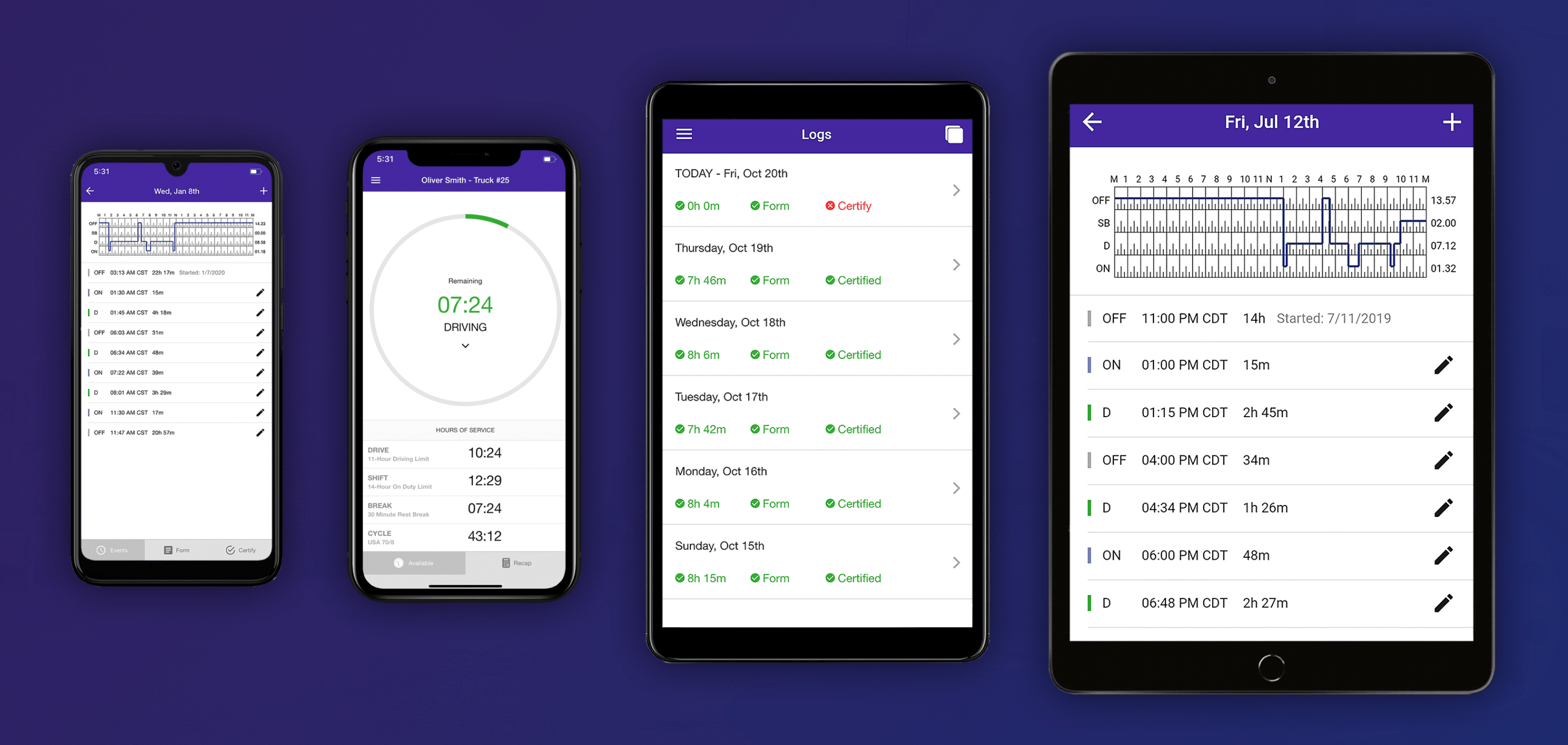
Managing compliance efficiently starts with an easy-to-use mobile interface. The HOS247 driver logbook app removes complex menu screens, allowing operators to change duty statuses, edit log annotations, and complete electronic Driver Vehicle Inspection Reports (DVIR) with minimal taps. By keeping the screen layout clean and clear, drivers spend less time managing software and more time focused on safe transit.
Plug-and-Play Hardware with One-Year Warranty
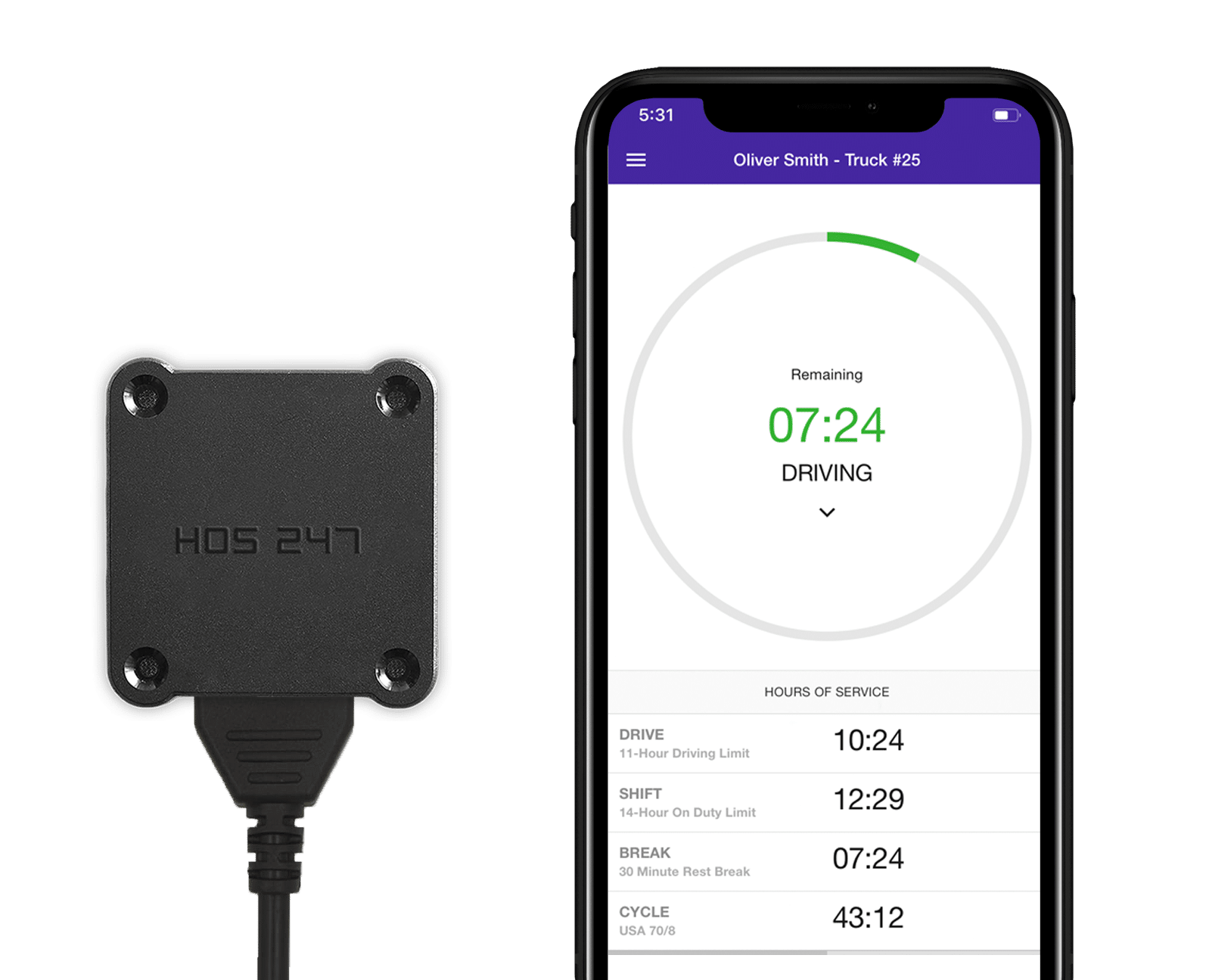
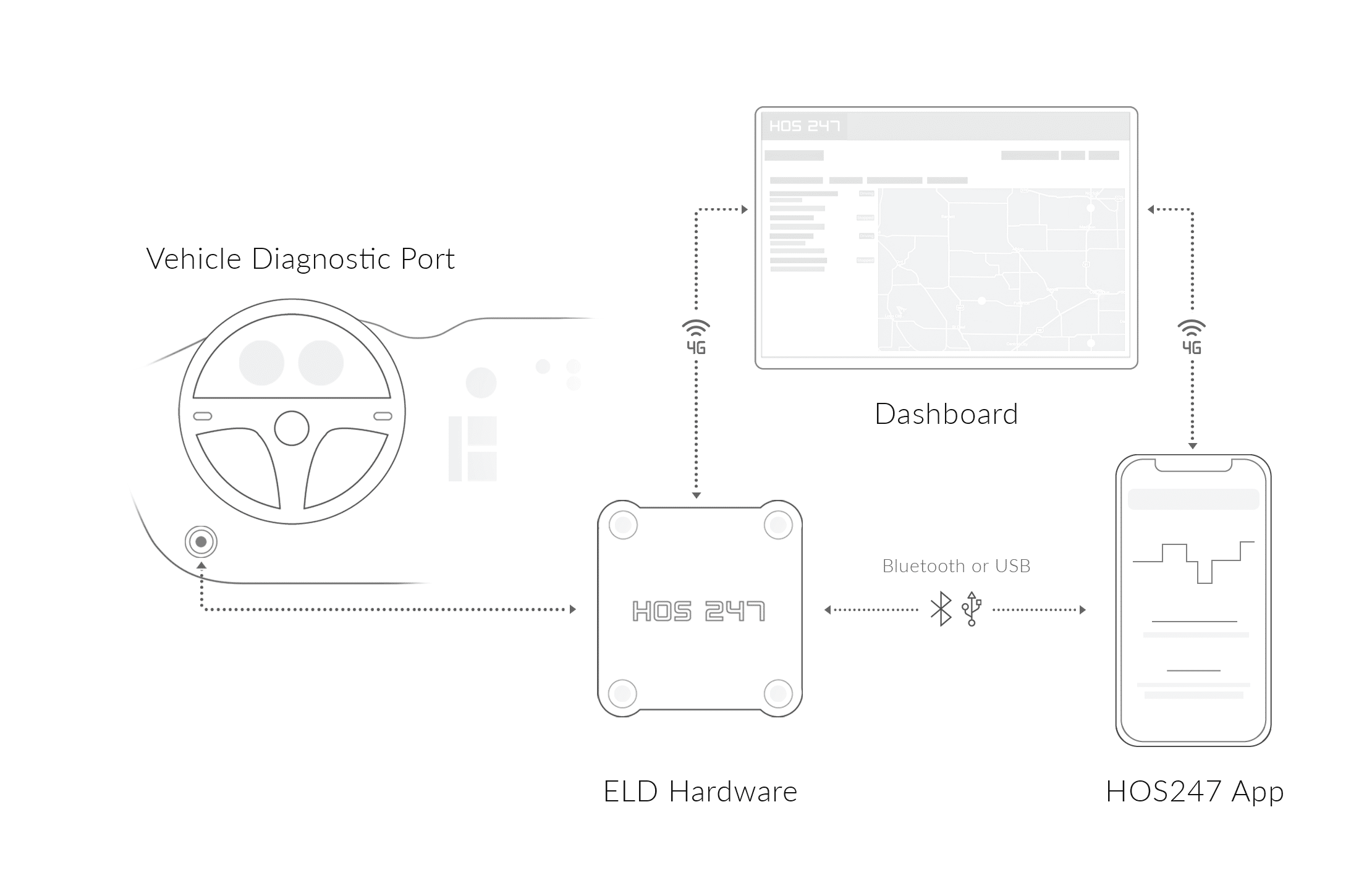
Data gaps create severe compliance risks during official inspections. The HOS247 system uses a solid plug-and-play hardware that establishes a stable, persistent Bluetooth connection with the driver’s phone or tablet, reading and transmitting ECM engine parameters continuously without dropping signals on rough roads or during long trips.
Automated CARB Clean Truck Check Integration
Meeting California Air Resources Board (CARB) emissions standards can add significant logistical stress to fleet maintenance routines. HOS247 streamlines this process by supporting remote CARB Clean Truck Check (CTC) testing directly through its integrated vehicle hardware. Once configured, the vehicle’s engine control system completes the required emissions tests, while the hardware transmits compliance records automatically without taking vehicles out of service or scheduling manual testing sessions, helping fleets operating in or through California maintain regulatory compliance.
Multilingual Driver Support
Navigating technical issues or DOT inspections under pressure can be challenging. HOS247 provides live, dedicated technical support fluent in English, Spanish, Polish, and Russian. Having access to knowledgeable troubleshooting specialists helps drivers can resolve hardware or software questions immediately, preventing minor technical hiccups from becoming major roadside delays.
Optimized Software Battery Performance
Resource-heavy mobile apps can drain device batteries quickly and cause phones or tablets to overheat on the dashboard. The HOS247 app is optimized to run smoothly in the background without draining your battery or overheating your phone on the dashboard. This light processing footprint preserves device battery life and minimizes the need for high-wattage charging setups inside the cab.
Transparent Hardware Replacement Options
Unexpected equipment damage shouldn’t disrupt your business operations or strain your operating budget. HOS247 maintains clear, straightforward hardware policies that allow carriers to swap out damaged cables or gateway modules quickly. Fleet owners can replace hardware without encountering surprise penalties, hidden activation costs, or inflated markup fees.
Centralized Fleet Manager Portal
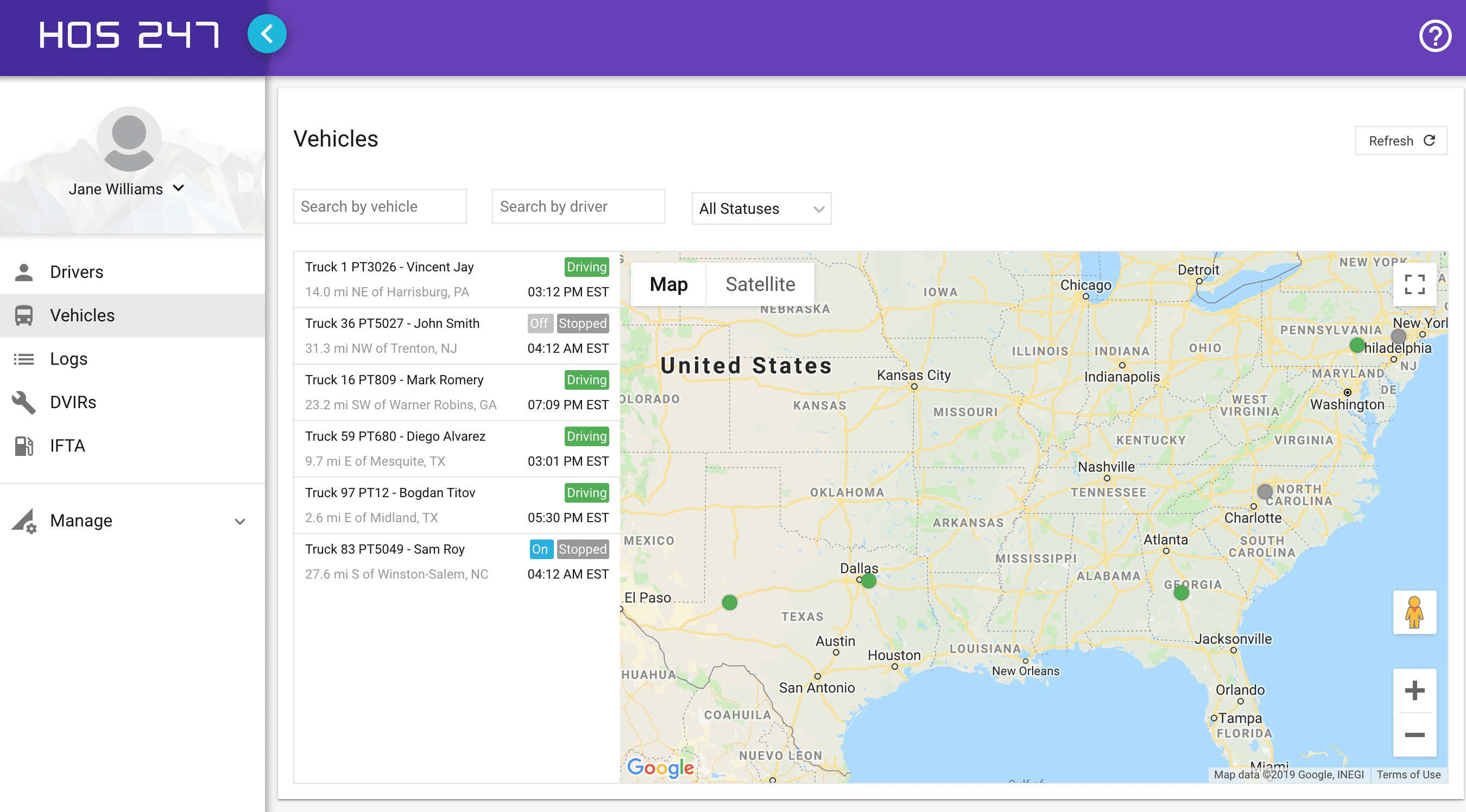
Clear visibility across your entire operation makes fleet administration far more efficient. The HOS247 centralized web portal allows dispatchers and safety directors to review real-time GPS vehicle locations, monitor active digital driver logs, and automate IFTA mileage calculations by jurisdiction from a single dashboard. Consolidating GPS tracking, ELD compliance, emissions testing, and IFTA management into a single hardware platform eliminates the need for separate devices and additional recurring subscription fees.
No-Contract Subscription Plans
Operational flexibility is essential for managing changing freight volumes and seasonal cash flow. HOS247 offers straightforward, no-contract subscription plans that let carriers add or remove vehicle connections as needed. This flexible model protects fleet capital by eliminating multi-year hardware leases and restrictive long-term commitments.
Actionable Three-Step Onboarding
Getting started with HOS247 requires a low-friction setup process:
- Install the vehicle gateway. Plug the telematics device directly into the vehicle’s diagnostic port.
- Create your portal account. Register on the web portal to set up driver profiles and fleet settings.
- Configure driver schedules. Select your applicable hours-of-service rules inside the mobile app.
Pairing dependable vehicle hardware with an intuitive mobile app gives motor carriers a practical compliance setup. With reliable tools in place, fleets can maintain safety ratings, cut down on paperwork, and focus on running freight.
Keeping Logs Intact During Cellular Signal Dropouts
Running freight through mountain passes, rural corridors, or remote deserts often means losing cellular coverage for extended stretches. For many drivers, crossing into dead zones creates genuine anxiety about whether their logging software will continue tracking their shift correctly.
Budget or poorly optimized applications frequently fail when disconnected from a cell tower, leading to:
- Frequent application crashes. Unoptimized software can freeze or crash when network connections drop unexpectedly.
- Unrecorded data gaps. Lost connectivity can erase log blocks and create gaps in the daily duty status grid.
- Time-consuming manual corrections. Missing records force drivers to retroactively rebuild logs on paper, creating audit stress.
A professionally engineered logging system solves this problem through local memory storage. If you lose cell service, the app instantly saves your status updates and engine data to your phone’s internal storage. The software continues tracking your shift offline without interruption.
Once the truck returns to cellular range, the system automatically syncs local data to the secure cloud database in the background — without duplicating entries or requiring manual driver prompts. Using offline-capable software keeps your logs intact through dead zones, eliminating the stress of lost records when cell service cuts out.

Clearing Roadside DOT Checkpoints Without Stress
Few situations generate as much operational pressure as an unexpected roadside DOT safety inspection. When an officer signals a truck into a weigh station bay, the efficiency of your logging setup determines whether you get back on the road in minutes or face extended delays.
Federal regulations require compliant logging platforms to include an inspection mode to keep roadside checks fast and secure:
- One-tap screen lockdown. Instantly locks the display so officers can view only the current day’s log grid and the preceding seven consecutive days of duty status records.
- Driver privacy protection. Restricts access to personal text messages, photos, banking apps, or other private files on the mobile device.
- Wireless data transfer. Transmits official records directly to the officer using secure FMCSA web services or encrypted email.
If local cellular congestion or server outages prevent wireless transmission at the scales, federal rules provide a clear backup protocol. Drivers can present the clean, 24-hour visual graph grid directly on the device screen for manual review. The inspecting officer can verify compliance right from the display, keeping the inspection moving forward legally.
Utilizing an organized, driver-friendly inspection interface minimizes checkpoint friction, helping protect your valuable road hours and keeping your deliveries on schedule.
Automated Logic for Specialized Driving Statuses
Managing standard hours of service is straightforward enough on a basic run, but specialized driving categories can quickly complicate your daily math. Calculating split shifts, applying rule extensions, or switching duty profiles on the fly introduces plenty of room for driver error. Advanced logging software automates these intricate calculations behind the scenes, helping drivers prevent unintentional compliance violations.
Split-Sleeper Berth Shifts
Calculating qualifying rest breaks — such as 8/2 or 7/3 sleeper berth splits — by hand is a common source of math errors. Compliant logging software tracks these split shifts dynamically, updating your available driving window in real time so you always know exactly when your hours reset without pausing to recalculate your shift on paper.
Adverse Driving Conditions
Unexpected severe weather, highway accidents, or sudden road closures can disrupt a carefully planned route. Federal rules allow a two-hour driving extension when drivers encounter unforeseen adverse conditions. Advanced application software automatically applies this two-hour buffer to your daily drive window when toggled, keeping your cycle accurate without triggering false violation alerts.
Yard Move and Personal Conveyance Profiles
Not all vehicle movement counts toward your active driving hours. Moving a trailer across a shipper’s terminal requires toggling to Yard Move (YM) under On-Duty Not Driving status. Driving off-duty to a hotel or restaurant requires toggling to Personal Conveyance (PC) under Off-Duty status. Modern logging applications allow drivers to switch into these profiles cleanly, preventing non-highway moves from accidentally burning up legal drive time.
Regional and State Boundary Changes
Crossing state lines introduces varying regulations that standard federal interstate rules do not always cover. For example, intrastate limits in states like Texas or California offer different daily driving caps and rest requirements than standard interstate guidelines. Compliant logging platforms detect location shifts automatically and update active rule sets accordingly, preventing compliance mistakes when crossing regional borders.
Automating these intricate rules directly inside the cab allows independent owner-operators and fleet drivers to manage their legal drive time effectively. Utilizing advanced, automated software turns complex federal logic into a simple, reliable business asset.
Choosing a Reliable Electronic Logbook for Long-Term Success
Maintaining an accurate record of duty status is the foundation for keeping your trucks moving, protecting your safety profile, and passing roadside DOT inspections cleanly. As commercial carriers evaluate digital logging platforms, the most critical lesson is that initial price tags rarely tell the full story. Choosing a cheap, unproven platform often leads to hidden operational costs — such as dropped Bluetooth connections, lost data during cellular signal outages, device overheating, and unresponsive technical support during stressful roadside checks.
Choosing an ELD based on daily reliability saves your business far more money than chasing the lowest upfront price. A truly cost-effective system helps you satisfy daily truck driver log book requirements while protecting your bottom line through app stability that prevents data loss in dead zones, hardware that maintains a continuous engine connection, and straightforward billing that eliminates surprise markups, multi-year leases, or contract penalties.
Regulatory compliance should never feel like an endless administrative battle. When supported by intuitive mobile software, reliable vehicle gateways, and responsive live support, daily hours-of-service management transforms into a straightforward, background routine. Equipping your fleet or independent rig with transparent, contract-free logging tools stands as the single most effective strategy for cutting administrative paperwork, preventing costly out-of-service orders, and maximizing your earning potential on the open road.

As an expert in B2B and B2C sales, I’ve dedicated myself to perfecting sales processes and client retention strategies in the logistics and trucking industry. I have significantly contributed to the expansion of the ELD service, catering to retail and wholesale clients in need of HOS247 ELD solutions. My unwavering commitment to implementing state-of-the-art sales techniques and technologies ensures the continuous growth and success of businesses I work with.








The electronic logbook law is another term for the ELD Mandate, which is a federal law requiring certain commercial motor vehicle drivers to use electronic log devices (ELDs or elogs). This new law on electronic logs shouldn’t be news to

Carriers can turn the ELD requirement into an advantage by choosing an electronic logbook with the right qualities for their business. There are some must-have features to achieve federal compliance, and some others are not mandatory but can prove useful

If you want to streamline your fleet management processes, it’s crucial to ask yourself: What is fleet tracking and how can it make a difference for my business? GPS fleet tracking is a digital solution that empowers truckers to monitor