
Analyzing app store user review volumes helps safety managers verify software stability across thousands of active commercial drivers. Real-world driver feedback highlights practical application issues that sales sheets often miss, such as frequent screen lockups, slow menu loads, or dropped Bluetooth connections during transit. Monitoring user rating trends over time gives motor carriers a clear picture of software reliability, helping fleets avoid frustrating technology investments before committing to a provider.
Key Characteristics of an Efficient Electronic Logbook
Elogs are a mandatory compliance tool that can create daily friction unless the system provider designs both the software and hardware for real-world use. Here are some key aspects to take into account to find the most efficient device with the best logbook app:
- Straightforward installation. This is a one-time operation, but the speed of installation can affect the ELD rollout and cause downtime. If an installation process is complicated, it will likely be time-consuming and may affect the bottom line. Make sure to consider how the installation process goes and the costs involved.
- Clear pricing. Providers have different pricing structures, and it should be very clear when you ask about their prices what exactly is included with the service. When additional fees are charged for things like dedicated tablets, installation, activation, or training, these can add up to a much larger bill than you signed up for. Make sure you get a fully functional elog system for the price in front of you.
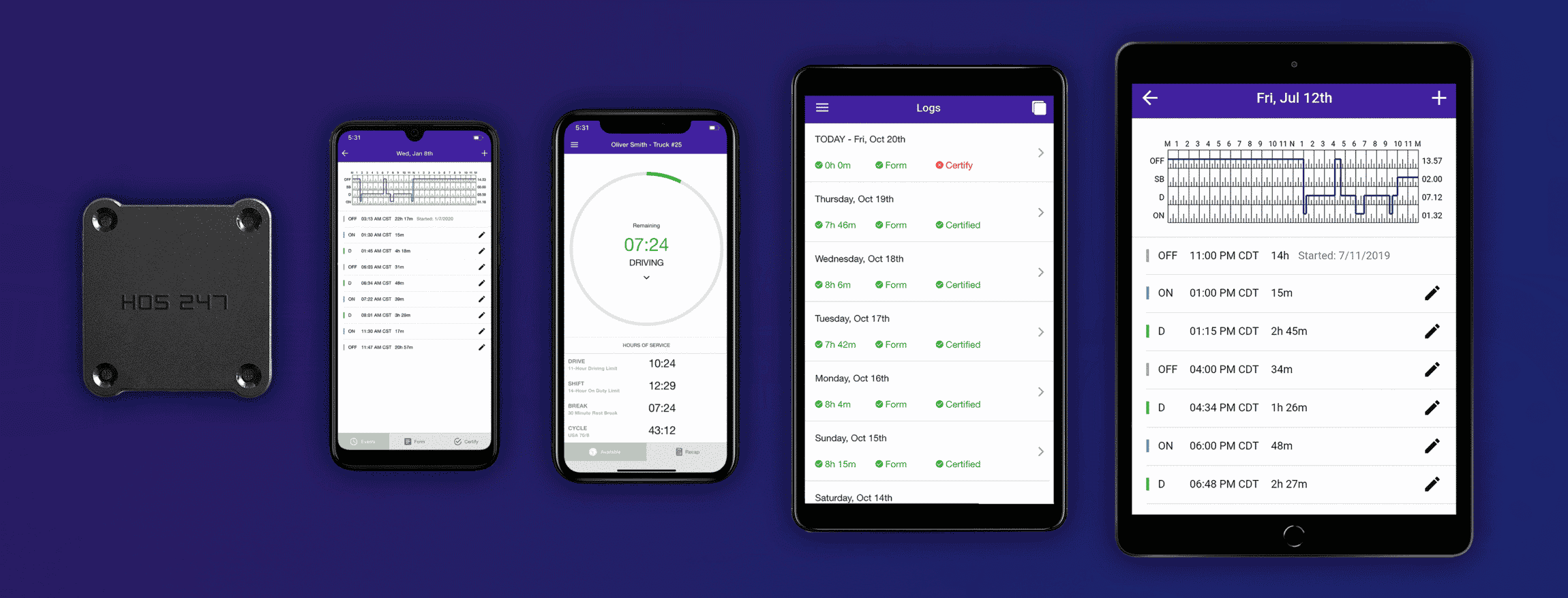
- Easy-to-use interface. Drivers have a lot to deal with while on the road. The elog app should not make that more challenging for them. Status updates, vehicle inspection reports, compliance reports, and the like should be accessible with a few taps of the screen. The best logbook app will be intuitive, easy to use, and liked by drivers—if drivers complain about the app, it might be a good idea to consider a different provider.
- Compatibility with different devices. The best logbook software should be available for iPhone and Android smartphones, as well as tablets from both operating systems. A compatible app will be more quickly adapted and better received by the driver, not to mention cheaper, since drivers can use their own devices.
- Compatibility with different vehicle classes. A single fleet can have light- and medium-duty trucks, vans, box trucks, trailers, and many other kinds of vehicles. A device that can operate across all types of trucks will simplify things considerably. Having just one solution means that the staff only needs to learn one system, which will simplify fleet management.
- Compliance with updated regulations. The FMCSA sometimes updates its regulations, and your ELD provider should be ready to respond at that moment. Bear in mind that penalties for non-compliance can add up to substantial amounts of money, so it is best to choose a provider who is well informed and makes for a reliable compliance partner.
- Flexible plans. The business will grow over time, and the ELD solution can also grow with it. The best online logbook provider will allow users to adjust it to their needs. Look for plans that can be scaled up or down and providers that do not lock you into long-term contracts.
Evaluating these core operational features helps fleet managers select a system that simplifies daily compliance, lowers administrative expenses, and earns positive feedback from drivers on the road.
Managing Logs in Areas Without Mobile Service
Commercial trucks frequently travel through remote mountain passes, rural highways, and cellular dead zones. A reliable electronic logging system must maintain accurate Hours of Service records even when a cellular data connection is completely unavailable.
Storage and Forward Data Protection
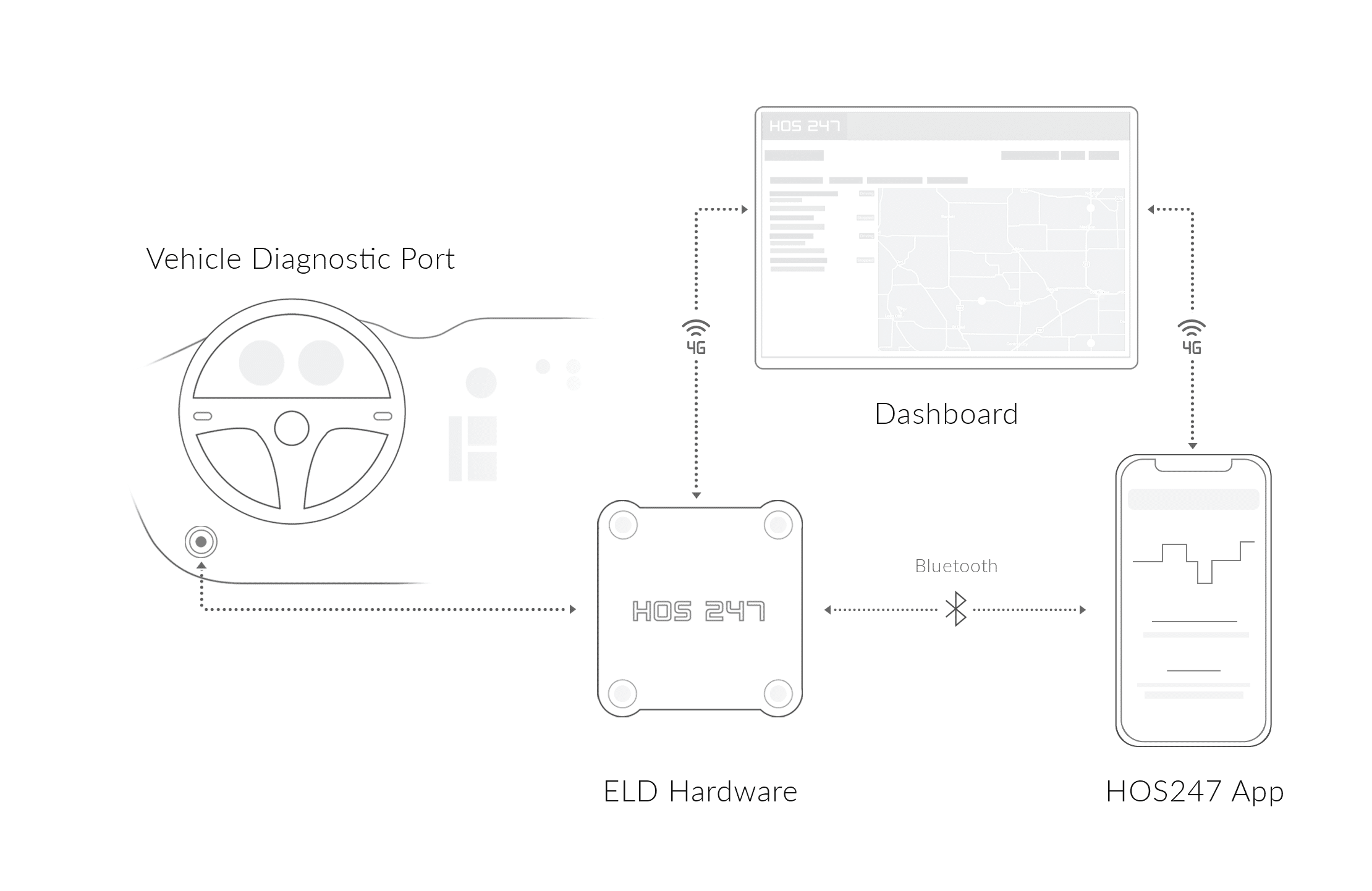
When a vehicle enters an area with no mobile signal, the engine gateway hardware continues to record engine telemetry, drive time, and odometer readings automatically. The device stores these metrics locally on its internal memory chips, ensuring that no telemetry data is lost while offline.
Automatic Syncing Protocols
The mobile application stays connected to the engine plug via a local Bluetooth connection, keeping the driver’s screen active and updated in real time. Once the vehicle enters a cellular coverage area, the hardware executes a background synchronization protocol, automatically transmitting cached log files to the central fleet management portal.
Continuous background memory sync ensures records of duty status remain complete, accurate, and ready for safety officials at any point along the route.
Are Logbook Apps FMCSA Compliant?
Even the best logbook app is not enough to comply with federal regulations on electronic logging devices. The FMCSA has a clear definition for a compliant ELD: a tamper-resistant device that connects to the engine and records HOS data directly from it. Logbook apps are only half of the solution; the hardware piece is essential to achieve compliance, as it is the component approved by the FMCSA.
Under federal regulations, the mobile screen serves as the mandatory viewer for safety officials during a roadside inspection, while the connected engine hardware handles automated calculations in the background. The app displays information on any compatible smartphone or tablet so drivers can manage their RODS and transfer data easily during an inspection, but it must function as part of a fully registered hardware system to remain legally compliant.
When Is a Device FMCSA Compliant?
The FMCSA does not have a process to ensure the devices registered on their ELD approved list are in line with their current guidelines. Elog providers certify their own logbook solution using a checklist for requirements issued by the FMCSA; they must declare to meet the criteria to be included in the list, but the Administration does not verify compliance. This process is known as “self-certification”.
The list of approved devices is kept available to the public on the FMCSA website. When providers are found to be non-compliant, the FMCSA can remove them and the device from the official list of approved devices. Users should keep an eye on the list to avoid issues should their provider be found not to meet all requirements. In that case, motor carriers will have 8 days to replace their device with one included in the list and remain within federal standards.
Managing Registry Revocation Windows
If the FMCSA removes an unapproved logging device from the official registry, motor carriers receive a strict 60-day window to replace the non-compliant hardware across their fleet. Operating a vehicle with a revoked logging device after this grace period leads to immediate out-of-service violations at roadside checkpoints. Regularly verifying your provider’s status on the federal registry protects your fleet from sudden operational disruptions.
Resolving Unassigned Vehicle Movements
When a commercial vehicle moves without an active driver profile logged into the mobile application, the engine hardware captures the movement as unassigned vehicle telemetry. Managing these unassigned driving segments is essential for maintaining accurate fleet records.
Reviewing Unidentified Telemetry Blocks
Whenever the vehicle diagnostic port detects motion without a logged-in user, the logging hardware stores the time, location, and odometer metrics in the system buffer. When a driver next logs into the mobile app, the software displays a visual alert prompting the driver to review the unassigned drive time block.
Assigning Past Drive Segments
Drivers review the unassigned movement history directly on their mobile screens to claim authorized trip segments or decline movements completed by mechanics or yard personnel. Safety managers can then reassign the unclaimed drive segments to the correct driver profile within the central management portal.
Keeping unassigned vehicle data organized prevents serious recordkeeping violations during comprehensive terminal safety audits.
Executing the Roadside Inspection Mode Workflow
During a roadside safety check, drivers must present their Hours of Service records quickly and securely to law enforcement officers. Using an intuitive inspection mode workflow simplifies this process and protects private personal data stored on the driver’s phone.
Activating the Screen Data Lock
Before handing a mobile device to an inspector, the driver activates the built-in inspection mode within the logbook app. This action locks the application screen to display only the mandatory 24-hour log graph grids and duty status reports, preventing officers from accessing personal phone applications, text messages, or private files.
Secure Web Services File Transfer
When the inspecting officer requests electronic records, the driver selects the wireless data transfer option inside the app. The system packages the active 24-hour log sheet along with records for the previous seven consecutive days, transmitting the encrypted file directly to the FMCSA web services database.
A clear inspection setup shortens roadside enforcement stops, allowing drivers to quickly complete the review and return to their delivery routes.
Benefits of HOS247 Logbooks
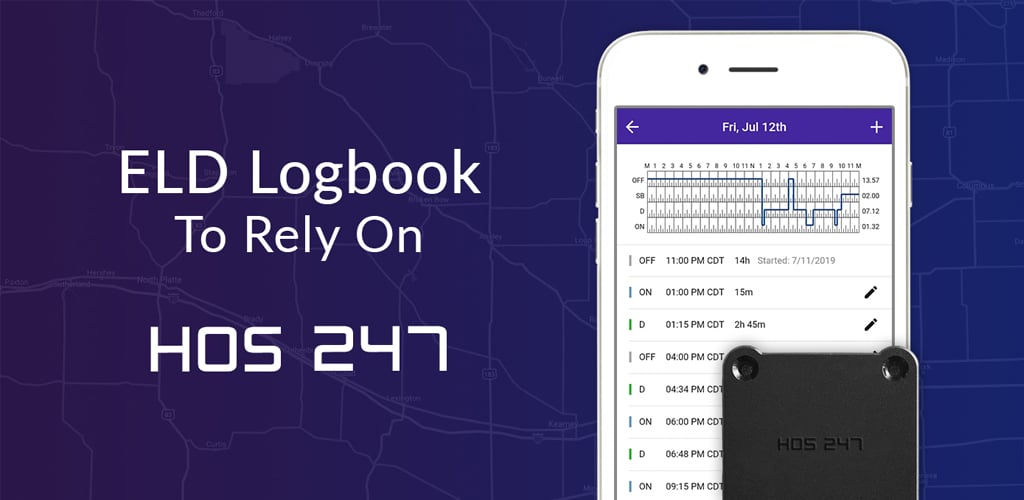
HOS247 makes it a point to offer drivers and motor carriers an effective solution for their needs. HOS247 ELD is an FMCSA registered device designed to enhance fleet performance and make operations smooth and efficient. The added value comes from several benefits, including:
- Top-rated user services. Customer support is critical to getting the most out of your logbook. Our multilingual team (English, Spanish, Russian, and Polish) is available Monday through Sunday, ready to answer any questions or troubleshoot any issues that may come up.
- Trial period. HOS247 offers users two weeks to try out the device and app for iPhone and Android to get a sense of how the system performs on the field. If customers choose to return the device within this period, they will receive a full refund, no hassle.
- Contract-free subscription. Flexible plans are a staple of HOS247. The no-contract policy allows clients to scale their monthly plans up or down as their business requires or cancel if they so decide.
- Reliable hardware. The best logbook app will still be only as good as the hardware that goes with it. HOS247 devices are resistant and easy to install to make sure performance is consistent and up to expectations. Our users appreciate the stable Bluetooth connection.
- Driver-friendly interface. The hardware pairs up with an intuitive app with a straightforward design for drivers to easily manage RODS.
- Extra fleet management features. In addition to electronic logs, HOS247 logbooks support integrated real-time GPS tracking, CARB CTC testing, vehicle diagnostics with active fault code detection, automated IFTA mileage calculations, and idle time monitoring.
- Flexible scale operations. The subscription structure allows owner-operators and growing fleets to scale their technology smoothly. When freight volume changes, carriers can adjust active vehicle connections up or down without being trapped in multi-year equipment leases or rigid pricing tiers.
Integrating these core tools into a single platform helps safety managers lower office workloads, improve driver satisfaction, and maintain total compliance on the road.

Frequently Asked Questions About the Best Logbook App

I’ve co-founded, built and managed several transportation-related businesses. Now, I’m a founder and CEO of HOS247 – an AI Transportation Platform for trucking companies, freight brokers and other logistics operations. We are transitioning old-style operations to technology-advanced logistics entities and help them to grow their businesses. ELDs (electronic logging devices), fleet tracking and management 2.0 combined with AI-powered dispatch tools.








For commercial carriers and owner-operators, commercial driver’s license (CDL) driver log books serve as the official record of a driver’s duty status under federal transportation rules. Federal regulations require drivers to log working hours using these records. The Federal Motor

Are California’s hours of service (HOS) rules different from the federal mandate? Do you really need an ELD for a route that never leaves the state? If you find yourself asking these questions, you aren’t alone. The regulatory environment in

Top ELD Providers in the US ELD compliance is a key concern for trucking businesses and everyone is looking for top ELD providers to help them achieve it. There are multiple elogs out there, too many to choose from. To