
The Mechanics of Manual Graph Grid Entry
Keeping a paper log requires close attention to detail. If you are exempt from using an electronic device, you must understand how to fill out the standard log book grid by hand to avoid form violations during a roadside inspection.
Tracking Time in Fifteen-Minute Increments
The daily log sheet contains a 24-hour grid broken down into small, fifteen-minute blocks. To meet driver log book requirements, you must draw a straight, continuous line across the grid indicating your exact status for every minute of the day. Whenever you switch from one status to another, you must drop the line down vertically and continue the path horizontally across the new row. At the end of the 24-hour cycle, you have to add up the total hours in each row and write the final numbers on the right side of the sheet, ensuring the sum equals exactly 24 hours.
Notating Mandatory Duty Status Changes
Every single time you draw a vertical line to change your duty status, you must also write down where that change happened. The regulations require you to list the name of the nearest city or town along with the state abbreviation in the remarks section at the bottom of the page. For example, if you pull off the highway to fuel up, you cannot simply drop your line to “On-Duty Not-Driving”; you must write down the location where that fueling stop took place.
Filling out these forms by hand takes up valuable time and leaves a lot of room for simple clerical errors. Modern software screens remove this tedious step completely by tracking your line and recording your location shifts automatically as you move.
What Information Should a Driver Log Book Contain?
Apart from the driver’s status, RODS must include the following information:
- Date.
- Total mileage driven during the 24-hour period.
- Commercial motor vehicle identification.
- Name of carrier.
- Driver’s signature or certification (at the end of each 24-hour period).
- 24-hour period starting time (using the time zone of the driver’s home terminal).
- Main office address.
- Remarks.
- Name of co-driver.
- Total hours in each duty status.
- Shipping document number(s) or name of shipper and commodity.
Other features that can be included in a daily log are drivers’ hours from the last seven days, breakdowns and accidents, and on-duty non-driving activities, such as fueling or loading and unloading.
Verifying mandatory form and manner fields before you sign off on your log is essential for avoiding unnecessary fines. Roadside inspectors look closely for blank spaces on your sheet. Leaving out simple details like a shipping document number, a trailer number, or your total daily mileage will result in an immediate form violation penalty, even if your actual driving hours are perfectly accurate.
How Long to Keep Driver Log Books
When a safety official pulls a commercial vehicle over for a roadside inspection, the driver must immediately provide their recent records of duty status. Federal recordkeeping protocols outline exactly how long to keep log book records depending on whether the files are in the truck or at the home terminal.
For the roadside check, drivers must keep their logs for the current 24-hour cycle and the previous seven consecutive days accessible in the cab. Once that eight-day block is complete, the driver submits the records to the carrier.
The motor carrier is then required to keep each of these logs in the main office for at least six months from the date of receipt, along with any supporting documents that might be needed in an audit, such as dispatch records, scale tickets, custom declarations, crash reports, toll receipts/records, fuel receipts/records, etc.
Auditing Supporting Documents Against the Hours of Service Log
Safety departments must manage log data carefully to prepare for official carrier audits. Reviewing your files ahead of time ensures that all records match up perfectly.
Cross-Referencing GPS and Financial Timestamps
Federal safety investigators do not just look at the lines drawn in a logbook during a terminal audit. They collect your company’s fuel receipts, road toll transponders, scale tickets, and GPS tracking data to verify the accuracy of your records. If a toll transponder shows your truck passed a gate at 2:00 PM, but your log shows you were in the sleeper berth at that exact hour, investigators will flag the entry as a false log violation.
Managing Secondary Copy Backups
To protect company files from technical failures or data loss, regulations require keeping an independent backup copy of all logging data. This secondary copy must be stored on a separate storage drive or secure cloud system. If a main computer system crashes or an on-site server fails, the safety department can still produce the necessary files to pass an inspection.
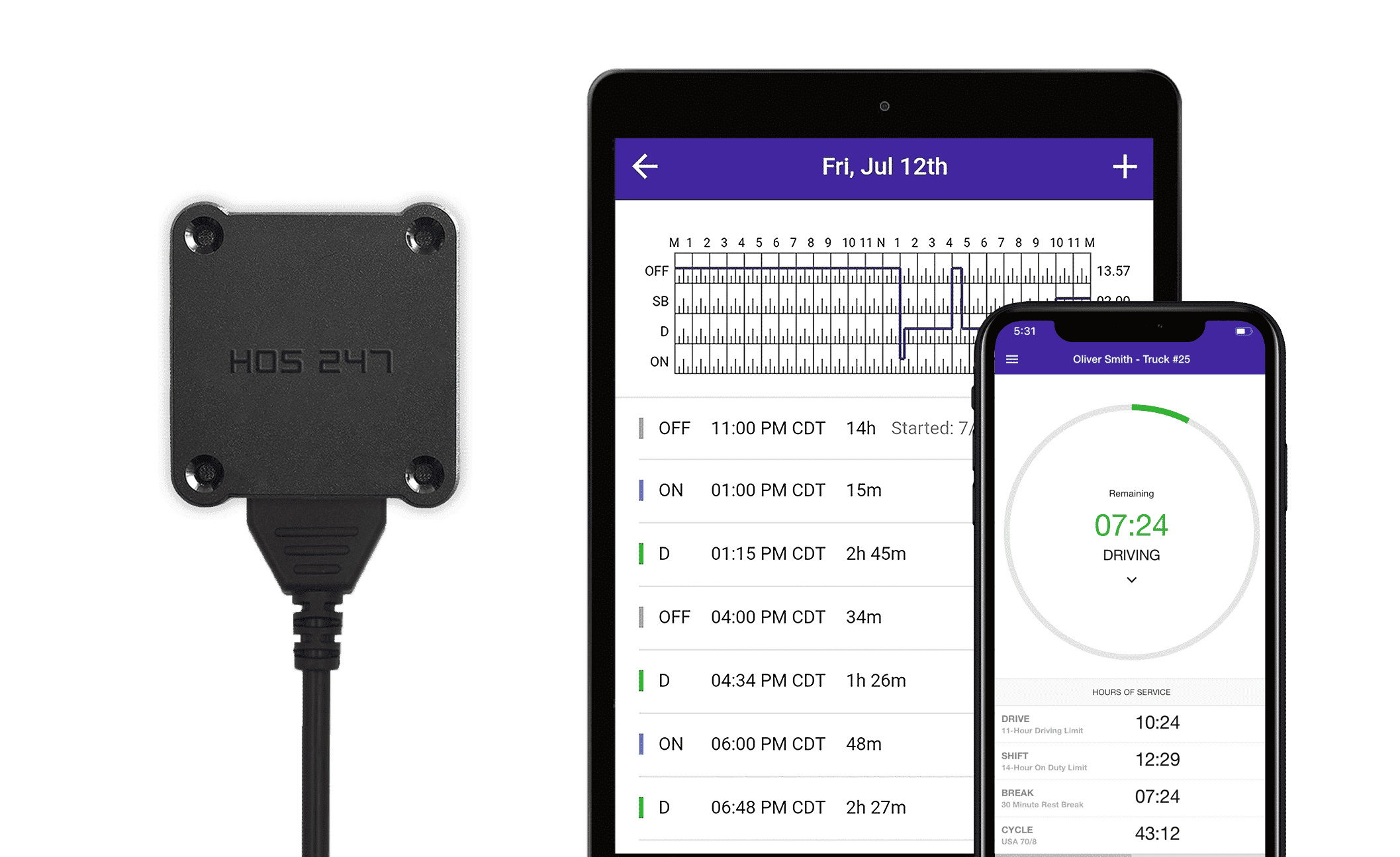
Organizing these documents by hand takes hours of tedious paperwork every week. An automated system files your electronic records and timestamps together in one place, which saves safety departments time and prevents missing files.
What Are the Requirements for Driver Log Book Apps to Be FMCSA Compliant?
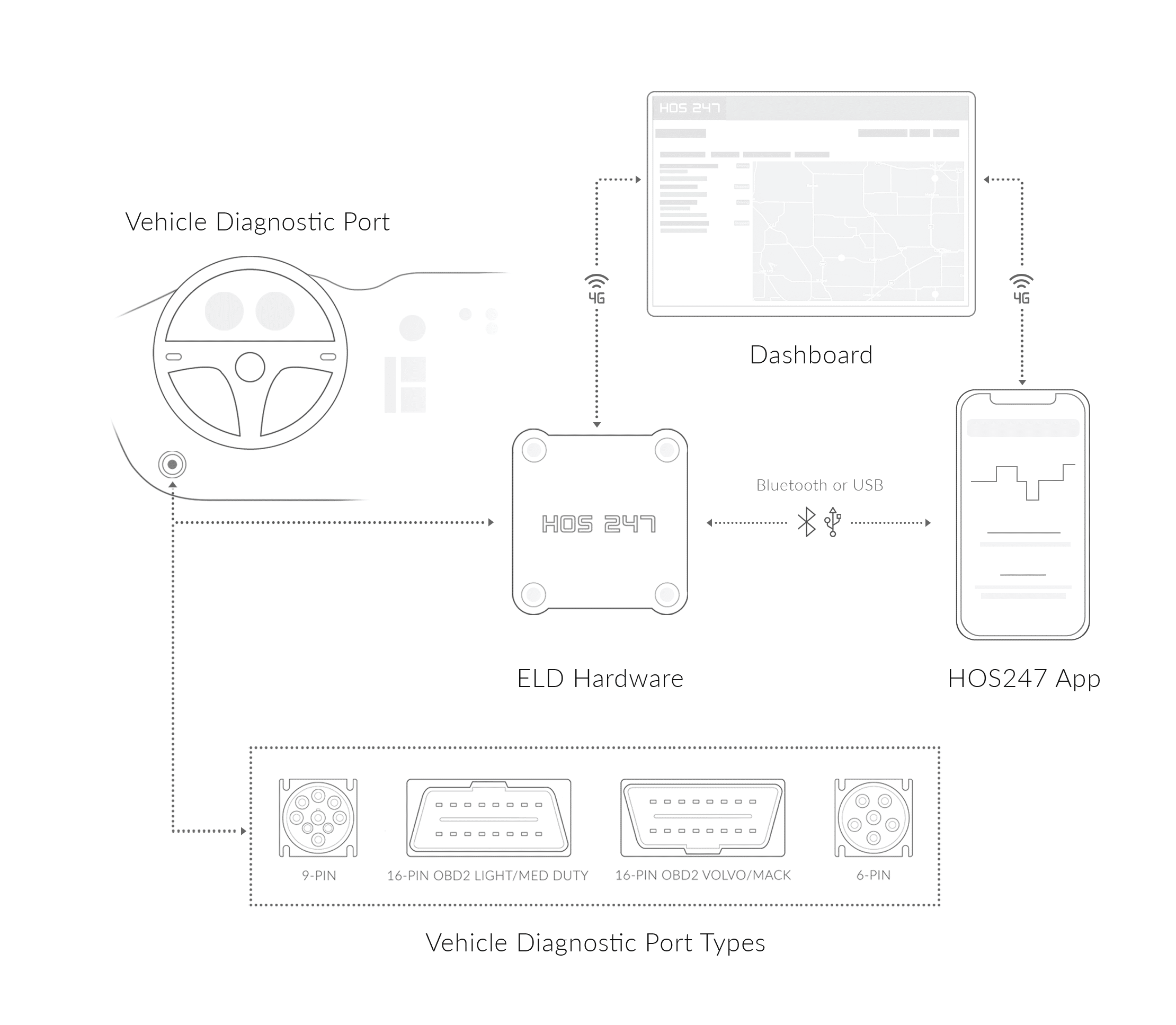
Most elog solutions let you access your logs through an app downloaded to your smartphone or tablet. However, the law establishes that electronic logging devices must connect to the engine of the vehicle, which is why an app cannot be compliant when used alone. The hardware must be installed and, when paired up with the app, automatically records HOS information. The app is only the method of communication between this device and the smartphone or tablet screen, so it can only be considered compliant as part of a FMCSA-certified elog system.
System self-certification standards require the mobile application to act strictly as an approved visual viewer for the data collected by the engine plug. A compliant app cannot allow you to manually type or fake your actual driving time logs. The software must display the information exactly as it comes from the truck’s engine control module, ensuring the records remain completely tamper-free and match federal design rules.
To ensure your electronic logbook, including the app, is compliant with DOT regulations, you can check the list of FMCSA-approved devices to make sure your provider is there. There is also a list of devices whose certification has been revoked. Checking both lists periodically might save you compliance issues in the future.
Should You Choose Android or iOS Apps To Run ELD Software?
Regarding compliance, the operating system of your ELD solution is not an issue. However, you must take into account driver convenience when you select your elog provider. One thing to take into account is the availability of devices. If a single ELD provider is chosen to equip a fleet, the best option is to choose an elog solution whose app is supported by both operating systems so each driver can use their preferred or available smartphone or tablet. Any credible provider should have both options, and some even work with lesser-known operating systems.
Matching hardware with software that supports both mobile platforms eliminates technical bottlenecks during fleet equipment rollouts. When the tracking system operates identically on both types of phones, the safety department does not have to manage separate tracking setups, allowing the carrier to deploy new trucks without hardware compatibility delays.
Before you commit to an ELD solution, take into account how user-friendly its app is. You want to avoid being stuck with an app that is difficult to get around or that drivers dislike since this will most likely cause complications when managing the log book and might lead to issues in case of an inspection. You can look for user reviews from real customers on ELD rating websites to find out what they think of a certain app, and help you make a decision.
Resolving Unidentified Driving Time Records
Every vehicle movement must connect directly to an active driver profile. When a truck moves without a driver logged into the mobile system, the hardware flags the miles to preserve the accuracy of the baseline metrics.
Identifying Unassigned Vehicle Movements
If an outside mechanic takes the vehicle for a road test or a yard hostler switches trailers in the drop lot, the engine hardware automatically logs the distance, engine hours, and times. Because no mobile device was linked to the engine plug during the move, the software marks these miles as unassigned driving data on the main system. The unmanaged vehicle movement remains flagged until the safety department or the primary operator reviews the block.
Reviewing and Accepting Log Records
The next time the primary driver links their smartphone app to the vehicle, the screen displays a mandatory notification showing the unassigned miles. The software allows the operator to review the exact odometer changes and matching timestamps to verify who was behind the wheel. If the driver performed the move as a yard spot, selecting the accept button adds the time straight to the personal logbook. If an assistant or mechanic drove the truck, selecting the decline button returns the segment to the carrier portal for office reassignment.
Reviewing these unidentified records every day prevents tracking gaps from piling up on your profile. Clearing out unassigned segments ensures that company records stay accurate during carrier investigations and terminal safety audits.
HOS247 Is a Top-Rated ELD Provider with an Easy-To-Use Compliant Log Book
HOS247 offers a FMCSA-approved ELD that complies with all DOT requirements and regulations. Here are some of the benefits of HOS247 ELDs:
- Intuitive app. The app can be installed on both Android, and iOS devices and it has been designed to make managing the log book as easy as possible for drivers.
- Reliable hardware. HOS247 ELDs are dependable and quickly installed. Bluetooth connectivity to your devices is strong and uninterrupted to ensure compliance at all times.
- Market-leading customer support. Get driver support seven days a week in English, Spanish, Polish and Russian. Our team is highly qualified and available to help with any issue you encounter on or off the road.
HOS247 has flexible plans that you can scale up according to your needs, with no lengthy contracts. Apart from ensuring compliance, HOS247 offers extra features such as real-time GPS and IFTA mileage records and a vehicle diagnostics section to log any issues. You can try our HOS247 electronic logging devices for two weeks with a money-back guarantee.
Truck Driver Log Book Fines and CSA Scores
Compliance, Safety, and Accountability (CSA) is an FMCSA program that scores motor carriers according to a Safety Measurement System (SMS). Once a month, the FMCSA updates motor carriers’ CSA scores based on investigation results, crash reports, number and severity of safety violations, and roadside inspections. These scores are measured to the 100 percentile, with 100 being the worst. Driver and vehicle violations add points to a carrier’s CSA score, and a high score may put you at risk for inspections, raise your insurance premium, and lower clients’ trust in your company.
Since the elog rule has been in full enforcement, there are 22 ELD-related violations that affect carriers’ CSA score with up to 7 points for not using the appropriate method to record HOS. Incomplete or wrong logs can earn you 5 points, including violations such as not noting an ELD malfunction or the display screen not being visible from outside of the vehicle. One point will be awarded for lesser violations, such as not having the ELD manual, not certifying the log, or failing to enter information like the shipping documents or location descriptions manually.
Understanding Truck Driver Log Book Fines and Out-of-Service Orders
On top of the damage done to your CSA score, truck driver log book fines can be expensive. Regulators assess civil penalties per violation, which means financial fine adjustments quickly multiply if errors occur across several days. Under federal penalty structures, failing to prepare or maintain a required hours of service record results in a recordkeeping fine of up to $1,584 per day, capped at a maximum total penalty of $15,846 per occurrence.
Knowingly falsifying electronic logging records carries a separate fine of up to $15,846 per entry. For critical non-recordkeeping violations — such as driving past the 11-hour driving cap or the 14-hour duty limit — the motor carrier faces civil assessments of up to $19,246 per violation, while individual drivers can be fined up to $4,812.
In addition to these financial adjustments, inspectors place drivers immediately out of service for critical violations. Operating a commercial truck without a functional electronic logging device, utilizing an unregistered app, or falsifying status lines results in an automatic suspension at the roadside facility. The out-of-service order stands until the logging records are legally corrected, causing extensive delivery delays and increasing carrier risk ratings.

Simplifying Compliance for the Long Haul
Choosing the right driving log app is crucial for ensuring compliance with DOT regulations and enhancing the efficiency of your operations. Whether you are a small owner-operator or manage a large fleet, investing in a robust and reliable driving log app like HOS247 can provide significant advantages and a competitive edge in the transportation industry.
Utilizing a stable mobile setup that works on devices drivers already know simplifies daily recordkeeping and keeps operations running smoothly. When the logbook application maintains a dependable connection and stores data reliably during cellular drops, drivers can focus entirely on delivering their loads safely and on time.
It is advisable to stay informed on driver log book regulations, utilize the available resources, and always aim for excellence in your fleet management practices. With the right tools and a reliable compliance partner, you can achieve greater success and drive your business forward with confidence.

I’ve co-founded, built and managed several transportation-related businesses. Now, I’m a founder and CEO of HOS247 – an AI Transportation Platform for trucking companies, freight brokers and other logistics operations. We are transitioning old-style operations to technology-advanced logistics entities and help them to grow their businesses. ELDs (electronic logging devices), fleet tracking and management 2.0 combined with AI-powered dispatch tools.








In the world of trucking, where compliance with rules and regulations is necessary for efficient and productive operations, having a dependable commercial truck log book is crucial. Drivers’ logs, originally kept on paper, are used by authorities to verify hours

The trucking industry has long been the backbone of commerce, connecting businesses and consumers across vast distances. As the industry has grown and evolved, so too have the methods of managing fleets of vehicles. In the early days of trucking,
Professional truck drivers depend on reliable electronic logging technology to maintain compliance while managing their daily operations efficiently. While the ELD mandate changed how hours of service are tracked, the quality and reliability of these devices vary significantly across the